
Inspiring
October 8, 2018
Answered

Font not working when rendering from AE

  • October 8, 2018
  • 7 replies
  • 5197 views

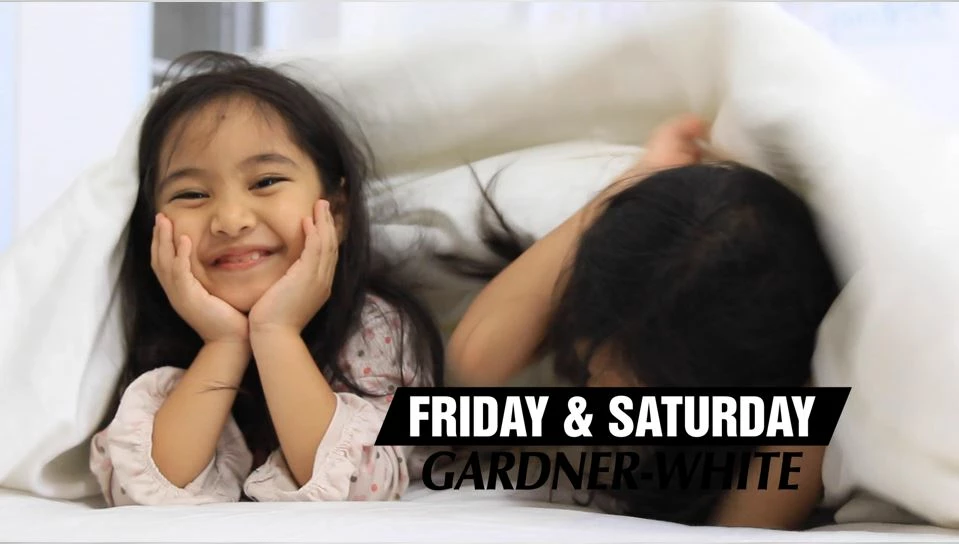
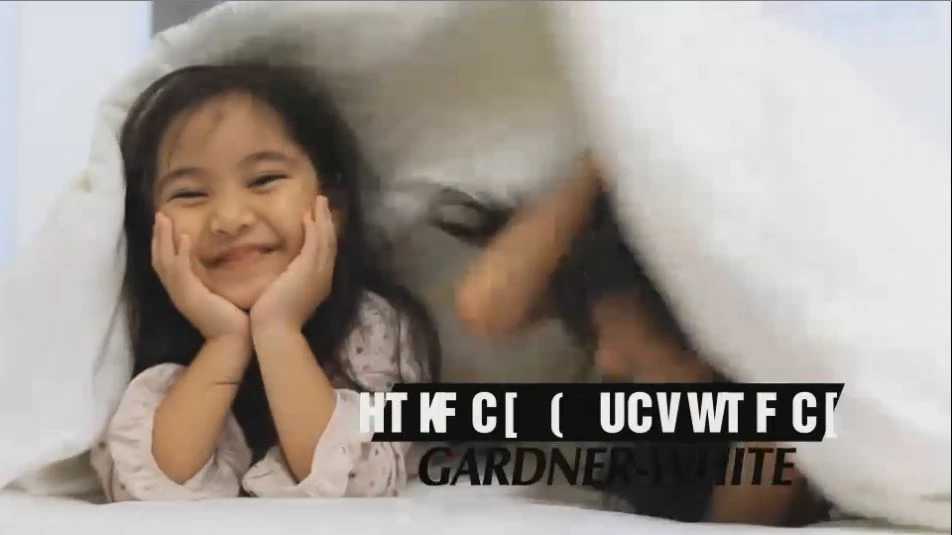
I have a font called Helvetica Inserat, and it works find in After Effects while working but when I render it gets all garbled.
What is happening and how can I fix it?

How it should be:
How it renders:
This topic has been closed for replies.
Correct answer mike233

Re-imaging my computer seems to have worked.

7 replies

mike233AuthorCorrect answer
Inspiring
October 9, 2018

Re-imaging my computer seems to have worked.

OussK
Community Expert
Community Expert
October 9, 2018
mike233Author
Inspiring
October 9, 2018

THat doesn't change anything either. I actually have tdo that all the time because of another issue with AME.

mike233Author
Inspiring
October 9, 2018

Im using the latest version of AME 12.1.2 and Ae is version 15.1.2

OussK
Community Expert
Community Expert
October 9, 2018

Check this video may it can help,

Note: do it in your own responsibility, it's not an official solution from adobe.

Fix Corrupted Unreadable Fonts On Windows 7, 8/8.1, 10 & Restore The Default Windows Fonts - YouTube

in video they remove the font hive for all all fonts, so try to remove the font hive for the corrupted font only 

mike233Author
Inspiring
October 9, 2018

Thanks Ive actually done this already, it didnt change any thing. I think that is because it is not really a windows specific issue. The problems is that, the font isnt corrupt, it works fine in the After effects project, and every other program adobe and otherwise. It is only a problem when rendering form AE. So something is wrong the Adobe rendering mechanisms.

OussK
Community Expert
Community Expert
October 9, 2018

Did you try to render using adobe media encoder ?

OussK
Community Expert
Community Expert
October 9, 2018

so if it's only on your machine that mean may your font is conflict with other one, so as Mylenium say you must provide more information about your system, also try to remove this font than installed again and restart you system also try stop other Helvetica font and test this, really i don't this their are a magic button can fix this.

mike233Author
Inspiring
October 9, 2018

I tried all of that. Reinstalling and restarting. We have plenty of other Helvitica fonts that work just fine, its just this one and its only acting up on my machine.  Ive found previous forum post with similar issues but they were from many years ago. and there was no solution. Im on a Windows 7 PC with i7 CPU, 32 GB of RAM, its the same specs as everyone else in the office.

OussK
Community Expert
Community Expert
October 9, 2018

Look like this font  have some issue with AE, so if you'r able to change the font just do it and this will fix your problem,

mike233Author
Inspiring
October 9, 2018

Also Im at my work and it is only and it is only my computer doing this, everyone elses works fine. So it is something in my machine that is doing this. The client wants this font so changing that is not ant option.

Mylenium
Legend
October 9, 2018

Impossible to know without actual system info, render settings etc.. From the looks of it that feels liek an unwanted substitution becaused your system language is not teh same as AE's and rendering through AME mesees therefore up character mapping.

Mylenium