
Footage visibility disappeared
Hello,
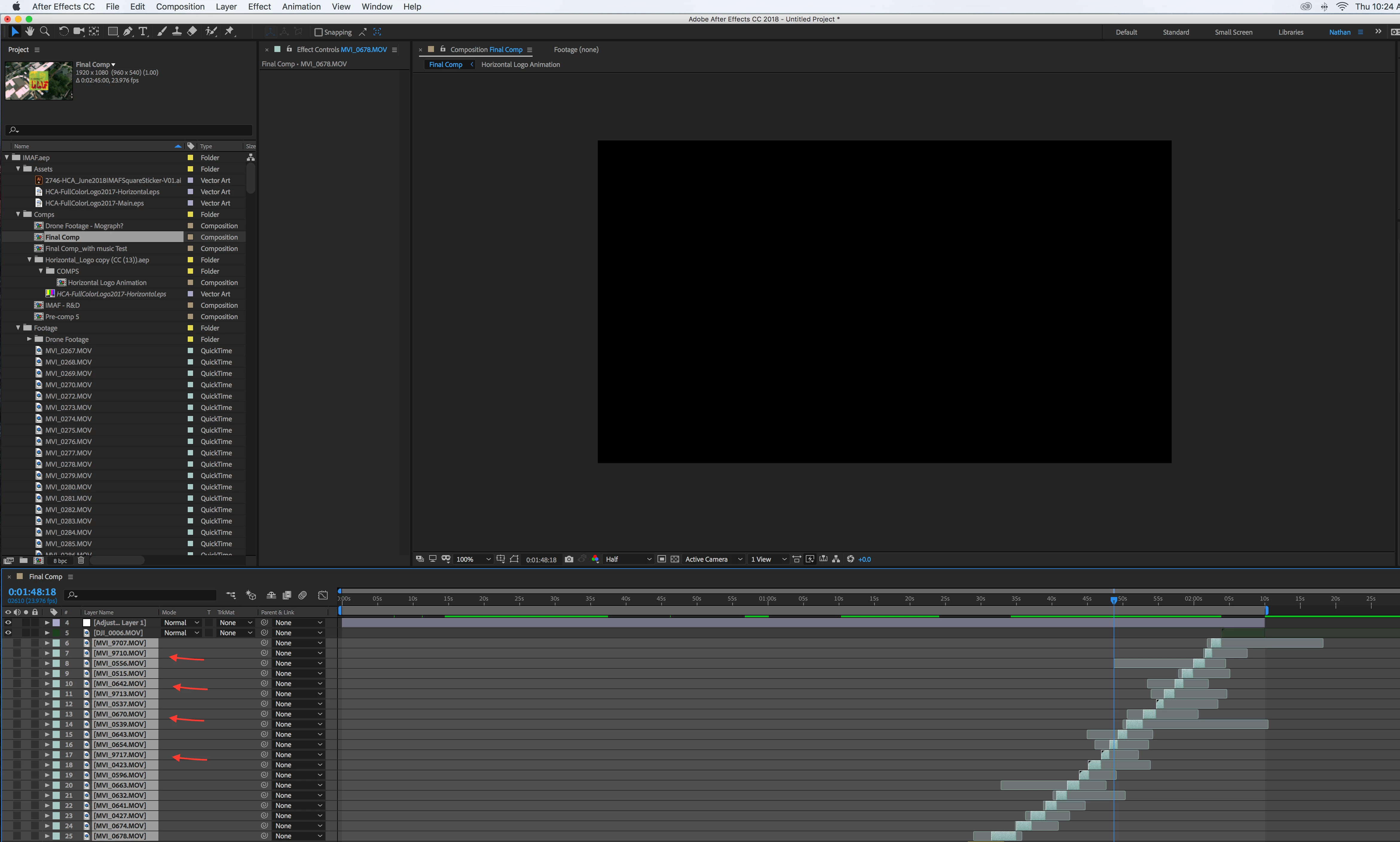
So recently my work has updated from CC 15 to CC 18. I have been working on a video in After Effects and everything has been moving smoothly. But then when I re-opened the same project file I had in CC15 in CC18 I was greeted with a bunch of missing external files, I reloaded all the files and they were found just fine. However, now I am unable to see any of the footage from my videos. All the missing files have no visibility button, so I can't see the footage anymore in the viewport.
I don't know how this problem is caused and only found 1 other person online dealing with the same problem. The solution they were given was to use media encoder to change all the files to a different codec. I tried changing them all to the same naming and the same file type but it just creates large files that take up too much space with how much footage I have. Just trying to find a way to not have to redo a bunch of work. I tried making a new composition, I tried importing this project file (the converted one for CC18 and the original, un-converted project file) into an entirely new project and it still had the missing files and no visibility options.
Here is a screenshot of my problem:
Any help is appreciated.
Nathan
 AdChoices