
Deaf_Guy
Inspiring
November 25, 2019
Answered

How to move anchor point

  • November 25, 2019
  • 1 reply
  • 2536 views

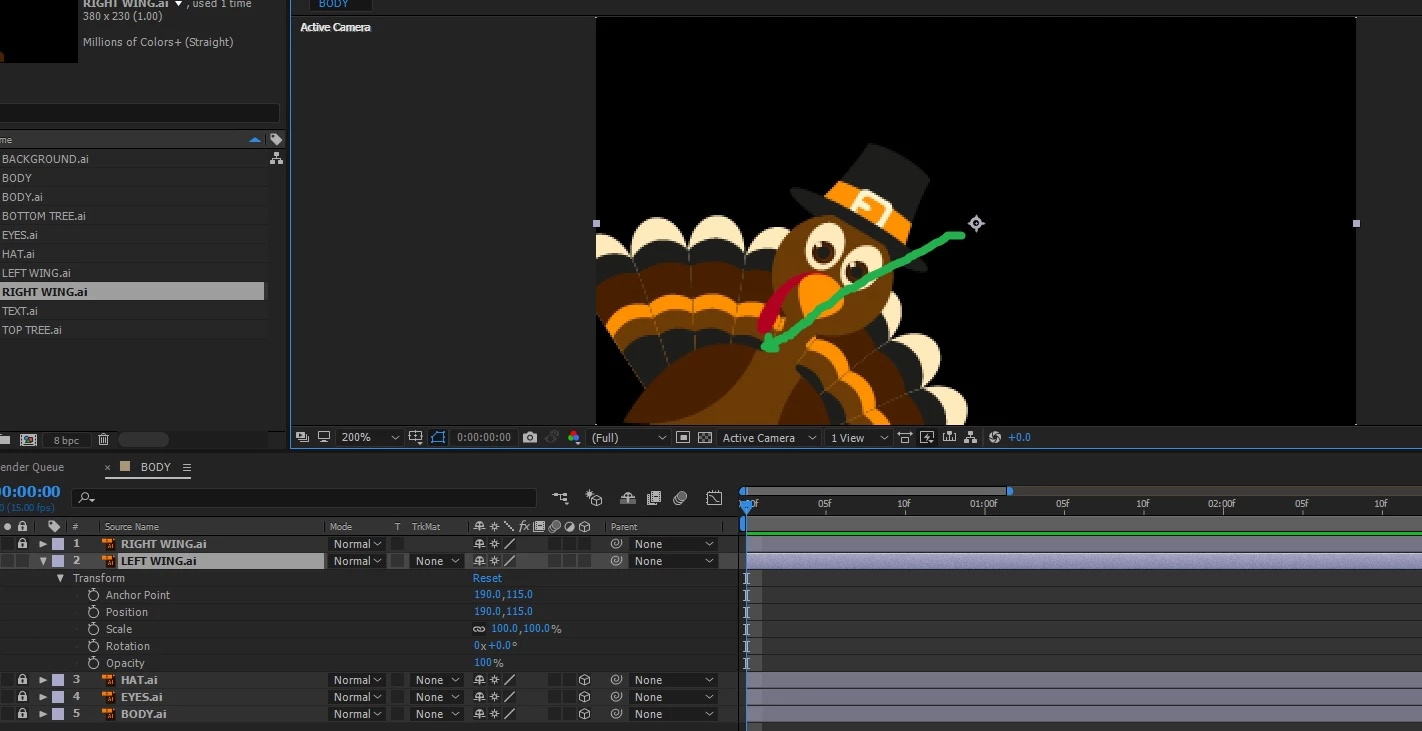
I'm trying to make the wings of the cartoon turkey flap. I want to use the rotate function which should work but I need to move the anchor point of the image down to where the rotate originates. When I try moving the anchor point, it moves the entire image around and not just the anchor point. I thought that if you grabbed the center crosshair of it, it will move it to where you want and then I could do rotation.


Can someone tell me how to do this please? Thank you. See image below:
 

Correct answer Rick Gerard

Use the Anchor point tool (y) or change the values in the timeline.  Sounds like you are new to AE. I suggest that you start here: Learn AE

1 reply

Rick GerardCommunity ExpertCorrect answer
Community Expert
November 25, 2019

Use the Anchor point tool (y) or change the values in the timeline.  Sounds like you are new to AE. I suggest that you start here: Learn AE

Deaf_Guy
Deaf_GuyAuthor
Inspiring
November 25, 2019

Thanks Rick that was helpful.


BTW, I'm not sure why because I asked this question you think I'm "new." Yes, I'm not a Hollywood artist creating million dollar animations in AE. But I have made some cute and decent stuff in it. I simply can't help it that there's a million different commands in the software and users don't often have a need for some of those commands until they approach each job one at a time.


Thanks for the help and it works great now.