ti.s.cavalcanti
Inspiring
April 28, 2018
Answered

How to stretch "Sweeping Curves" preset time?

  • April 28, 2018
  • 1 reply
  • 802 views

I put Sweeping Curves preset in a shape, and by default, this preset ends in 5 seconds... I want to stretch for a minute! I know that this preset is based in keyframes, I could drag this keyframes in timeline but I don't know how I can keep the proportions of properties in a effect... I can't get editing keyframes manually, bacause I could not lengthen the values for animate proportionally the keyframe clocks.

My main difficult is in the Turbulent Displace effect that have values "without logic"...

This topic has been closed for replies.
Correct answer Roei Tzoref

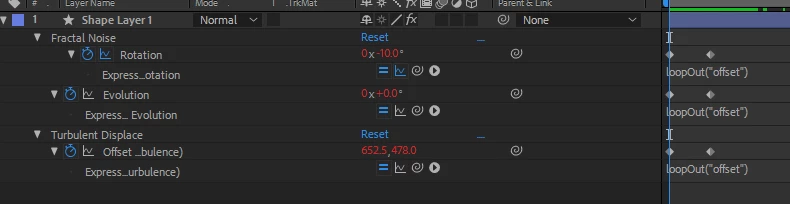
you can add this expression to each property

loopOut("offset")

it will offset the animation of the properties (same speed) for as long as the layer/composition is.

1 reply

Roei Tzoref
Roei TzorefCorrect answer
Legend
April 28, 2018

you can add this expression to each property

loopOut("offset")

it will offset the animation of the properties (same speed) for as long as the layer/composition is.

ti.s.cavalcanti
Inspiring
April 28, 2018

hahahaha; Simply amazing! Thank you!