
February 24, 2020
Answered

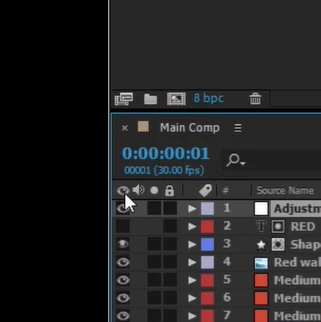
I hid the visibility/sound/solo/lock options, help needed.
  • February 24, 2020
  • 1 reply
  • 581 views

I accidentally hid features and I've spent an hour trying to figure out how to bring those options back; I still don't know where to go to bring back features (like the ones mentioned in the title and in the picture). On another note, it'd be nice if someone could give me some detailed pointers on how to reset settings to factory/default settings (Windows). I've tried doing CTRL+ALT+SHIFT before I launch AE (following numerous guides) but there is no pop up asking me if I need to "reset" anything and instead, just shows me the Properties... not what I wanted. 
This topic has been closed for replies.
Correct answer David Arbor

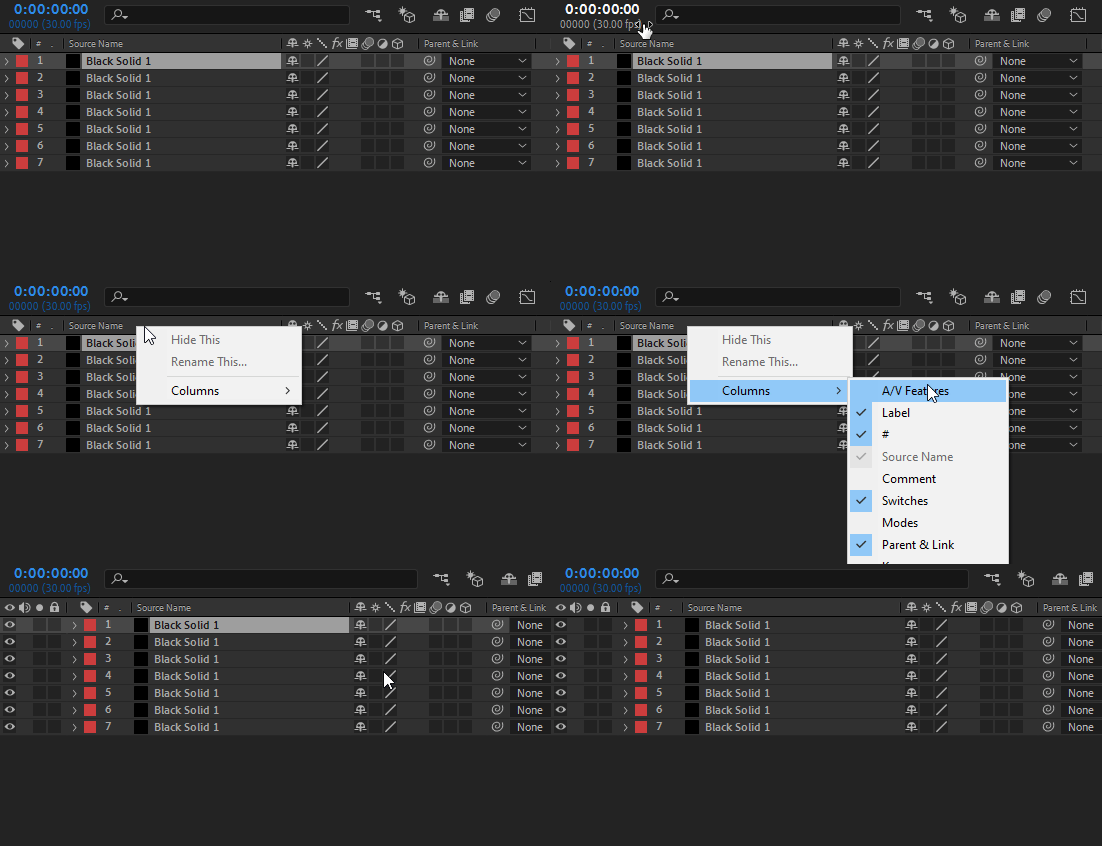
See the attached GIF for how to bring the A/V Features column back.

Right-click anywhere in the header area > Columns > A/V Features.


As for trashing preferences, this article gives the path for manually handling them: https://helpx.adobe.com/after-effects/using/preferences.html#reset_prefs


1 reply

David ArborCorrect answer
Inspiring
February 24, 2020

See the attached GIF for how to bring the A/V Features column back.

Right-click anywhere in the header area > Columns > A/V Features.


As for trashing preferences, this article gives the path for manually handling them: https://helpx.adobe.com/after-effects/using/preferences.html#reset_prefs