
Inspiring
September 6, 2012
Answered

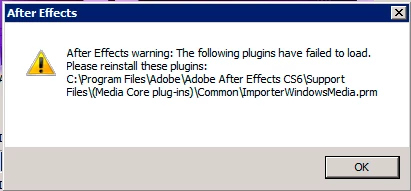
ImporterWindowsMedia.prm plug-in error
  • September 6, 2012
  • 4 replies
  • 31476 views

I've been using AE on a Mac for over 10 years, so this Windows error is new to me.  I removed the plug-in which gets rid of the error, but in the off-chance that I actually need this plug-in, I'm just wondering if anybody knows how to reinstall this or get this working?

I've installed it on a Windows 2008 Server, which throws the error on AE CS6 startup and 9 render nodes with Windows 7--all of which throw the error in the terminal window when running aerender.exe.  The render nodes are specifically to render AE and C4D projects only, so I haven't installed anything beyond the OS, Quicktime and what's needed for those two programs to render.

    This topic has been closed for replies.
    Correct answer

    Windows 10 comes without Windows Media Player, please Adobe go on and disable that error message on Win 10, makes no sense here.


    Hi everyone.

    If you have this problem and if you are on Windows 10, you can try to install the Windows Media Player Official.

    Download and install free Windows media player for Windows 10 - YouTube

    4 replies

    Participant
    November 17, 2019

    this vedio deleted 

    Participant
    September 16, 2021

    right.

    prdx-de
    Participant
    May 17, 2016

    If you're on Windows 10 Pro N build 1511, the correct update seems to be here: https://support.microsoft.com/en-us/kb/3099229​.

    The other update didn't change anything for me – this one worked!

    Participant
    January 16, 2023

    thank you, this one work on me too

    Participant
    December 18, 2014

    Hello, my problem is the same. Is there any solution to the problem? Windows 8.1

    tvr45364114
    Participant
    January 20, 2015

    @Mylenium's answer worked for me: I need to install and run Windows Media Player before this error went away.

    For reference: I had installed AfterEffects a Windows Server 2012 R2 image, which did not have Windows Media Player. Every time I ran AE, this plugin error would appear (ImporterWindowsMedia.prm failed to load).  To fix it, I enabled the "Desktop Experience" feature in Windows (Server Manager > Add Feature > User Experience > Desktop Experience), which in turn enabled the "Media" feature.  Enabling that feature installed Windows Media Player.  After restarting the computer, AE no longer complains about this plugin.

    Sigrid_Mayerl
    Participant
    November 9, 2015

    Windows 10 comes without Windows Media Player, please Adobe go on and disable that error message on Win 10, makes no sense here.

    Mylenium
    Legend
    September 7, 2012

    Could be a simple compatibility issue. Windows Media requires some per-user configuration stuff and that may not be present if you never bothered to launch Media Player on those systems. And of course the usual permissions issues and such would figure in as well...

    Mylenium

    Participant
    January 16, 2024

    Mejor solucion Actualicen los codec de Windows media y santo remedio