
Inspiring
December 2, 2019
Answered

Inner shadow or bad aliasing/black outline on red text when rendered

  • December 2, 2019
  • 4 replies
  • 4358 views

Does anyone know how to rectify this in AE?

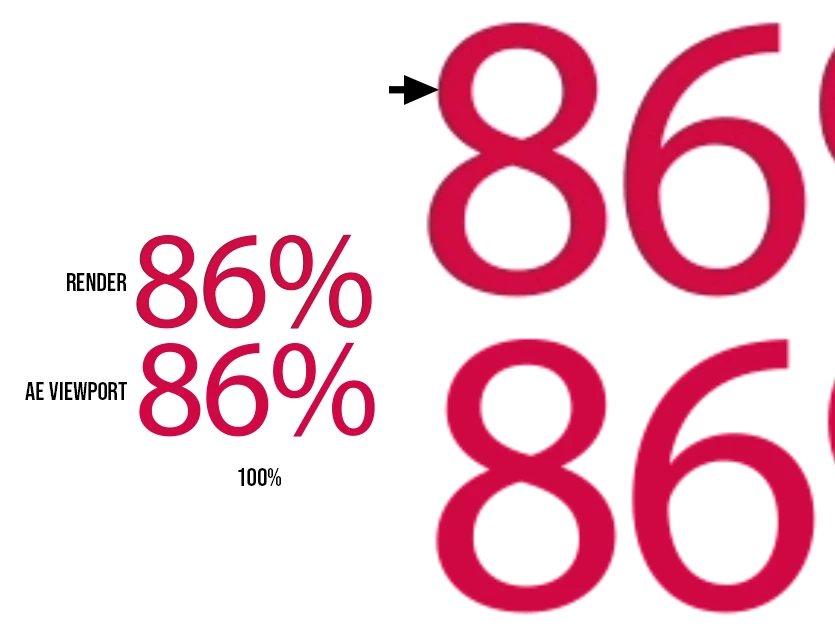
It does'nt seem to matter what render settings I use I can't seem to get AE (or AME) to render red type correctly.


As you can see from this screen grab, the viewport displays red on white exactly as it should, but the render seems to add a black outline, almost like an inner shadow.


Thanks in advance
Correct answer Roland Kahlenberg

No TV or display unit (other than color calibrated units) will display colors exactly as per RGB settings. You actually have some leeway.


Tell your client of the issue and ask for access to previous works of theirs with an identical color scheme. Then check for identical issue. There is a 99% chance they have used a different color scheme - Branding Red + White Background and not have had the same issue.


I will then adjust the Red saturation by 5%-10% until the Chroma Crawl issue is no longer visible.


Also, I should have asked earlier, what are your compression settings in AME/HandBrake? Low quality settings will also lead to such issues.


4 replies

Participant
April 30, 2024

I had this same problem with a white-on-magenta contrast and this is what solved it.
I exported a ProRes4444 mov file, though I don't think it matters what Quicktime subsetting you choose as much, long as you export with Channels: RGB + Alpha. My video didn't even have any transparent parts but this is what fixed it.

Participant
December 20, 2023

install ffmpeg if you haven't already)). render uncompressed avi and run this command in the folder with the file.

ffmpeg -i filename.avi -c:v libx264 -profile:v high444 -preset slower -tune animation filename.mp4


Replace "filename" with the name of your file.

Roland Kahlenberg
Legend
December 2, 2019

Without looking at your Timeline, Effects Control Panel, Comp Settings and Render Settings, this looks like a case of Chroma Crawl - https://www.google.com/search?client=firefox-b-d&q=chroma+crawl


Try reducing the Saturation level of the Red. Also, try rendering from AE to a high level format and then using this output in AME, to output to a H264 format/file.

Very Advanced After Effects Training | Adaptive & Responsive Toolkits | Intelligent Design Assets (IDAs) | MoGraph Design System DEV
Nick2049Author
Inspiring
December 2, 2019

Thanks for the info.


I can't really modify the colour as it is part of a clients brand.

I've tried rendering DNxHD from AE and then transcoding to H.264/5 via both AME and Handbrake. No such joy.


With regards to settings they are as follows:

16bit sRGB workspace

1080/30 comp

The only effects on these layers are 'Fade in+Out Frame' but I've tried with and without, other than that it's just a basic text - Myriad Pro Light.

Render settings varies but the last attempt was DNxHR/DNxHD 1080p HQ 8-bit


Roland Kahlenberg
Roland KahlenbergCorrect answer
Legend
December 2, 2019

No TV or display unit (other than color calibrated units) will display colors exactly as per RGB settings. You actually have some leeway.


Tell your client of the issue and ask for access to previous works of theirs with an identical color scheme. Then check for identical issue. There is a 99% chance they have used a different color scheme - Branding Red + White Background and not have had the same issue.


I will then adjust the Red saturation by 5%-10% until the Chroma Crawl issue is no longer visible.


Also, I should have asked earlier, what are your compression settings in AME/HandBrake? Low quality settings will also lead to such issues.


Very Advanced After Effects Training | Adaptive & Responsive Toolkits | Intelligent Design Assets (IDAs) | MoGraph Design System DEV
Mylenium
Legend
December 2, 2019

Nothing to fix because nothing is broken. It's an inherent limitation of rendering to compressed formats like MP4) - the color information is reduced (chroma subsampling) and reconstructed from adjacent pixels, which can mean that not all color channels line up exacxtly. That and of course you have the most unfavorable scenario there one can imagine - red vs. white is causing an extreme contrast plateau, which any compression algorithm will have a tough time to accommodate in its limited color range. The only option here would really be to adjust the colors or employ old tricks liek adding subtle noise/ dithering or blurring the outlines to at least reduce the contrast and by way of that also give the algorithm also more "mushy" pixels to work with.


Mylenium

Nick2049Author
Inspiring
December 2, 2019

Thanks for the info. So basically, at it's current saturation, it's impossible to avoid this without first degrading the denisty/reolution of the text?