
joepineapples
Participant
December 8, 2018
Answered

Latest trial version mp4 glitch

  • December 8, 2018
  • 1 reply
  • 1347 views

Just trying out the latest version (trial) of CC 2019, and when I import an mp4 clip, after effects is adding glitched gfx on at least one frame.  Sometimes an entire green background or running along the bottom (as in the example below).  It is there after rendering as well. Bit against the clock (6 days remaining), so need to know if there are things to try sorting it before I think about a purchase.
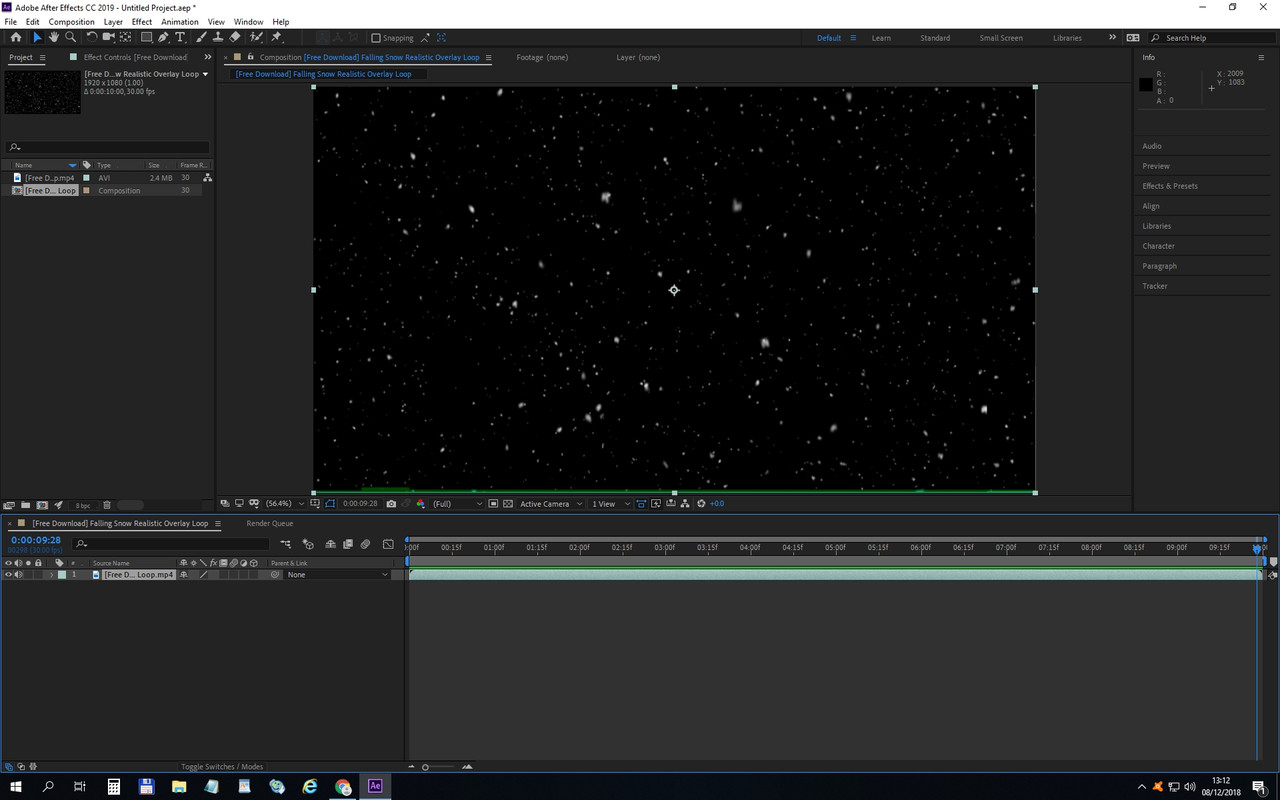
glitch.jpg

thanks

joe

    This topic has been closed for replies.
    Correct answer Rick Gerard

    Are you talking about the green line at the bottom of the frame? There is a 99% chance that the problem is in the MP4 file. MP4 is not a production format, there are hundreds if not thousands of different combinations of things that can go wrong with a highly compressed interframe format like MP4 that may or may not be related to After Effects. Most of those problems start with the encoding settings that were used to compress the file to start with.

    Try using a different format or transcoding your video to a frame based production format. I use After Effects almost every day and have very few problems that cannot be solved very quickly. Folks can't create this kind of work or run a business using buggy rubbish. https://www.awn.com/news/loiseau-qui-danse-wins-best-show-siggraph-asia-computer-animation -festival, they just have to use compatible systems and professional workflows.

    1 reply

    joepineapples
    Participant
    December 9, 2018

    Oh well, on the bright side its going to save me some money not buying this buggy rubbish.

    Rick GerardCommunity ExpertCorrect answer
    Community Expert
    December 9, 2018

    Are you talking about the green line at the bottom of the frame? There is a 99% chance that the problem is in the MP4 file. MP4 is not a production format, there are hundreds if not thousands of different combinations of things that can go wrong with a highly compressed interframe format like MP4 that may or may not be related to After Effects. Most of those problems start with the encoding settings that were used to compress the file to start with.

    Try using a different format or transcoding your video to a frame based production format. I use After Effects almost every day and have very few problems that cannot be solved very quickly. Folks can't create this kind of work or run a business using buggy rubbish. https://www.awn.com/news/loiseau-qui-danse-wins-best-show-siggraph-asia-computer-animation -festival, they just have to use compatible systems and professional workflows.

    joepineapples
    Participant
    December 9, 2018

    Thanks for the reply and suggestions Rick.  The video (MP4) is the only version I have unfortunately (created by a 3rd party).  Externally, the footage plays back faultlessly and I guess I just expected it to do so within AE.  Its like every time I load it in, AE adds a different glitch.