
Layers shown in flowchart, but not on the Timeline????
Hello!
I have a problem which I have ever experienced before. I have checked through the internet for a solution but I cant find anything! Now, I hope some of you After Effects gurus can explain to me what is going on!
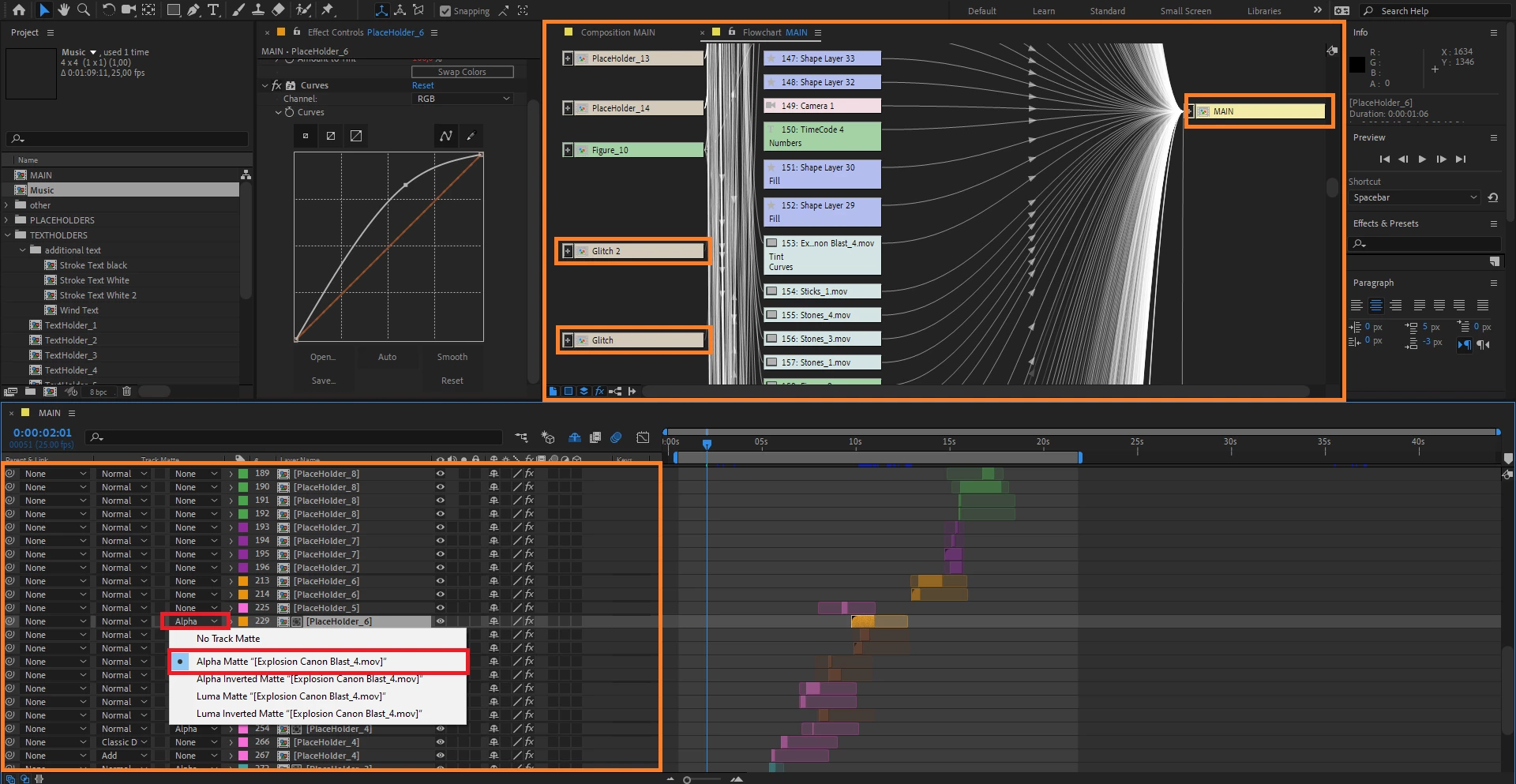
So I downloaded a project earlier from the internet which I wanted to use and edit for myself. The thing is, that I cant find all the elements on the timeline or in any comp. But I can see that there is alot more layers in the comp if I look on the flowchart.
For example when I look on the "Main" comp. All I can see is compositions named "PlaceHolder1, 2, 3" and so on. Where you will place your own footage insted of what the original creater used.
But the rest.. All the solids, displacements, adjustment layers, null object, they are totaly gone from the timeline, when I can clearly see that there is alot more than just "placeHolders" in the flowcharts. Is it possible somehow to hide all these layers to make it easier for the "new user"?
If thats the case.. How can I make it possible for myself to see and edit all these other things?
I will add that I had to convert the project into another version of AE when I started it, if that relevant.
Thanks!
 AdChoices