Answered
Motion Blur Issue
When I enable motion blur on layers in my comp, the layers disappear, in the preview and render. i purged my cache, turned GPU acceleration on and off, nothing so far solves the issue. ❤️ AE CC 2018

When I enable motion blur on layers in my comp, the layers disappear, in the preview and render. i purged my cache, turned GPU acceleration on and off, nothing so far solves the issue. ❤️ AE CC 2018
Thanks for the suggestions Rick but I am already using the classic renderer, i have never used C4D or Ray-traced rendering
You did not enable motion blur, you created an adjustment layer. Motion blur is the column headed by three circles just to the left of the half-filled circle which is for Adjustment Layer:
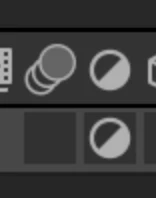
You will also have to enable it in the timeline using the same icon. It will turn blue when selected.
Already have an account? Login
Enter your E-mail address. We'll send you an e-mail with instructions to reset your password.
 AdChoices