

Alexis Fradier
Participating Frequently
February 3, 2020
Question

Motion Graphic Template - Responsive Design Time / Protected Region bug in Première Pro

  • February 3, 2020
  • 1 reply
  • 3875 views

Hello everyone!


I’m working on a Motion Graphic Template kit in AE for an editor/client to use in Premiere.


Everything is working great except I have a pretty annoying bug regarding the Responsive Design Time feature once the Mogrt are imported in Premiere.


The RDT feature works well inside of AE when I put my template in another comp to test it : I have the blue protected region, and when I’m resizing/retiming the comp, the protected region keep their duration.
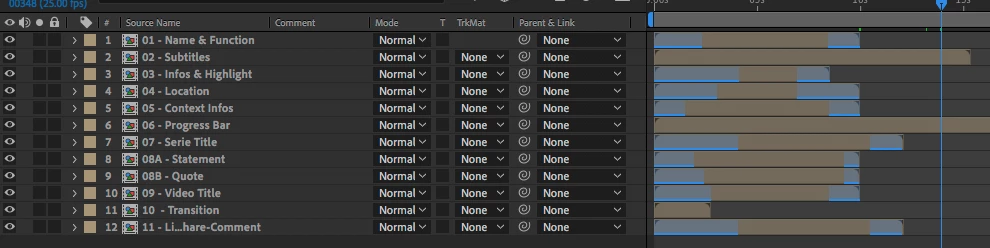
 

But when I import them in Premiere with the Essential Graphics panel, the protected regions are slowed down or accelerated, and the outro animation happens at a random point in time.


I’ve tested with a simpler comp (just a text with little animation) and it works.. That means, maybe it is something in my animations that break the RDT ? (That’s the scary hypothesis)


Would you have any ideas what can break the RDT features only in Premiere ? I have no sounds in my templates, no time-remap, nothing I can think of that can impact the time remapping process.


My mogrt are 1920x1920 comps as they need to fit either a 1920x1080 comp, or a 1080x1080, or even a 1080x1920 (vertical) edit...


I’m working on MacOS 10.13.6

With AE  17.0.2 (build 26)

And Premiere Pro 14.0.1 (build 71)


I would be glad to share one or two mogrt files if necessary.

Anything that can point me in the right direction would be much appreciated.


Thanks a lot !


1 reply

nishu_kush
Legend
February 3, 2020

Hi there,


Thanks for the detailed post. I see that you are having trouble with Motion Graphics templates in Premiere Pro.

Could you try rendering the Timeline in Premiere Pro (Sequence > Render In to Out) and check if that makes a difference? Are you getting the same issue in the export?

Let us know, we're here to help.


Thanks,

Nishu

Alexis Fradier
Participating Frequently
February 3, 2020

Hello !


I knew I forgot something 🙂

So yes, I tried to render to sequence to see if it fixes the issue, but no. Whether as a preview or in a PRORES422 render, the problem is still there : If I try to make my 10sec mogrt template 35 seconds long, the intro animation is slowed down and the outro happens at 17seconds, slowed down as well...


Thanks for your help !

Alexis Fradier
Participating Frequently
February 10, 2020

Hi Alexis, if I were in your position, I will try to set the end points of the RDT at 1 or 2 seconds away from the last KFs of each RDT; just to see if this helps.

And have you tried rendering in PPro without hardware acceleration - just a thought on my end since it's cause other weird results in PPro that otherwise worked perfectly, in AE.

You should also send a Bug Report, together with you AEP and MoGRT files.


Hello Roland,


Thanks for your insights,

I had tried to render with and without GPU rendering, as I had some trouble with that in the past, but it made no difference.

I also set the end points of the RDT at 1 or 2 seconds away from the last KF, but no big changes.


However, if that can help, I did some more tests :

- I tried the templates on another machine, with ONLY the latest version of AE and PP installed. As I have multiple versions on my machine for compatibility reasons, I wanted to try on a clean machine. It didn't help as I had the same issues, but it actually made a difference on a specific occasion : 

- I tried to have only one Protected Region (Intro or Outro, not both) and that made a difference. It seems to react as intended.


For now, I've used only the outro, as it's the least worst option (sorry to be a bit grim here 🙂 ) but it seems, that the problem comes from having two protected region in the AE (I don't know why I haven't tried that before)


The only thing is that the behavior was not very consistent... and on the machine with multiple AE/PP versions installed, I still had some bugs, whereas, on the clean one, I got a pretty much consistent result (but that may come from an old cached version of the mogrt still here..)


I'd be glad to submit a bug report along with the files, as I would be even happier the day this problem gets resolved, but I'm not sure where to do that...


Let me know !

And thanks for not letting me alone in this difficult experience 🙂