
March 1, 2018
Answered

Motion Tile Causes Render to Fail.

  • March 1, 2018
  • 2 replies
  • 7678 views

Been wracking my head since midnight trying to get this thing to work.

I'll cut to the chase, because I have no other idea why it won't render.

____________________________________________________________________________________________________

Keypoints:

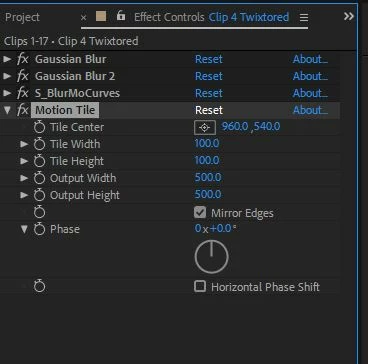
-Disabling Motion Tile makes the render possible, enabling it results in the "Failed" status in Adobe Media Encoder.

-I can confirm Motion Tile is the problem, since I disabled all other effects one by one (Twixtor Pro, Gaussian Blur) and rendered each time after disabling each effect.

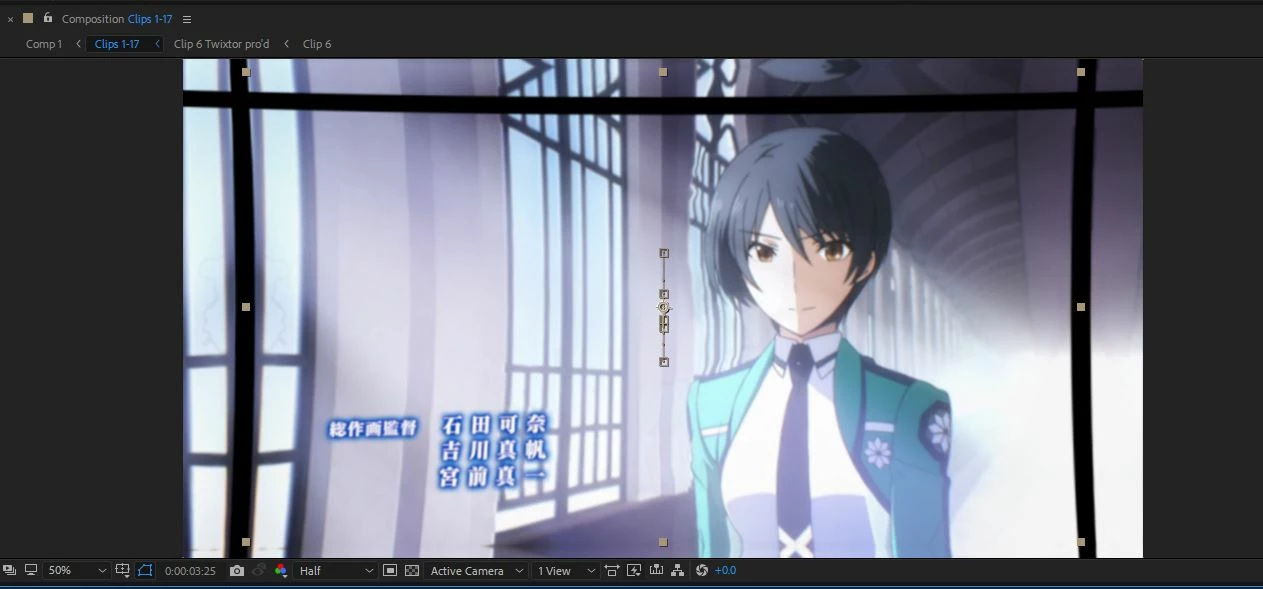
-Moving the Motion Tile effect to the bottom of the "Effect Controls" list (see examples below) allows the render to work, but my position keyframes and scales cause black edges to appear.

EXAMPLE:

Putting Motion Tile on top = Render Fails

Putting Motion Tile at the bottom = Render Works (but black edges appear on the sides - EXAMPLE BELOW)
Example of the black edges:
I have tried different ways to render this project, from AVI formats to TIFFs - all have failed.

I will try separating all my effects and keyframes by precomping them, then adding Motion Tile, but I highly doubt it will work.

This was not an issue the last time I used AE (approx 1 week ago), and everything has been operating smoothly until last night (when I tried to render this).

SPECS:

Using After Effects CC 2018

CPU: Ryzen 7 1700 8 Core

GPU: Asus Geforce GTX 970 Turbo Edition

RAM: 16 GB of Team T-Force Night Hawk RAM - rated @3200mhz speed but running at 2133mhz instead

Storage: 500GB SSD, 1TB HDD, 2 External Hard Drives (After Effects is installed on the 500GB SSD, and the project file is on the 1TB HDD).

__________________________________________________________________________________________________________________________

Any ideas to solve this issue would be greatly appreciated - wouldn't mind paying $50 or so via Paypal to get a solution that works. Thank you for your time!

This topic has been closed for replies.
Correct answer Roland Kahlenberg

Those small chunks are way too small - I was thinking of 10 or even 20 seconds if I knew you had a 90-second Timeline to render. But that's not the real issue.

Thus far, your renders have failed to pass through two similar effects, from two different developers - CC Repetile is a bundled effect from Cycore while Motion Tile is an in-house, developed AE effect.

Till now, I'm still not certain if you have pre-rendered Twixtor on its own. Then use that pre-render to apply either Motion Tile or CC Repetile. If CC Repetile is missing mirroring features; can you get that from the Mirror effect? But of course, did you try the Tiling options for CC Repetile?

I also noticed RealSmartMotionBlur was used. can you switch this off? This effect can be used after a render, if need be. I would look at the effects you have and switch off these really unimportant effects. Your aim is to get a render out. Twixtor should be rendered first or last, after you get a render out. And it's the same thing with RSMB - this should be rendered last, after your pre-render. Finishing the job is more important than trying to render everything at one go.

Once you've gottten your renders done and should you have the time, jump in to see which effect(s) or combination of effects is the cause.

2 replies

Roland Kahlenberg
Roland KahlenbergCorrect answer
Legend
March 2, 2018

Those small chunks are way too small - I was thinking of 10 or even 20 seconds if I knew you had a 90-second Timeline to render. But that's not the real issue.

Thus far, your renders have failed to pass through two similar effects, from two different developers - CC Repetile is a bundled effect from Cycore while Motion Tile is an in-house, developed AE effect.

Till now, I'm still not certain if you have pre-rendered Twixtor on its own. Then use that pre-render to apply either Motion Tile or CC Repetile. If CC Repetile is missing mirroring features; can you get that from the Mirror effect? But of course, did you try the Tiling options for CC Repetile?

I also noticed RealSmartMotionBlur was used. can you switch this off? This effect can be used after a render, if need be. I would look at the effects you have and switch off these really unimportant effects. Your aim is to get a render out. Twixtor should be rendered first or last, after you get a render out. And it's the same thing with RSMB - this should be rendered last, after your pre-render. Finishing the job is more important than trying to render everything at one go.

Once you've gottten your renders done and should you have the time, jump in to see which effect(s) or combination of effects is the cause.

Very Advanced After Effects Training | Adaptive & Responsive Toolkits | Intelligent Design Assets (IDAs) | MoGraph Design System DEV
March 2, 2018

Roland you scored! It was a success!

I disabled every single effect for each clip, other than Motion Tile and the transform keyframes for each clip (such as Position, Scale, Rotation).

Rendered 3 seconds to test it - Success!

Rendered 10 seconds - Success!

Gonna finish disabling all the effects and rendering the barebones of it tomorrow - and hopefully apply all the other effects afterwards.

Things are looking up now thanks to you - I haven't slept for almost 26 hours and I just want to thank you for sticking through with me on this struggle - I have no words.

I would gladly send you some payment to compensate for your time - feel free to message me your paypal address and I'll pay you once I wake up.

Thanks so much Roland - can't believe I was missing out on these solutions.

Roland Kahlenberg
Legend
March 2, 2018

AccCCKK!! I wasn't intending for you to remove the keyframes for the Transform properties unless you required them to work together with the Effects. As you pointed out earlier, your render issues come about when Transform > Scale is keyframed. My concern now is that when you render with these back on, tomorrow, the issue will persist.

So, which Effects did you render with then?

Very Advanced After Effects Training | Adaptive & Responsive Toolkits | Intelligent Design Assets (IDAs) | MoGraph Design System DEV
Roland Kahlenberg
Legend
March 1, 2018

Use CC Repetile instead of Motion Tile. CC Repetile is more memory efficient - although there is no reason to believe your issue is memory related. If CC Repetile gets the job done then good for you. But it will also be good to know if disabling just Twixtor Pro will help.

Very Advanced After Effects Training | Adaptive & Responsive Toolkits | Intelligent Design Assets (IDAs) | MoGraph Design System DEV
Dave_LaRonde
Inspiring
March 1, 2018

I'd be tempted to pre-render the video footage, applying Twixtor all by itself.  No other effects.

Then re-import and I bet life gets a lot better.

March 2, 2018

Hello Dave,

I have just rendered all the clips I put Twixtor on, then copied all the other effects and presets on to the rendered twixtored clips - unfortunately the result was the same - rendering with motion tile or CC Repetile resulted in a failed render, and sometimes crashed AE after trying several times.

Thank you very much for your input though - it was a very simple yet effective idea - just frustrated that it didn't get through.

Thank you though!

Jason