
Participating Frequently
November 22, 2019
Answered

No video on 16" MacBook Pro with AMD Radeon Pro 5500M in AE

  • November 22, 2019
  • 5 replies
  • 4852 views

All i'm seeing opening any .ae file on my new MacBook Pro is variations of this (attached). Files still open fine on my old 13". Videos play back in quicktime, but the .ae display is all glitchy.
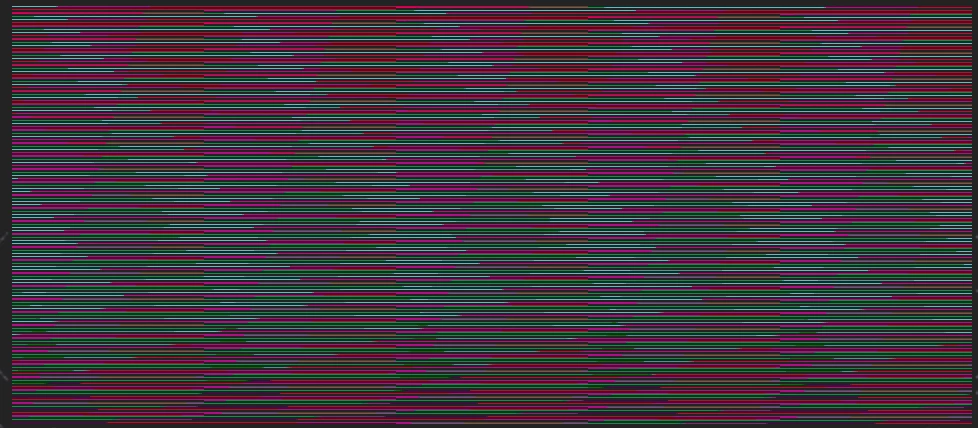
 

Title edited by Mod

This topic has been closed for replies.
Correct answer gupta shivangi

strangely, if you turn on rulers, it seems to fix it.  go figure. 


Hi all,


We got a lead! Our engineering team has been able to reproduce the issue at their end. They are actively working on a fix.

Meanwhile, you may install and use the previous version of After Effects. We're extremely sorry for the inconvenience caused.


Let us know if you have any other questions. We'll be happy to help.


Thanks,

Shivangi

5 replies

Participant
December 19, 2019

Hi Shivangi


I have this same issue on my device with the same spec, 


It is not only a problem with AE. I have tried to check out all the problems, but this issue appears in Primiere pro 2020cc


It appears when I set the new project with recommened GPU acceleration. But when I set the new project with OpenCL, there is no issues with resizing the video or image.


When I called adobe, one of your representative told me to contact with AMD to fix it.


AMD had no clues on this issue as well.


Do you think this problem is exclusive to Mac?

Participating Frequently
March 4, 2020

I am about to buy a MBP 16" with the new AMD 5500M Card so far with CC2018 but the idea is to use AE on this machine. Any one knows if this is working properly so far on AE2018 and AE2020 ?.


Hope it got into a good end. Thank you very much.

Participating Frequently
October 10, 2020

Hello,

I am looking into a MAcbook pro 16inch, either the 5500 or 5600 graphics card.  I would use it largely for AE2020 work.  So very curious if this issue has been properly resolved.


Thanks,

Inspiring
December 10, 2019

This is now fixed in version 17.0.1! A fix for premiere is next I hope.

Participating Frequently
March 4, 2020

Hello.


It is already fix on AE ? 2020 17.0.1 ?.

Working properly on it own monitor MBP 16" ?.

And what about Premier ?.

I am about to buy a MBP16"


Thanks.

gupta shivangi
Legend
November 22, 2019

Hi there,


Thanks for contacting us. I agree that graphics card is very important to get correct preview.


  • Which version of macOS are you using?
  • Does it happen with any specific file format?
  • Could you share a sample file with us so that we can test it at our end?


We're here to help.


Thanks,

Shivangi

Participating Frequently
November 22, 2019

Using 10.15.1 Catalina. Happens with every file. Even when there are no video elements on the timeline. Open a file, see the glitch, even without anything on the stage.


I can send a file but I assume (and what I was told by the support person this evening) the current version is incompatible with the new hardware. 

Chakshoo123
Participant
November 22, 2019

Installed 16.1.3 working fine with Amd.

Participating Frequently
November 22, 2019

after having a support person commandeer my machine for an hour, it seems that after effects 2020 is not compatible with the stock drivers for the (upgraded) AMD Radeon Pro 5500M that comes in a new 16" MacBook Pro. previous version of the software works. they said contact AMD to get new drivers.