
Participant
January 12, 2020
Answered

Rendering Cinema 4d file from AE. But it takes nearly 10 hours to render.

  • January 12, 2020
  • 3 replies
  • 1192 views

Hello everyone.


I'm just new to using Cinema 4d from after effects.


I made just 2 mins video in cinema 4d and trying to export it from after effects 2020.

But it takes nearly 8 hours to render.


Here are my system details:


Windows 10, Intel i5, 8th generation.

My graphics card is intel UHD family.

Ram 16gb.

Hp desktop


Is this not enough to render 3d files?


Please throw some ideas on how to render fast. It's  irritating me a lot.
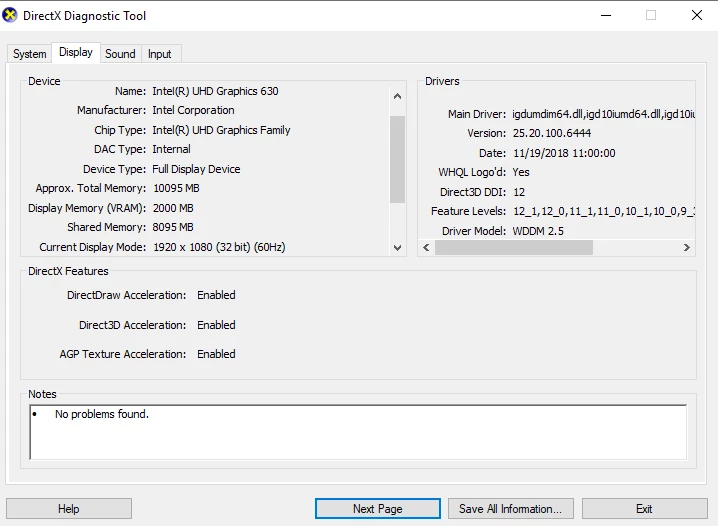
 

Thanks  


This topic has been closed for replies.
Correct answer Rick Gerard

Just to add to Mylenium's post - When I'm working on complex effects and composite shots I redesign when my render times start approaching 7 minutes per frame. Most of my work renders at under 20 seconds per frame, but complex work with a lot of 3D elements can easily approach 7 minutes per frame even when I use tools like Render Garden which can cut render times by 75% on modest systems.


It is not uncommon to see render times of dozens of hours per frame on films produced by Pixar and other high-end 3D studios. Once all the rendering is done frames can be loaded into specialized software to allow you to manipulate and preview in realtime, but there is still no shortcut for the initial render time and all of the calculations that are required to get the 3d turned into usable polygons that things like Pixar's open-source Open Subdiv and USD can use. 

3 replies

Rick GerardCommunity ExpertCorrect answer
Community Expert
January 12, 2020

Just to add to Mylenium's post - When I'm working on complex effects and composite shots I redesign when my render times start approaching 7 minutes per frame. Most of my work renders at under 20 seconds per frame, but complex work with a lot of 3D elements can easily approach 7 minutes per frame even when I use tools like Render Garden which can cut render times by 75% on modest systems.


It is not uncommon to see render times of dozens of hours per frame on films produced by Pixar and other high-end 3D studios. Once all the rendering is done frames can be loaded into specialized software to allow you to manipulate and preview in realtime, but there is still no shortcut for the initial render time and all of the calculations that are required to get the 3d turned into usable polygons that things like Pixar's open-source Open Subdiv and USD can use. 

Mylenium
Legend
January 12, 2020

There is no ideas to throw in. You seem to have a complete misconception of how 3D rendering actually works and clearly running it from inside AE will not improve matters. 8 hours for two minutes doesn't sound all too bad in fact. That's 3600 frames at 30 FPS and translates to fifteen seconds per frame, which is as good as it may ever get. To me as a longtime 3D artist this sounds like the most trivial of scenes already with no potential to optimize it further. That aside, even if this was just vanilla native AE stuff half a minute per frame would be nothing. Again, you appear to have a totally wrong idea how all of this works and expect it to do things it can't when there is basically nothing wrong.


Mylenium

Community Expert
January 12, 2020

Render time depends on what is going on in the frame.