
Participant
February 21, 2021
Question

Resolution settings

  • February 21, 2021
  • 4 replies
  • 498 views

Hello,

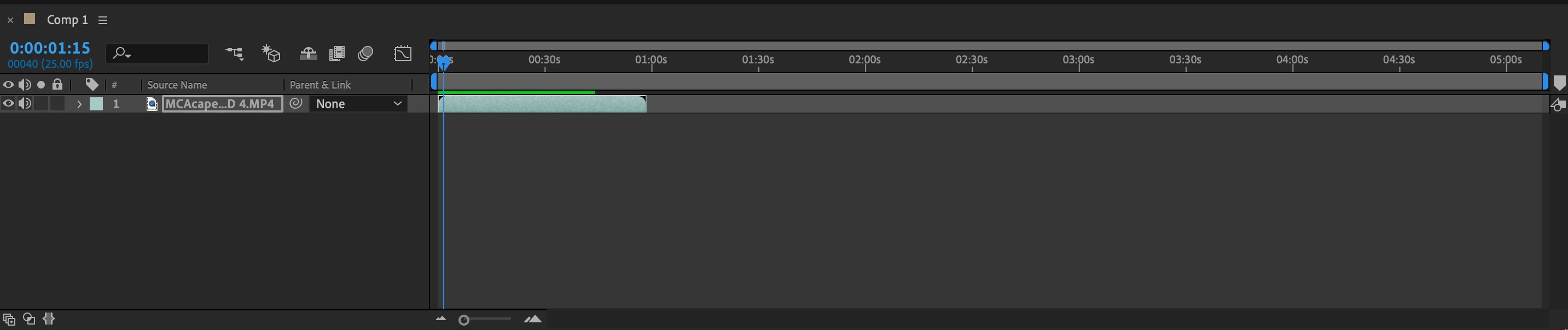
When I play my file/video in third resolution the video is in focus but it only plays 3/4 of the video. There is a green line and then a blue one or a black one, the video plays until the blue/black line and then jumps back to the start again. When I play in full resolution it plays the whole video but out of focus. I have a this assignment to hand in by this evening 😬. 
Thanks 

This topic has been closed for replies.

4 replies

Community Expert
February 21, 2021

After Effects is not a video editing app and playback for more than a few seconds is not expected behavior. Experienced users use playback to check timing and action in the scene and it is usually done using reduced resolution, fast previews, or even skipping frames. Critical frames or Hero frames as I call them are checked at full resolution with all effects turned on. You will quickly get used to trusting your work if you adopt this pencil test/ink and paint workflow. None of the big effects and animation houses run their motion and timing tests with full effects and full resolution. They all work at reduced resolution to make sure the shot works before finishing the effects, color correction, and compositing.


When you say the video is out of focus I am assuming that you are seeing adaptive resolution which is probably set to 1/4 or even 1/8 in your preferences. If you want for the preview to render it will be previewed at the comp panel resolution settings. I don't think there is anything wrong with After Effects. You are just expecting it to behave like a video editing app and it is not one.


Warren Heaton
Community Expert
Community Expert
February 21, 2021

Switching to a lower Composition Resolution trades slower render times and full image quality for previews that render faster and run longer.  Working quickly in AE is often a mix of lowering Comp Resolution to work faster and then switching back to Full Resolution to check how things are going to look when rendered at Best Settings / Lossless.


If you want to stay in Full Resolution and you're not getting the full duration of your Comp in the Preview (the green line), you'll either need more RAM or need to switch to using the Work Area to define what time range renders and plays.  It looks like you're getting 40 seconds right now; however, that's with just one layer.  As you increase the complexity of your Comp, that may shorten.  Your screen shot doesn't show what your current Comp Resolution is, but the principle applies if you're getting 5 seconds of Preview or 45 seconds of Preview.


Community Expert
February 21, 2021

In case ShiveringCactus's suggestion does not work, also check the Resolution of the Preview panel, this is usually also a reason.


Byron.
Bb0pAuthor
Participant
February 21, 2021

Thank you I will try both 👍 

ShiveringCactus
Community Expert
Community Expert
February 21, 2021

The green line is the RAM cached frames After Effects can play back.  Blue is hard drive cached frames.  The out-of-focus you're seeing is the playback resolution of the preview.  At the bottom of the comp window, you should see a setting for this.  

It's probably set to auto.  This is only about the preview, when you come to render out your video, After Effects will produce a full quality version.

Bb0pAuthor
Participant
February 21, 2021

Thank you 👍