
Known Participant
May 3, 2019
Answered

Round line join?

  • May 3, 2019
  • 1 reply
  • 2981 views

I'm trying to draw a simple L-shaped line with a rounded join, like this:
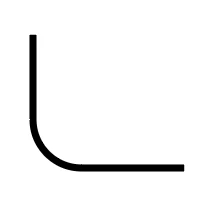
I use the pen tool to draw the basic L shape. When I look under Contents > Shape > Stroke, I see that there is a setting for Line Join = Round Join, but choosing that doesn't alter the line at all. I'm guessing there's some simple way to turn a sharp corner into a rounded corner, but I can't seem to find it... Can anyone help?
    This topic has been closed for replies.
    Correct answer Roei Tzoref
    When I look under Contents > Shape > Stroke, I see that there is a setting for Line Join = Round Join, but choosing that doesn't alter the line at all.

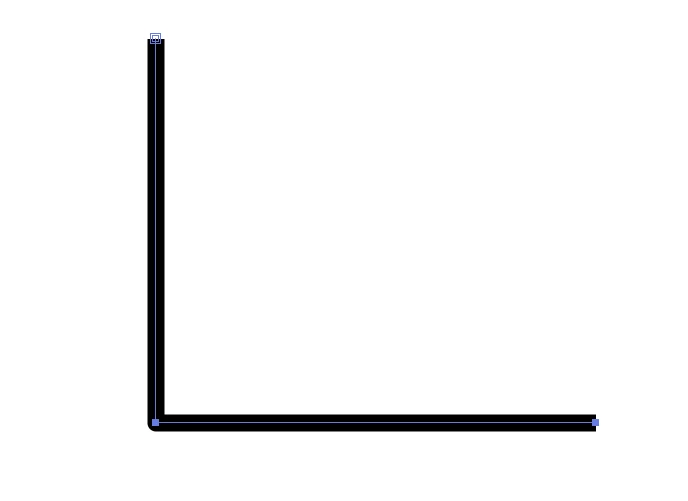
    it will round the join but if you have no bezier handles it will look like this:

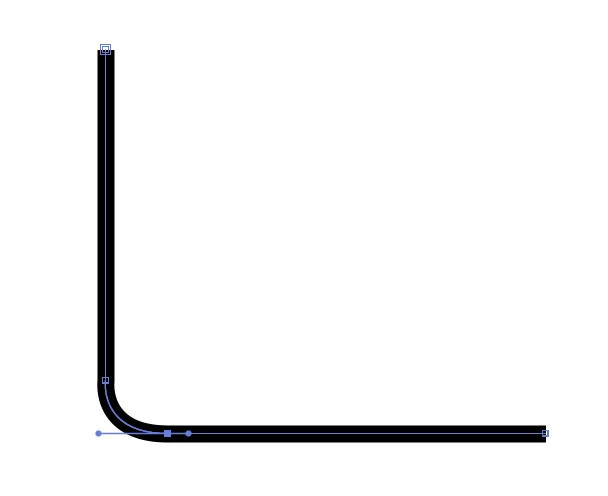
    if you want a curved corner, you can create 2 vertices before and after the corner and use the bezier handles with the convert vertex tool (pen tool+alt key). like this:

    1 reply

    Roei Tzoref
    Roei TzorefCorrect answer
    Legend
    May 3, 2019
    When I look under Contents > Shape > Stroke, I see that there is a setting for Line Join = Round Join, but choosing that doesn't alter the line at all.

    it will round the join but if you have no bezier handles it will look like this:

    if you want a curved corner, you can create 2 vertices before and after the corner and use the bezier handles with the convert vertex tool (pen tool+alt key). like this:

    Known Participant
    May 6, 2019

    Ohhh...I thought there would be something like how the curved corners work in Illustrator or InDesign... Thank you for the help!