
Known Participant
October 21, 2019
Question

Seems to be a bug in After Effects SWF import?

  • October 21, 2019
  • 1 reply
  • 488 views

So, I'm noticing some discrepancies between Adobe Animate CC 2019 and Adobe After Effects CC 2019 after importing an SWF. I've got advanced layers turned off in Animate, and most of it comes through correctly, but some of it just doesn't match up. I noticed that a motion tween that was set to 'bounce' was coming through wrong, but different easing seemed to work. Additionally, if you look at the contrails on the images below - it comes through perfectly when exporting a png sequence (top image) but wrongly when export a set of SWFs (bottom image). Those trails are somewhat complex (they're a symbol containing 4 instances of a second symbol containing some masked layers) but certainly display correctly in animate and the PNG export, so I can only conclude that it's a bug in the SWF rendering in After Effects? Using PNG sequences for the minute as a workaround.


Anyone else seeing these problems? Anyone got a fix?


Thanks!
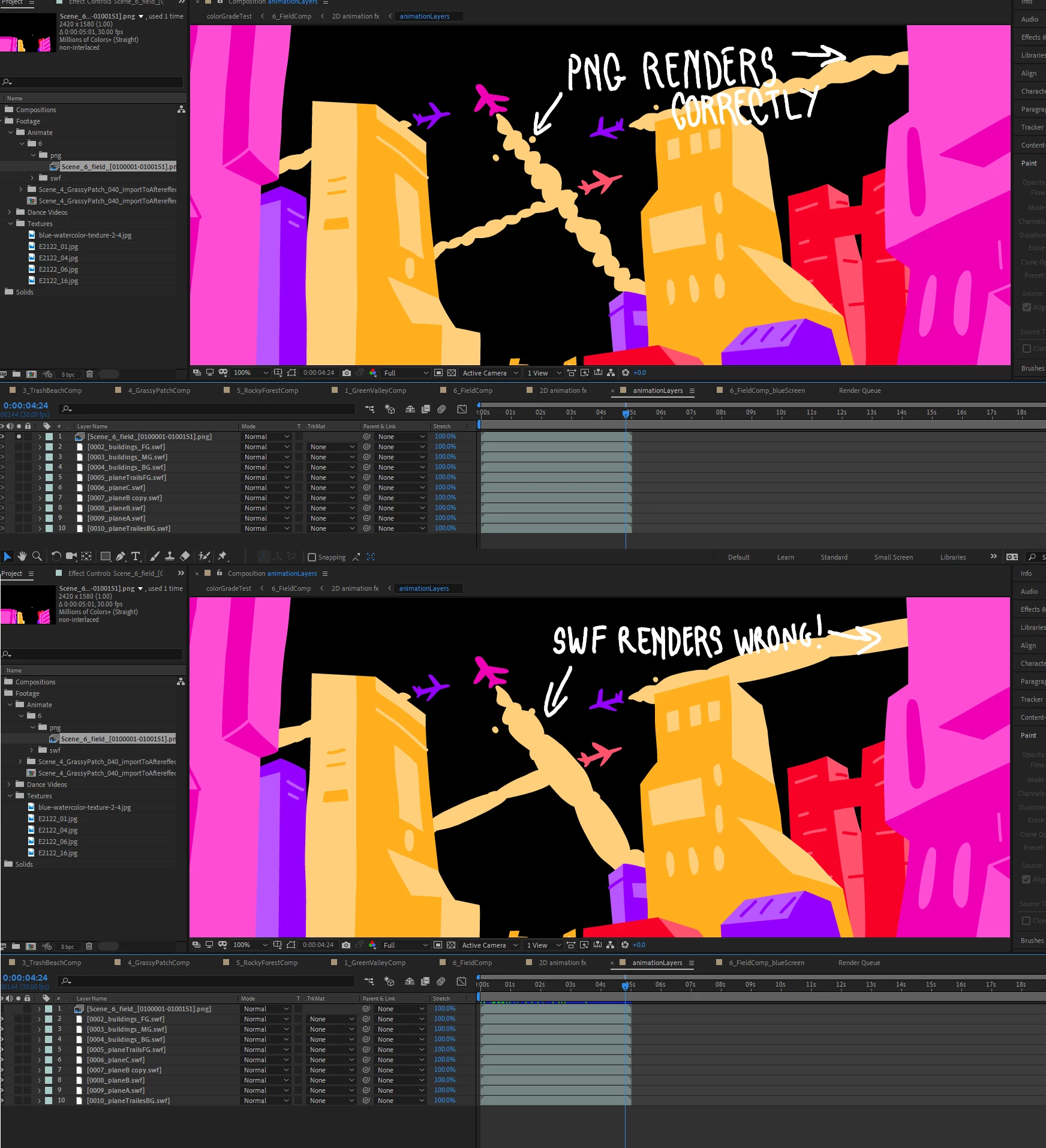


    This topic has been closed for replies.

    1 reply

    Mylenium
    Legend
    October 21, 2019

    Perhaps digging into the animate docs might shed some light on this, but the way I see it, it's perfectly normal. All of what you describe are features that were only added in more recent versions and were never supported by the legacy SWF player - non-destructive masks and extended keyframe behaviors simply didn't exist way back then. They may work when publishing to SVG and HTML canvas, but I don't think they are even meant to work in the SWF renderer. Haven't looked at Flash/ animate in ages, though, so I'm not really 100% sure.


    Mylenium

    Known Participant
    October 21, 2019

    Thanks Mylenium, but I couldn't see any mention of this in the documentation, and I don't think I'd consider these bugs 'perfectly normal' 🙂


    Essentially what you're saying is that Adobe After Effects CC 2019 uses an outdated system to import files from Adobe Animate CC 2019, so the imports don't work properly, and shouldn't be expected to?


    Adobe lists SWF in their "supported file formats" ( https://helpx.adobe.com/after-effects/kb/supported-file-formats.html), I think users could expect the importer to work properly with the latest version of the software? And if the SWF format simply can't handle the documents created in Adobe Animate, it seems like a weird choice for loading moving content from one piece of Adobe software to another. At the very least some kind of error message explaining that you're using features that SWF doesn't support would be useful!


    I've created a feature request/bug report for this, if you're having same problem, feel free to upvote it here

    https://adobe-video.uservoice.com/forums/911311-after-effects/suggestions/38859070-after-effects-doesn-t-properly-support-swf-import