
Karel Bata
Known Participant
July 18, 2020
Question

Slitscan - how?

  • July 18, 2020
  • 3 replies
  • 1590 views

Hi,

How would I set about creating the slitscan technique that created this image?
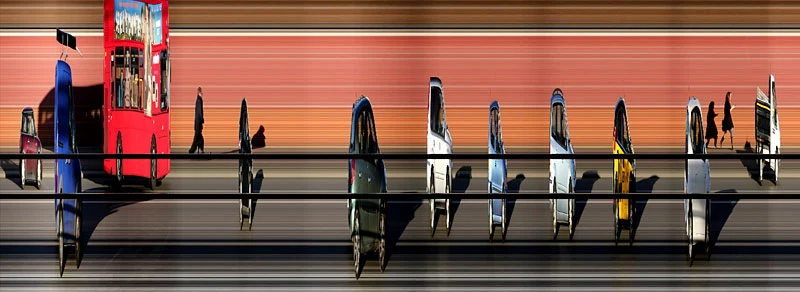
 

The image is borrowed from Martin Dixon, who created a program in Processing. (You can read more at slitcam. com )

I could go the Processing route, but I'd like to hang on to the tools I'm used to in AE, such as to remove the dark bands evident in the pic above.

Maybe someone's already created a script? I know about Slitscan on aecripts, but it's a bit limited.

Many thanks!

This topic has been closed for replies.

3 replies

adams3624564
Inspiring
July 18, 2020

You could use the displace time plugin (it ships with AE) and use a gradient as the displacement map.


https://helpx.adobe.com/after-effects/using/time-effects.html#time_displacement_effect

Justin Taylor-Hyper Brew
Community Expert
Community Expert
July 18, 2020

There's a plugin for that: https://aescripts.com/slitscan/

Mylenium
Legend
July 18, 2020

You could try the Echo effect or any such frame accumulation effect from third-party suites. Similarly, simple time-freezing using tiem-remapping would work. The only real caveat is the quadrizillions of layers and comps you may need since there's no specific effect in AE that would actually create the final image by fetching the individual lines and offsetting them. That, for all intents and purposes, will remain the biggest hurdle, no matter what and is no doubt why the existing script is so limited, too. In any case, to properly do it you'd have to write a whole custom plug-in, so for the time being resorting to external apps would be the best option.


Mylenium

Karel Bata
Known Participant
July 18, 2020

Thnaks. Well if you're saying that then there's not a lot of hope!

Though you'd think there would be a market for this and somebody would write it. But I guess AE doesn't lend itself to this. A shame.