Participant
February 6, 2018
Answered

Stabilizing Steadicam Horizon tilts in long shot?

  • February 6, 2018
  • 1 reply
  • 915 views

I have a 4 minute "oner" of a scene shot on steadicam. We slowly circle a two person dialogue scene. Problem: The steadicam op tilted from side to side quite a lot, so the horizon line is not straight and the image tilts from one side to the other throughout. Is there an easy way to stabilize the horizon? Because we circle the action 4-5 times, any anchor points to track are only in frame for a few seconds at a time. I've tried warp stabilizer, and the footage is smooth, but we still tilt back and forth. Any options here besides keyframing the entire thing by hand (which will take forever)? This is 8K footage, so I problem zooming as much as needed.

    This topic has been closed for replies.
    Correct answer Rick Gerard

    Warp stabilizer is not the right tool. I would split the shot into several sections so that you have something you can track both position and rotation on in each shot. Then you would Motion Track just rotation. You will have to select rotation first then deselect position. You would apply that tracking data to a null and then you would tie the layers rotation to the nulls rotation with this expression by simply typing a minus sign and then dragging the expression pickwhip to the rotation property of the null:

    - thisComp.layer("Null 1").transform.rotation

    The minus sign reverses and thus cancels out the rotating horizon.

    Now you add a second null to the timeline and parent the footage to that null. You rotate that null to get the horizon level.

    The hard part is going to be lining up each shot when you put them back together. The easiest way I can think of to do this would be to add an extra frame to the head and tail of each shot so you can have one frame overlap. Set the blend mode of the top layer of the cuts to Difference and you'll know when you get a perfect match because the screen will go black when the duplicate frames match up perfectly.

    When you have all of the motion rotation stabilized shots put back together switch the blend mode back to normal, pre-compose the whole thing and then scale up the nested comp to get rid of the frame edges that are going to creep into the frame as the shot is rotated.

    I hope you followed that. Camera Tracking, Warp Stabilizing or any other technique that I can think of will not work. The easiest thing I can think of to do is track position and rotation and then just use rotation. Maybe this will help. It is a shot I took snorkeling in Hawaii and the horizon rolled all over the place. I Tracked Motion + rotation
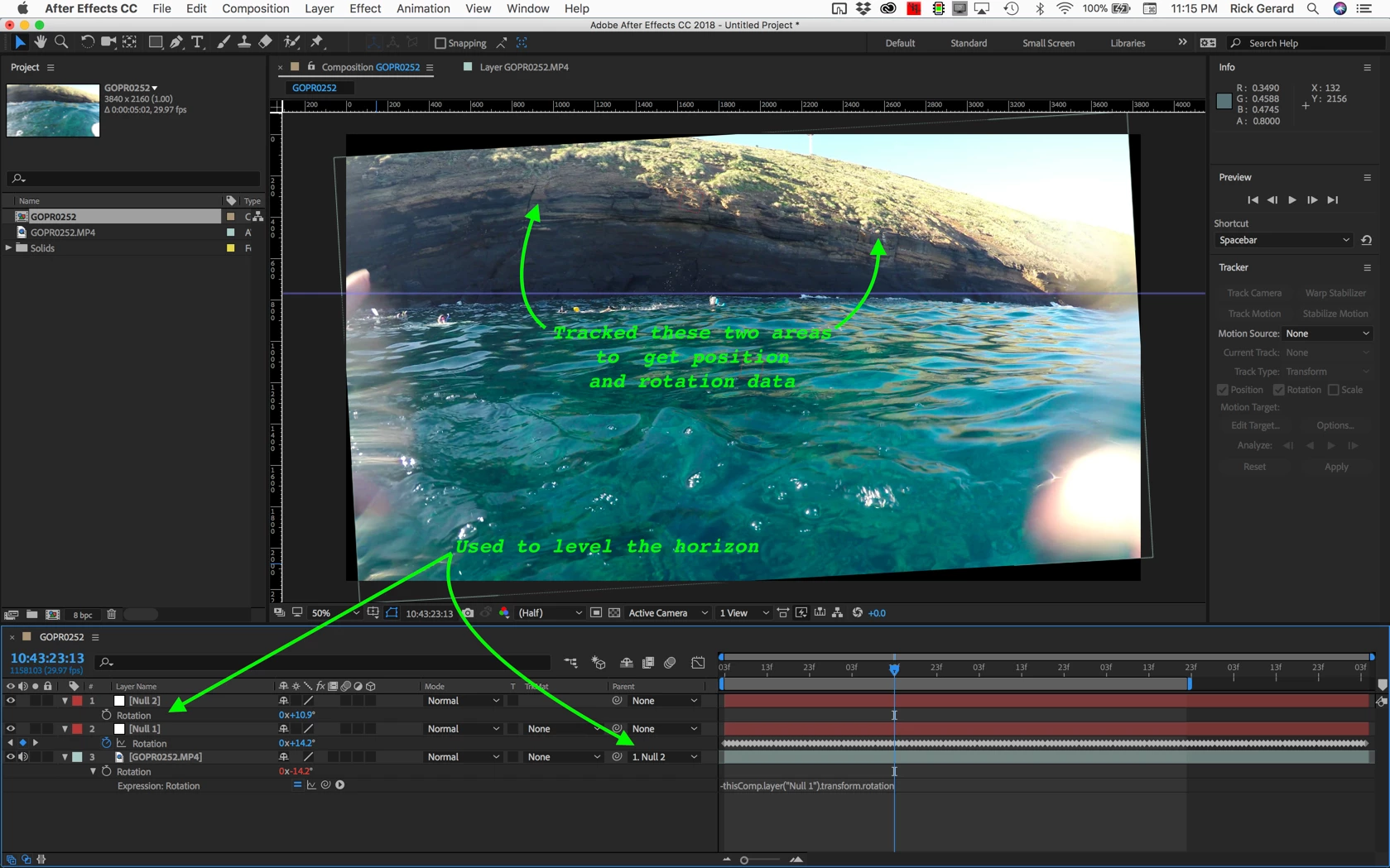
    You can see that I'll have to scale up the footage a bit to fix the crooked horizon. The hardest part of your shot will be matching up the frames of you cut up so they all fit back together. This is the easiest way that I can think of to fix a constantly changing crooked horizon.

    You could just apply the rotation data to the footage layer but I like using a null and an expression a little better because it gives you more options.

    1 reply

    Rick GerardCommunity ExpertCorrect answer
    Community Expert
    February 6, 2018

    Warp stabilizer is not the right tool. I would split the shot into several sections so that you have something you can track both position and rotation on in each shot. Then you would Motion Track just rotation. You will have to select rotation first then deselect position. You would apply that tracking data to a null and then you would tie the layers rotation to the nulls rotation with this expression by simply typing a minus sign and then dragging the expression pickwhip to the rotation property of the null:

    - thisComp.layer("Null 1").transform.rotation

    The minus sign reverses and thus cancels out the rotating horizon.

    Now you add a second null to the timeline and parent the footage to that null. You rotate that null to get the horizon level.

    The hard part is going to be lining up each shot when you put them back together. The easiest way I can think of to do this would be to add an extra frame to the head and tail of each shot so you can have one frame overlap. Set the blend mode of the top layer of the cuts to Difference and you'll know when you get a perfect match because the screen will go black when the duplicate frames match up perfectly.

    When you have all of the motion rotation stabilized shots put back together switch the blend mode back to normal, pre-compose the whole thing and then scale up the nested comp to get rid of the frame edges that are going to creep into the frame as the shot is rotated.

    I hope you followed that. Camera Tracking, Warp Stabilizing or any other technique that I can think of will not work. The easiest thing I can think of to do is track position and rotation and then just use rotation. Maybe this will help. It is a shot I took snorkeling in Hawaii and the horizon rolled all over the place. I Tracked Motion + rotation

    You can see that I'll have to scale up the footage a bit to fix the crooked horizon. The hardest part of your shot will be matching up the frames of you cut up so they all fit back together. This is the easiest way that I can think of to fix a constantly changing crooked horizon.

    You could just apply the rotation data to the footage layer but I like using a null and an expression a little better because it gives you more options.