
Participant
March 30, 2017
Answered

Strange CPU use

  • March 30, 2017
  • 2 replies
  • 681 views

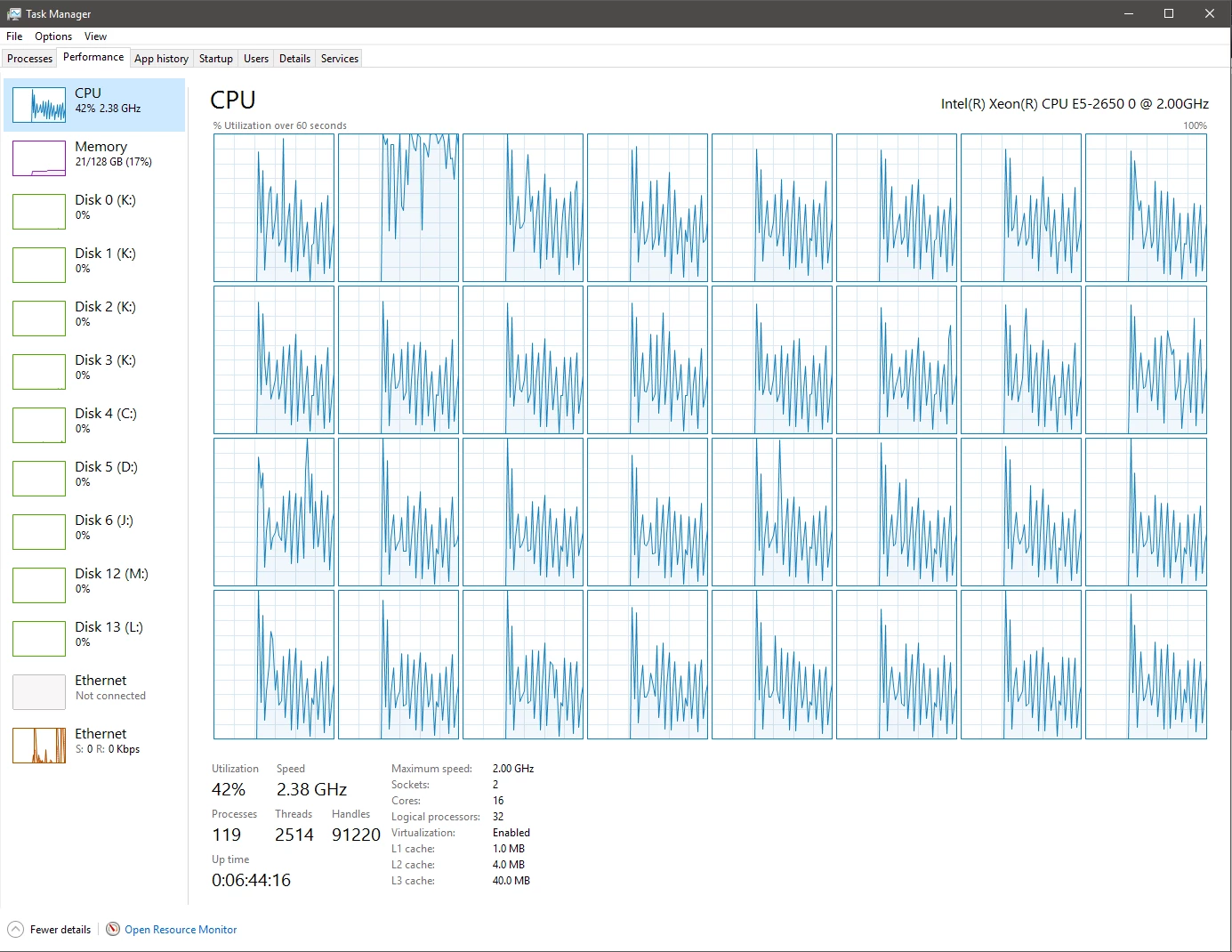
While rendering from After Effects CC2017 my CPU use is, for lack of a better term, spikey. It rapidly goes high, then low, then high....

I am not sure what is wrong. It could be my system but I can't locate the issue. Does anyone have any suggestions? I've never seen After Effects do this before so I am obviously a bit concerned.

My system is made up of the following:

Dual Xeon E5-2650 V1 8-Core processors at 2GHz

AMD FirePro W7000 GPU (Adobe tells me that my drivers aren't compatible, though)

128 GB DDR3 RAM

4 WD Blue 7200 RPM HDDs in RAID 0

1 Samsung 850 SSD for OS

1 Samsung 840 SSD for Project Files

1 Hitachi 7200 RPM HDD for Cache Files
    This topic has been closed for replies.
    Correct answer Mylenium

    I'm not sure what you expect. You have 32 cores in your system (16 physical ones, 16 HT ones) of which AE will only use 2 or 4 most of the time. The rest is just the lack of precision in how the graphs are sampled. Given your system, it's really perfectly normal. You simply expect AE to work in a way it doesn't. Your Xeon system is less than ideal because of AE's limited multithreading to begin with and of course that being the case, the per-core efficiency is lower, introducing more wait cycles for the cores that have nothing to do while the others are busy. The same could be said for al lthat GPU stuff - eliminating a few idle cycles will of course result in a smoother graph, but that doesn't change the fact that AE sucks at using your system's resources. That's just how it is. I'm afraid you have bought the wrong kind of system and now are looking for magic buttons.

    Mylenium

    2 replies

    Dave_LaRonde
    Inspiring
    March 30, 2017

    Relax.  Don't sweat the details on this.  Your machine and AE are working just fine. 

    I think you have far more important things to worry about, such as learning how to use AE.

    Mylenium
    Legend
    March 30, 2017

    And what exactly? Without any info on the specifics of the project, comp settings, render settings etc. this is of no use to anyone. That aside, the performance graphs look perfectly reasonable for AE - render a frame/ comp/ effects buffer, wait for it to be stored to file, move on to the next frame. Perfectly natural that any of these steps will see a different CPU usage and idle cycles.

    Mylenium

    Participant
    March 30, 2017

    It's like this with every project. I have changed the Mercury Render from "Software Only" to "GPU accelerated" and that seems to smooth it out some, but it's just smaller spikes. This seems strange to me since Premiere and AE tell me they can't use the GPU (even though it is an approved card).

    It doesn't act like this on other computers, which leads me to think it's something with this particular system. I just can't seem to find the issue.

    Mylenium
    MyleniumCorrect answer
    Legend
    March 30, 2017

    I'm not sure what you expect. You have 32 cores in your system (16 physical ones, 16 HT ones) of which AE will only use 2 or 4 most of the time. The rest is just the lack of precision in how the graphs are sampled. Given your system, it's really perfectly normal. You simply expect AE to work in a way it doesn't. Your Xeon system is less than ideal because of AE's limited multithreading to begin with and of course that being the case, the per-core efficiency is lower, introducing more wait cycles for the cores that have nothing to do while the others are busy. The same could be said for al lthat GPU stuff - eliminating a few idle cycles will of course result in a smoother graph, but that doesn't change the fact that AE sucks at using your system's resources. That's just how it is. I'm afraid you have bought the wrong kind of system and now are looking for magic buttons.

    Mylenium