
sagaern
Participant
April 25, 2018
Question

Team Project bug - Linked items replaced with recovered

  • April 25, 2018
  • 4 replies
  • 1204 views

Hello all!

While working in a team project, me and my colleague suddenly got this error:

"After Effects warning: can not find source item for layer ID=57397; will replace with a placeholder. ( 26::143 )"
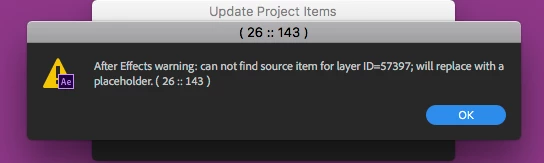
All of our linked files, both separate .ai files and library objects, suddenly became placeholder "recovered" files.

We solved this by going back to an earlier copy of our project, but still couldn't figure out why this bug occurred. We didn't move any of our linked objects or the ae file itself.

Has anyone else experienced this problem or know why it happens?

This topic has been closed for replies.

4 replies

Participant
April 28, 2020

Hello, I am also dealing with this issue.  Any insight would be helpful, although i found it happened when i accepted changes from a team member that updated the sequence with an After Effects Linked Composition in it.  I chose to use the new version and create a copy of the old.  This forced After Effects to duplicate all of the media within the composition, which is not what i wanted to do.  I can only guess, but I believe the duplicated media and duplicated compostions (all retaining the same files names and links) have created a mess inside of after effects.  I do not see a remedy, but i manually went through and replaced all of the missing "Recovered" files with the media.  This is a major isssue.

Participant
April 29, 2020

I didnt manage to fix this issue.

Its a huge problem, and literrally thousands of dollars of people hours have been waisted away on it now.

The only thing I managed to do is make the AE cloud project a local one, then manually export all of my animations as videos, and re-import them again into the Premiere project. It was painstaking, and will now slow down our project.

I hope this helps.

Participant
April 29, 2020

How were you able to make the AE Cloud project local?  I searched help and do not see any option to do that.  Can you give steps.  Much thanks!

Participating Frequently
April 27, 2020

I am also still having complications with this in Team Projects. Huge pain, especially since the whole team is working remotely during the COVID-19 crisis. If anyone has any recommendations or workarounds, I would appreciate it! 

Participant
January 21, 2020

We're dealing with this bug now too.

It only happens on one of the two computers. 

Tried reinstalling both Premiere and AE on the problem computer.

Still no luck.  Wasting so much time on this.

Participant
November 9, 2018

Was this issue ever sorted we are having a similar problem, thanks

sagaern
sagaernAuthor
Participant
November 12, 2018


Nope sorry, I haven’t heard about a solution for this yet.

We solved it by accessing an automatic backup for our team project through the media encoder (see screenshot). We used this window to browse through old copies, although I don’t remember exactly how we then reverted the project back to an earlier version.