
Inspiring
November 2, 2016
Answered

text is appearing condensed, don't know why

  • November 2, 2016
  • 2 replies
  • 4405 views

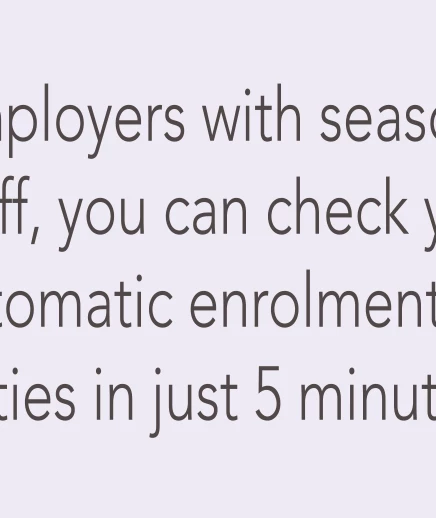
I recently took a course in After Effects and the last couple of days I've been really struggling to get to grips with it. My most recent problem is that when I type straight into the composition, my font (Avenir 35 Light) appears condensed/horizontally compressed for no reason that I can fathom.

How it looks:
How it's meant to look (ignore colour):

I was using the same proportion file yesterday and it was OK, and can't work out what I've done to make it like this. If anybody could enlighten me I'd be so grateful.
This topic has been closed for replies.
Correct answer Roei Tzoref

2 things come to mind:

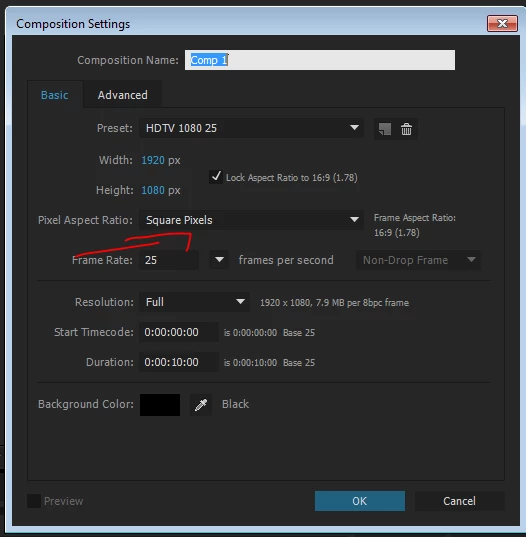
1. you are probably working in non-square aspect ratio. check your composition settings and see that you are using a square pixel composition

it is recommended to work from within the presets, but a common mistake is to choose an HDV Preset instead of HDTV.

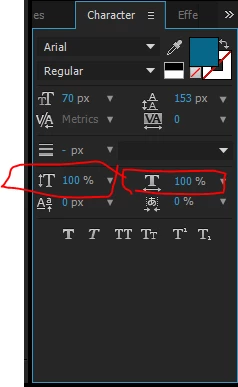
2. check your character panel and see that your settings are 100% for width and height

2 replies

Roei Tzoref
Roei TzorefCorrect answer
Legend
November 2, 2016

2 things come to mind:

1. you are probably working in non-square aspect ratio. check your composition settings and see that you are using a square pixel composition

it is recommended to work from within the presets, but a common mistake is to choose an HDV Preset instead of HDTV.

2. check your character panel and see that your settings are 100% for width and height

emmaTPR12Author
Inspiring
November 2, 2016

It was no 1! Thank you so much. Give me 5 mins and I'll come up with the next problem....

Mylenium
Legend
November 2, 2016

Check the scaling settings on the type palette and your composition pixel aspect ratio.

Mylenium