
Scuba_Scott
Participant
January 22, 2019
Answered

Thai font issues (Accent marks)

  • January 22, 2019
  • 3 replies
  • 11731 views

I need to translate a video to Thai from English (among many other languages).  I get documents from the translator in Microsoft Word, in "Angsana New" and the Thai font looks great (meaning, any accents that are stacked above a character are correct).  However, when pasted into Adobe After Effects, the accents get "crushed down". 

Here is an example:

CORRECT THAI
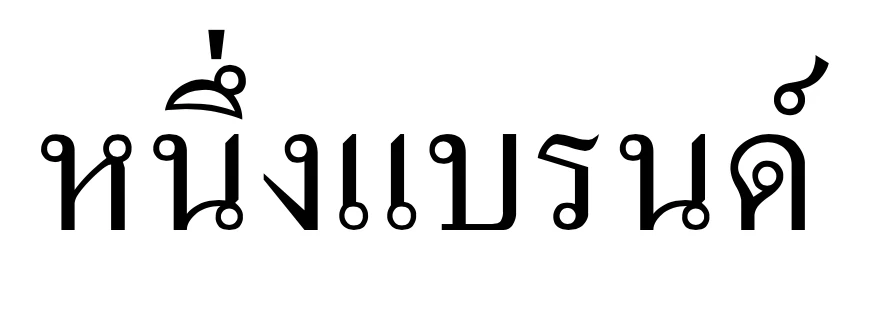
INCORRECT THAI

Any assistance would be great!

This topic has been closed for replies.
Correct answer bengilbey

I had a similar issue with inDesign using Adobe Thai. If you change the paragraph settings to World Ready Single Line (or paragraph) composer, the accents align in the correct place.

3 replies

Participant
October 18, 2023

None of these are working for me - My font remains squished down 

Known Participant
December 13, 2023

Me too. Years later, this is still an issue. What do we pay for? Could care less about AI if I simply can't cut and paste Thai text for our CEO. Also, the "Middle Easter & South Asian" composers are missing from the paragraphs menu as shown here - https://helpx.adobe.com/illustrator/using/asian-scripts.html - 🙄

bengilbeyCorrect answer
Participant
January 24, 2021

I had a similar issue with inDesign using Adobe Thai. If you change the paragraph settings to World Ready Single Line (or paragraph) composer, the accents align in the correct place.

Participant
May 25, 2023

This worked for me. Thank you!

megi37177599
Participant
February 21, 2019

Go to preference>type>text engine set to south Asian and Middle Eastern option

Then while selecting the text go to paragraph panel go to its options and reset it. This should work

Szalam
Community Expert
Community Expert
February 22, 2019

You may need to restart AE after making these changes to make it work properly.

Participating Frequently
February 6, 2020

I'm a year late, but I was having the same issue and this didn't help. Instead, I switched my tracking from Optical Allignment to Metrics (I prefer using Optical most of the time for english) and it fixed everything!