Participant
November 28, 2016
Answered

Track Mattes do not work when made 3D layers AE 2017

  • November 28, 2016
  • 1 reply
  • 14231 views

Ive upgraded to AE 2017. I have noticed that track mattes can no longer be 3d layers. They must be precomposed. Is anyone else noticing this?

Is this a bug ADOBE?

    This topic has been closed for replies.
    Correct answer Roei Tzoref

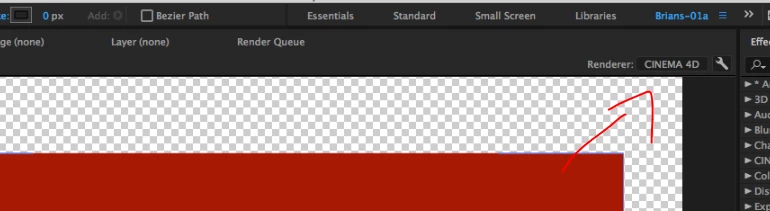
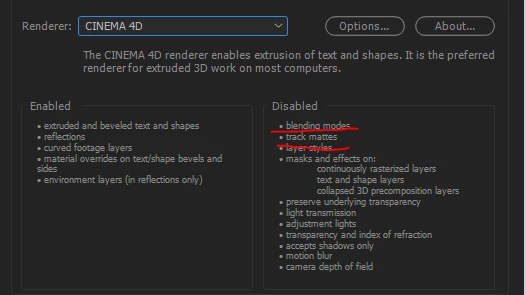
    gotcha! track mattes (and blending modes, and other things) don't work in the CINEMA 4D renderer. change it to Classic 3D
    1 reply

    Roei Tzoref
    Legend
    November 28, 2016

    do you have a layer style applied to the bottom layer? then 3D+Layer style+Track matte won't work in this case and never did. if this is another issue please be more specific and show as screenshots and specify exactly where is the problem.

    Participant
    November 28, 2016

    No layer styles applied. Just simple basic shapes.

    I have tested the same shapes with 2015 and then recreated in 2017. It doesn't work in 2017 but works fine in 2015.

    See Images below.

    On the first I have the track mattes enabled on 2d layer in 2017.

    The next image I have made them 3d layers and now they break. The bottom image is the track mattes with 3d layers recreated in 2015.

    Any ideas?

    I also just noticed Blending modes do not work in 3d layers either. Once I change it to a 3d layer blending mode disappears.

    Roei Tzoref
    Roei TzorefCorrect answer
    Legend
    November 28, 2016

    gotcha! track mattes (and blending modes, and other things) don't work in the CINEMA 4D renderer. change it to Classic 3D