
Participant
January 4, 2018
Question

Using Robert Penner's Easing

  • January 4, 2018
  • 2 replies
  • 1803 views

Hello,

I've been having problems trying to use Robert Penner's easing functions in my expressions.

var comp = thisComp;

var duration = comp.layer("Duration").text.sourceText;

var transition = comp.layer("Transition").text.sourceText;

duration = parseFloat(duration); // testing at 1

transition = parseFloat(transition); // testing at 1

var startDuration = inPoint + transition; // 1

var actualDuration = startDuration + duration + transition; // 3

var endDuration = actualDuration - transition; // 2

var startPos = [0, 0];

var endPos = [960, 0];

if (time <= (inPoint + actualDuration) / 2) {

  smoothEaseOut(inPoint, startDuration, startPos, endPos); // 0, 1, [0, 0], [960, 0]

} else {

  smoothEaseIn(endDuration, actualDuration, endPos, startPos); // 2, 3 [960, 0], [0, 0]

}

function easeOutQuint(t, b, c, d) {

  return c*((t=t/d-1)*t*t*t*t + 1) + b;

}

function easeInQuint(t, b, c, d) {

  return c*(t/=d)*t*t*t*t + b;

}

function smoothEaseIn(startTime, endTime, startVal, endVal) {

  var x = easeInQuint(time - startTime, 0, 1, transition);

  return linear(x, startTime, endTime, startVal, endVal);

}

function smoothEaseOut(startTime, endTime, startVal, endVal) {

  var x = easeOutQuint(time - startTime, 0, 1, transition);

  return linear(x, startTime, endTime, startVal, endVal);

}

For some reason, animation going in works, but animation going out is wonky.
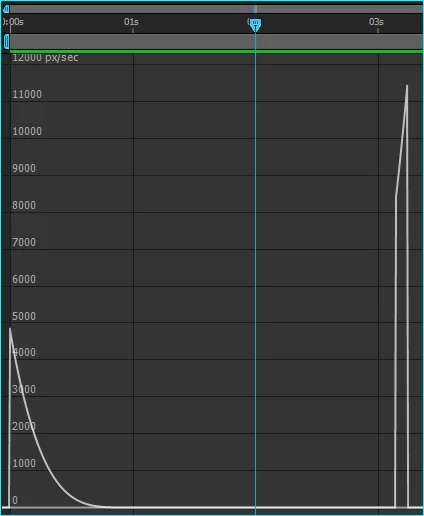
I can't figure out what went wrong. How do I implement the easing? I intend to use these easing instead of After Effect's built in interpolation functions.

This topic has been closed for replies.

2 replies

Mathias Moehl
Community Expert
Community Expert
January 4, 2018

From your screenshot it looks like the condition in line 21 "(time <= (inPoint + actualDuration) / 2)" is somehow wrong.

It looks like this is satisfied for all frames until the abrupt jump after 3s.

Not sure about the meaning of your vars transition, actualDuration etc, but maybe you want "(time <= (inPoint + transition) / 2)"?

Mathias Möhl - Developer of tools like BeatEdit and Automation Blocks for Premiere Pro and After Effects
Participant
January 4, 2018

Hi Mathias,

Thank you for replying.

I have been using Ease and Wizz as a reference, but I cannot use it directly because one of objectives for this project to not use keyframes, only interpolation, so that we can adjust the transition length and also the duration of the entire animation through live text template in Premiere Pro.

The condition, as far as I know, is correct because it's supposed to play transition in if current time <= (defined duration / 2) and play transition out if it's not.

I'm sorry if the information is not complete, I'll explain the variables in more detail.

var transition (a) is the defined length of transitions in and out, it gets its value from a text layer, which the video editors can access using Premiere Pro. Let's give it an example: 1

var duration (b) is the defined length of the static part of the animation before transition out plays, also like the above, gets its value from a text layer. Let's give it an example: 2

var startDuration is 0 + a the point in time transition in finishes. // 1

var actualDuration is (0 + a) + b + a, which defines the total length of the animation // 4

var endDuration is ((0 +a) + b + a) - a the point in time transition in starts // 3

if done correctly, it should give me a transition in for 1 second, hold for 2 seconds, play transition out for 1 second.

I hope that clarifies things a little. Sorry for my English, it's not my first language.

Thank you.

Mathias Moehl
Community Expert
Community Expert
January 4, 2018

Robert Penner's easing is implemented in Ease & Whizz

Ease and Wizz - aescripts.com

So you don't need to implement it again :-)

Mathias Möhl - Developer of tools like BeatEdit and Automation Blocks for Premiere Pro and After Effects