Participant
May 16, 2024
Question

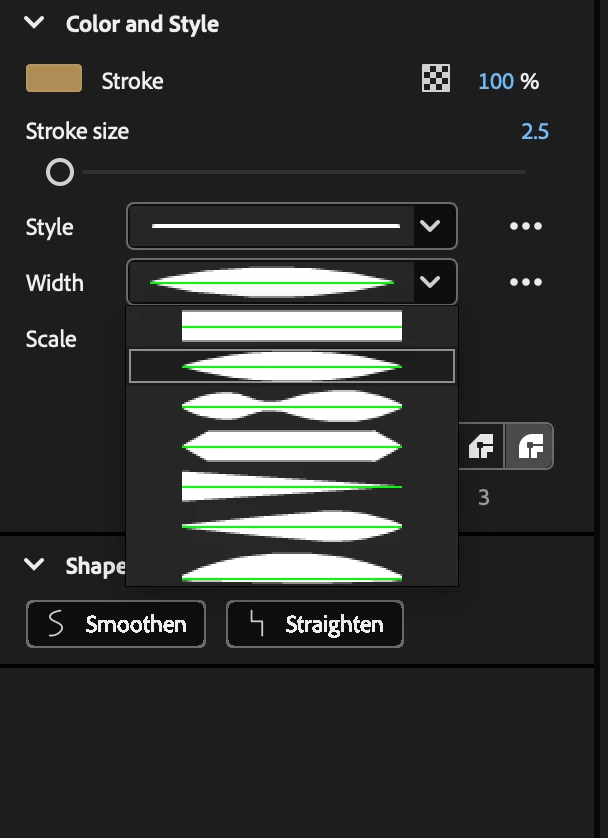
Adobe animate Crashes when changing the strokes width on the properties panel

  • May 16, 2024
  • 1 reply
  • 434 views

Why is Adobe animate crashing every time I try to change the width of the stroke on the property panel,  If I make a line with the paintbrush tool, line tool or whatever and then I try to change the width, the software crashes.


Why is this happening?


This topic has been closed for replies.

1 reply

kglad
Community Expert
Community Expert
May 16, 2024

assign a custom keyboard shortcut (edit>keyboard shortcuts)

uninstall animate, including preferences, per https://helpx.adobe.com/creative-cloud/help/uninstall-remove-app.html

restart your computer

reinstall animate

confirm your custom kb shortcut was removed.

test for problem

Participant
August 3, 2024

I'm having exactly the same issue on Animate 2024 on my Mac os Ventura 13.6.7. 

It crashes and istantly closes whenever i'm doing certain actions with line and pen tools, but not all the times. It happens especially after opening pop-up tabs in the Properties box (line thickness, fill colour), or selecting lines and fills with Selection tool.

I followed these steps, and reinstalled the software, but it looks like CC is unable to reset keyboard shortcuts. When uninstalling, it deletes all the preferences EXCEPT shortcuts. I tried to switch to default keyboard layout and choose not to save my custom shortcuts, but the issue still occurs after a while and when I reopen my project it goes back to the custom keyboard shortcuts I had previously.

If this is the cause of the error, is there another way to manually reset the keyboard shortcuts? Maybe from Library?

kglad
Community Expert
Community Expert
August 3, 2024

you can try press and hold Control+Alt+Shift (Windows) or Command+Option+Shift (Mac OS) as you start Animate.