


bonsaibullet
Participant
July 27, 2018
Answered

Adobe Animate exporting video as black screen with no audio

  • July 27, 2018
  • 3 replies
  • 4881 views

Hi everyone so I'm very new to animation software and I'm not sure what I've done wrong. I have a very short 16 second animation with some audio over it I'm trying to export for a youtube video but every time I try to export it I just get a quicktime file that is the length of the animation but it's just a black screen and no audio.

I've already moved the entire animation to start on the 2nd frame so the audio should be working, I'm just not sure whats wrong.
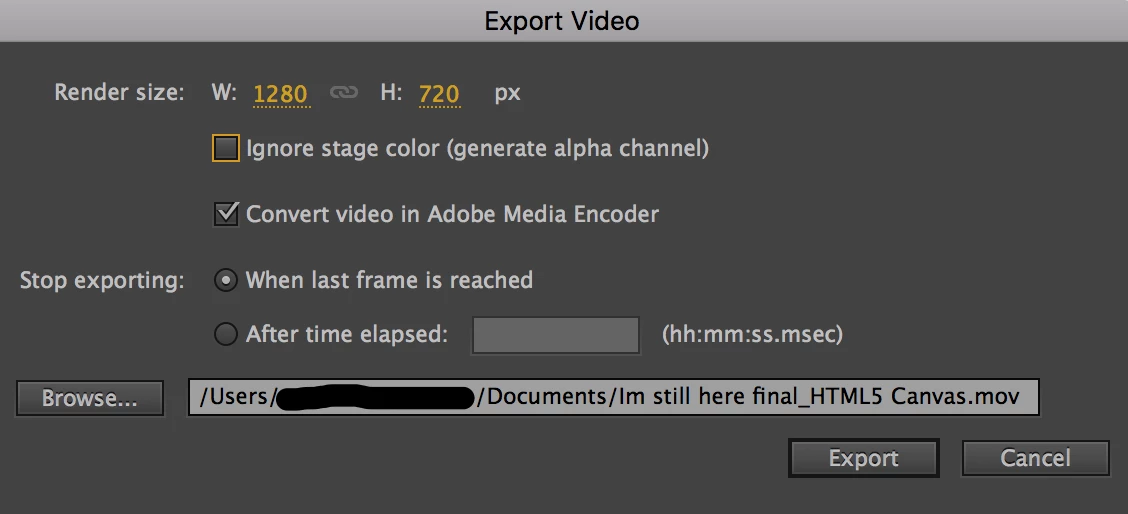
Here's the dialog window in animate itself, I've also tried doing the "after time elapsed" option with the end of the animation

Here's the queue in media encoder (latest update)

I havent messed with the H.264 thing because I have no idea what that means but I haven't seen anyone say to change that. But the other drop down I've tried so many of the options there all with the same result I don't get it !

I'm really not sure whats going on because I ran a MUCH longer animation (four minuets !) through it and while the audio was mangled the video was perfect !

If someone could PLEASE help me get my animation out of limbo I would just be the happiest person ever. Thanks !

This topic has been closed for replies.
Correct answer bonsaibullet

So I finally got the video to export, it turns out that Adobe animate just really hates the Media Encoder. Idk what the Media encoder is doing to my animations but if I export without it going through that it works perfectly fine.

3 replies

Participant
May 12, 2020

Hello, there. It's been a year since you posted but in case there's someone out there who is having the similar problem, maybe my solution will work. I just change the resolution of the scene (or maybe artboard? or canvas? I don't know what they call it) to 1280x720, and Encoder could render it just fine. I messed with the resolution and entered some random number before, but after I adjust it back, problem solved.


Welp, I'll leave my answer here

bonsaibullet
bonsaibulletAuthorCorrect answer
Participant
August 28, 2018

So I finally got the video to export, it turns out that Adobe animate just really hates the Media Encoder. Idk what the Media encoder is doing to my animations but if I export without it going through that it works perfectly fine.

bonsaibullet
Participant
July 29, 2018

So Ive been able to get the audio to export, but only if I click the "export movie" instead of "export video" it's making a flash video instead which i dont know if youtube will be able to accept, either way the visuals still aren't going through and if the audio isnt set to "stream" the audio that comes through is the beginning of the song I have playing, which I cut out for the project as the animation is set to a part in the middle of the song.

ankushr40215001
Inspiring
August 14, 2018

Hi,

I am not sure if you have managed to resolved your issue as its been a while you posted the query.

Sorry for the delay. However, if you are still facing this issue then please try following the solution mentioned here - Exporting flash file as .mov but audio is removed

It worked for many and hope will work for you also.

Thanks!

Ankush

bonsaibullet
Participant
August 23, 2018

Ive tried setting the audio to "sync" but the video is still broken! Neither the audio nor the visuals are exporting, the audio will export if I export as a movie but I cant get my animation to show up no matter what!

This is literally all i get when I export!!!