Participating Frequently
December 24, 2021
Answered

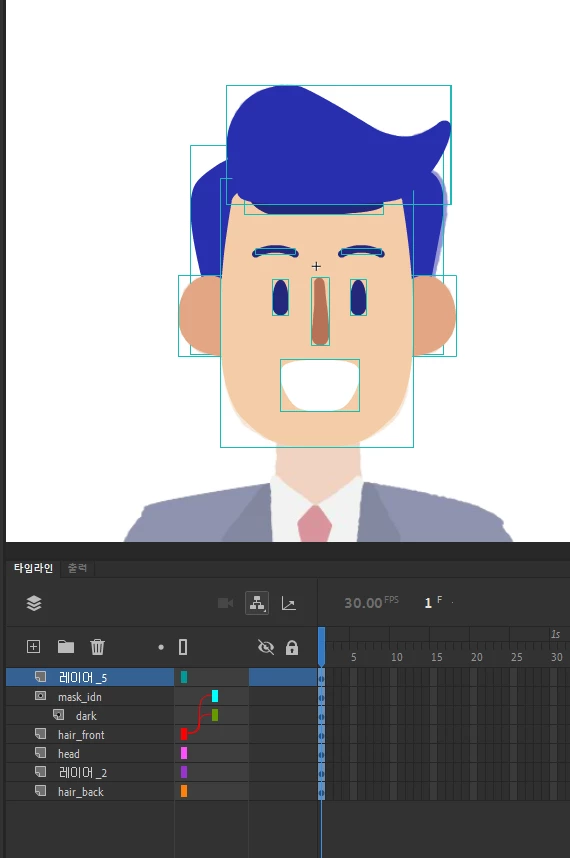
An error where the selection line is wide when there is nothing inside the symbol

  • December 24, 2021
  • 1 reply
  • 729 views

An error where the selection line is wide when there is nothing inside the symbol


It is indicated that there is something inside the symbol where there is nothing.


Even if I check each layer inside, there are no objects.
No invisible objects, no tiny dots.
Clicking on the frame or selecting with Ctrl + A doesn't grab anything.

But when I click on the symbol outside of it, the selection line gets weirdly wide.

This issue sometimes causes annoying issues when clicking on symbols.



A video is also attached.


I can share the file with you to fix the error.


thank you.

This topic has been closed for replies.
Correct answer n. tilcheff

My guess is that the error is caused by the mask layer.


The issue is caused by the groups in combination with Layer Parenting.

If you select everything and break apart, the bounding boxes are refreshed and the issue disappears.

Layer Parenting is supposed to be used with symbols, which have permanent registration and transformation points.


1 reply

kglad
Community Expert
Community Expert
December 24, 2021

unlock all your layers and then search for the object.

Participating Frequently
December 24, 2021

Yes. I did that.

Even then, no objects were found.

Please check the attached video. 😄

kglad
Community Expert
Community Expert
December 24, 2021

post a link to your fla