
Exit
  • Global community
    • Language:
      • Deutsch
      • English
      • Español
      • Français
      • Português
  • 日本語コミュニティ
  • 한국 커뮤니티
0

Animate 2020 What does the "Stabilizer" under "Fluid Brush Options" do?
Community Beginner ,
Nov 18, 2019 Nov 18, 2019

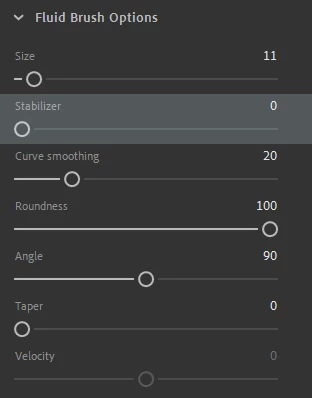
an cc stabilizer.png


So I found this little setting when digging around with the Fluid Brush, however is it meant to be a rename for "Brush Smoothness"? Or is it meant to stabilize as you draw like Lazy Nyzumi, Clip Studio, or Paint Tool Sai?


I'm asking this because it doesn't seem to be working like the latter.

If it does work for other computers, I take it that it doesn't have support for 4k monitors like the Cintiq?

TOPICS
Other , Product issue
16.8K
Translate
Report
Community guidelines
Be kind and respectful, give credit to the original source of content, and search for duplicates before posting. Learn more
community guidelines

correct answers 1 Correct answer

Adobe Employee , Nov 28, 2019 Nov 28, 2019

It is the latter functionality. Try comparing the line stability with value 0 and 100 and let us know if the range of the slider works for you or you need a increased range. Also it would be helpful if you can share a screen recording link of this issue.


You can directly post you comments in Animate forum by joining our Beta program where you will have an early access to our developmental builds, features and bug fixes. You can sign up to the program using http://adobe.ly/20AEkbJ


Translate
Community Beginner ,
Nov 18, 2019 Nov 18, 2019

Another extra detail that I've learned is that once you hover your mouse over it, it says "Curve Smoothing" when there's the setting underneath as well. I double checked to make sure it's hovered over stabilizer and same thing happened.


Perhaps it's just an unfinished feature standing out to tease us?

Translate
Report
Community guidelines
Be kind and respectful, give credit to the original source of content, and search for duplicates before posting. Learn more
community guidelines
Adobe Employee ,
Nov 28, 2019 Nov 28, 2019

It is the latter functionality. Try comparing the line stability with value 0 and 100 and let us know if the range of the slider works for you or you need a increased range. Also it would be helpful if you can share a screen recording link of this issue.


You can directly post you comments in Animate forum by joining our Beta program where you will have an early access to our developmental builds, features and bug fixes. You can sign up to the program using http://adobe.ly/20AEkbJ


Translate
Report
Community guidelines
Be kind and respectful, give credit to the original source of content, and search for duplicates before posting. Learn more
community guidelines
Community Beginner ,
Nov 28, 2019 Nov 28, 2019

Ahhh, now I see it!

Also here's a video if that helps! 


I would appreciate it if there was more range/distance or a drag to fully help us notice it though, but hey, that's what the beta program is for and I'm down to sign up!


Thanks for the help!

Translate
Report
Community guidelines
Be kind and respectful, give credit to the original source of content, and search for duplicates before posting. Learn more
community guidelines
Adobe Employee ,
Nov 29, 2019 Nov 29, 2019

Sure. Thanks for your feedback. We will look into this issue.

Translate
Report
Community guidelines
Be kind and respectful, give credit to the original source of content, and search for duplicates before posting. Learn more
community guidelines
New Here ,
Aug 30, 2024 Aug 30, 2024

you have got to do the smoothing option like in photoshop. its physically impossible to draw when i have shaky hands. it would be so useful

Translate
Report
Community guidelines
Be kind and respectful, give credit to the original source of content, and search for duplicates before posting. Learn more
community guidelines
Community Expert ,
Aug 30, 2024 Aug 30, 2024
LATEST
Translate
Report
Community guidelines
Be kind and respectful, give credit to the original source of content, and search for duplicates before posting. Learn more
community guidelines
New Here ,
Jun 28, 2022 Jun 28, 2022

I definitely agree with it needing more stabilising - something like in Photoshop would help a ton. As someone with quite shaky hands lineart is a nightmare in animate and I've been thinking of just downloading the addon that adds a timeline to photoshop for this reason.

Translate
Report
Community guidelines
Be kind and respectful, give credit to the original source of content, and search for duplicates before posting. Learn more
community guidelines