


Participant
July 30, 2018
Answered

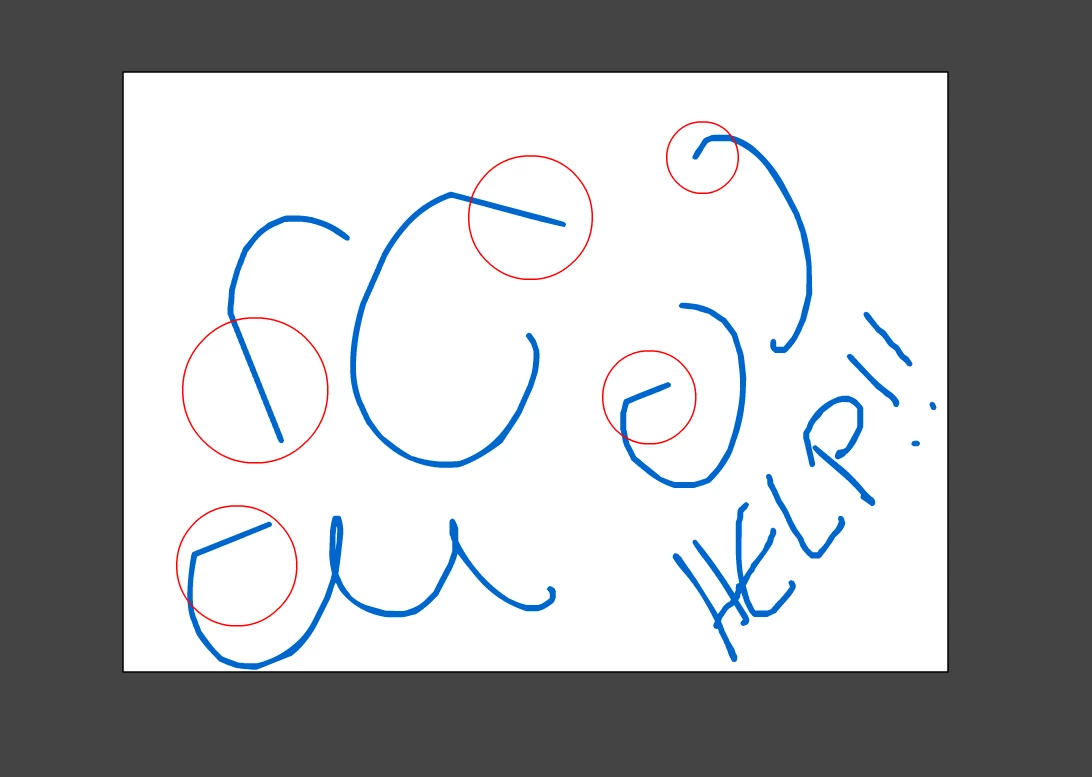
Animate CC adds random lines to curves and circles

  • July 30, 2018
  • 3 replies
  • 2514 views

When I start to draw a circle, I get straight lines where it should be curved. I have the latest windows 10 update, all my Monoprice 21.5" tablet driver updates, and all the Animate updates. This problem appears nowhere else as I use Photoshop normally and all my other programs don't glitch like this. I've seen other forums about this but everything I tried hasn't worked. Help!!
This topic has been closed for replies.
Correct answer enisb33197180

I had same problem with photoshop. I am using Wacom Cintiq. When i delete Wacom driver and download again problem was solved. Maybe same thing happened in Animate CC. Wacom driver problem.

3 replies

Participant
July 10, 2020

I had to go into my tablet settings and turn "Windows Ink" off. Windows Ink is needed in photoshop for pressure sensitivity, but for some reason in animate it messes stuff up lol. Hope this helps!

Community Expert
August 1, 2018

Also be sure to mess with your smoothing in the brush properties.

ankushr40215001
Inspiring
July 31, 2018

Hi there,

I have recently joined the Animate community and found a lot of users complaining about this issue.

However while testing out the drawing features in this software I went to Edit > Preferences > Drawing where there are few settings which we can define.

Can you also try toggling some of these settings and may be find a way through it.

Check this out for more info - Drawing preferences in Animate CC.

Hope it helps.

Thanks!

Ankush

Participant
August 1, 2018

Thank you for responding! I tried messing around with the options and I tried a lot of different combinations like you suggested but the problem is still there.

enisb33197180Correct answer
Inspiring
August 1, 2018

I had same problem with photoshop. I am using Wacom Cintiq. When i delete Wacom driver and download again problem was solved. Maybe same thing happened in Animate CC. Wacom driver problem.