


Known Participant
February 22, 2022
Answered

Animate created a script of the folders I had and also created duplicates layers - _obj and _prop

  • February 22, 2022
  • 2 replies
  • 2947 views

I've never had this happen before and don't know how to fix it. I had my layers all neatly organized in folders. Been working on this project for a couple of weeks with no issues. Suddenly tonight, it took OUT my folders and instead, added a new layer at the top called __layerObjectOrdering - that has a script in the first frame.


Additionally, most of the layers I had were duplicated - one called "name_prop_ " followed by its mate, "name_obj_"


I get compile errors now and although it DOES still play, there are a few errors here and there that weren't there before. Inconsistent stuff. Here's a screenshot of what my layers panel looks like now (top) - the bottom screenshot is the beginning of the script that's been placed in the first frame of the program-generated __layerObjectOrdering layer:
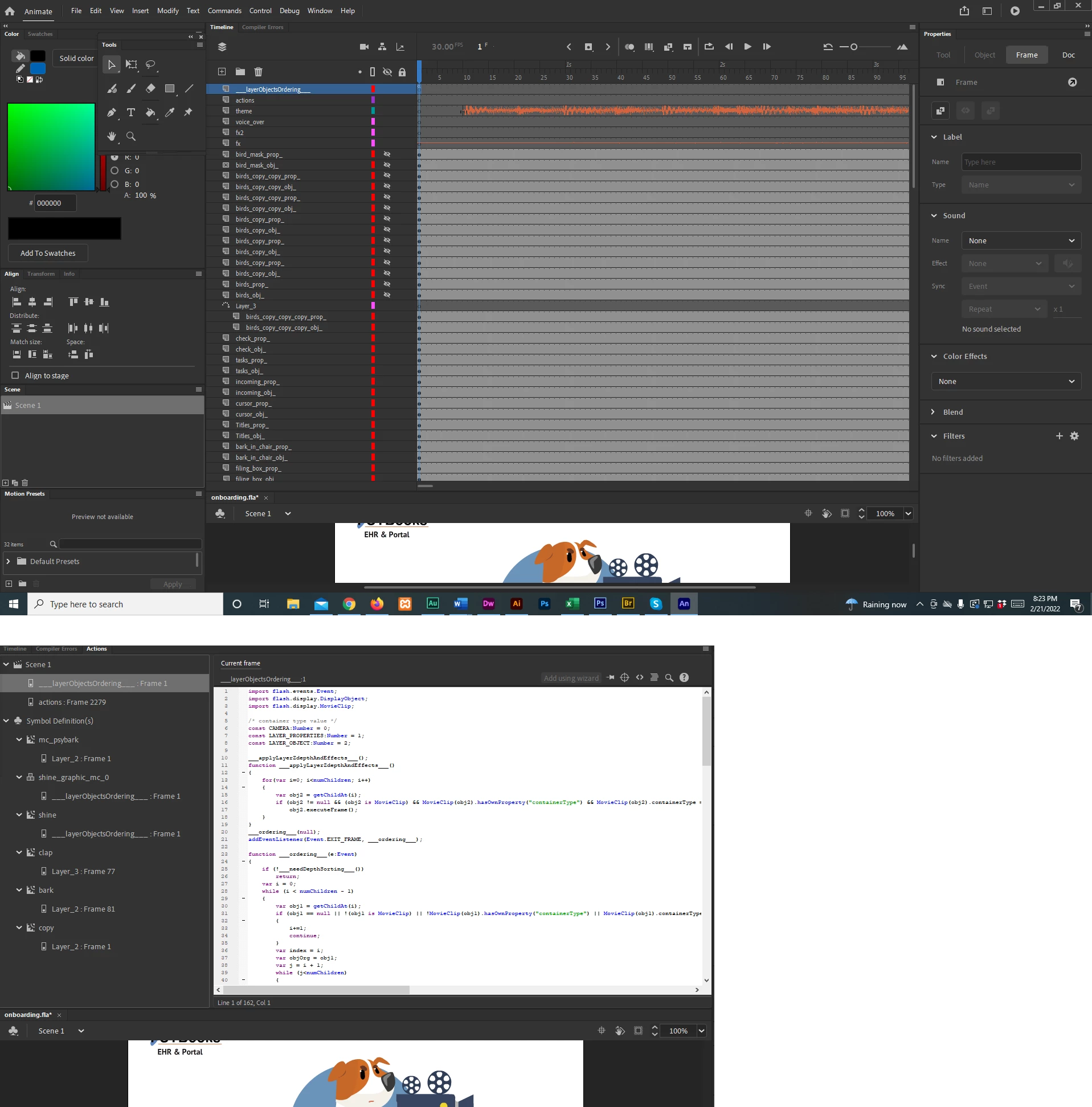


Here's a list of the compile errors I'm getting:


Symbol 'shine', Layer '___layerObjectsOrdering___', Frame 1, Line 6, Column 7 1151: A conflict exists with definition CAMERA in namespace internal.
Symbol 'shine', Layer '___layerObjectsOrdering___', Frame 1, Line 7, Column 7 1151: A conflict exists with definition LAYER_PROPERTIES in namespace internal.
Symbol 'shine', Layer '___layerObjectsOrdering___', Frame 1, Line 8, Column 7 1151: A conflict exists with definition LAYER_OBJECT in namespace internal.
Symbol 'shine', Layer '___layerObjectsOrdering___', Frame 1, Line 11, Column 10 1021: Duplicate function definition.
Symbol 'shine', Layer '___layerObjectsOrdering___', Frame 1, Line 20, Column 10 1021: Duplicate function definition.
C:\Program Files\Adobe\Adobe Animate 2021\Common\Configuration\Camera\Flash\privatePkg\___LayerProp___.as, Line 1, Column 1 5000: The class 'privatePkg.___LayerProp___' must subclass 'flash.display.MovieClip' since it is linked to a library symbol of that type.
 

Would appreciate any help. I thought maybe it was just a "you need to reboot me" thing. But I tried that, and unfortunately, the file opened up exactly this same way.

    This topic has been closed for replies.
    Correct answer n. tilcheff

    I had never heard of Advanced Layers and didn't realize I was using them. The thing that bothers me MOST about all of this is that I have no clue what I did that caused this to happen. It was fine and then it wasn't. I've been reading a bit about what Advanced Layers are/were supposed to do and the only thing I saw that I might have been doing was that I was using frame properties and object properties indiscrimantly. I didn't know the difference between the two so if I needed to change the alpha, sometimes I'd put it on the object, sometimes the frame. 


    There was ONE time - maybe within about half an hour of when it crashed - that I saw something about a "camera." I had no idea what that was or how I had triggered it. I found a way to turn it off and did. But aside from those two things, I'm not aware I was using any of the new tools.


    I'm leaning toward just starting fresh - with the Advanced Layers turned off. Your idea of using the video as an underlay is an excellent idea.


    The thing that feels hardest to me is that I'm going to have to do a lot of research to figure out how to do all of this. Even though, conceptually, I get how much help it could be to have the video underlay, I have no idea how to do it, so that will take me a bit to figure out. And also, I've never tried to transfer Flash assets before. I'm relieved to know that that's POSSIBLE . . . but so much work ahead to just learn all of this. 


    Anyway - whether we call it a bug or a glitch, I sure wish Adobe would fix it. I don't care how rare it is - the end result is pretty catastrophic. Although maybe that's overstated. It DID preserve most everything - hopefully when I transfer it it won't be bringing the problems along with it. However, I'm thinking it sort of will. Like - for example - WITHIN each of my graphic symbols, everything has also been changed to movie clips. It's all got to be changed. 


    I'm very sorry that you have to go through all of this.


    If you like, ZIP the original corrupt FLA, upload it to google drive and send me a link in a PM to have a look at it.

    There is no guarantee that I will be able to help, but I might be able to figure out something.


    2 replies

    n. tilcheff
    Legend
    February 22, 2022

    I believe this to be a crack in the shell and a little peek into the so called "Advanced Layers" internals - the unfortunate implementation which has made Animate slow, unreliable and very unpleasant to use.


    The tearing of the hidden wrapping exposes the doubling of everything and should explain the awful performance issues, plaguing the program since v.18-19.


    --


    To avoid this from happening again, my suggestion is to always turn Advanced Layers OFF and use SMR instead of Layer Parenting or any of the other new features.


    Nick - Character Designer and Animator, Flash user since 1998 | Member of the Flanimate Power Tools team - extensions for character animation
    Known Participant
    February 22, 2022

    How do I turn Advanced Layers off? And the versioning thing on?


    I don't really know what you mean by the new features. Animate is just one of many programs I use and I can go months between projects so although I can usually get it to do what I want it to do, it's not really ingrained. I'm a little lost.


    Most importantly, though, how do I know how to fix this? What to delete and what to keep? It's a pretty involved project - hundreds of hours have gone into it so far.


    Known Participant
    February 22, 2022

    If those Movie Clips contain your stuff inside with your structure intact, you may be able to remove the wrapper by using Break Apart Symbol to Layers.

    1. Lock and hide everything except that one layer - Alt-click on the padlock and eye icons in timeline

    2. Select the symbol on frame 1 and right-click on it. From the context menu choose:


    If it works, do this layer by layer.

    Just save copies of the file as you experiment and keep them until all is fixed.


    --


    From what I've seen here, the threads don't get locked once a 'correct' answer is selected.

    It will be up to you to decide whether the future questions belong logically to the same thread or not.


    Awesome! I'll try that! I've been going non-stop today. Am in a Zoom meeting now waiting for the other person to show up, which is the only reason I have time to post. But I'm actually DYING to get into this. It's a challenge! Disappointed that I'm not going to launch this when I had hoped but will probably learn a lot more about Animate by going through this process. Wouldn't want to wish it on anyone, though. YES to backups and versioning!

    kglad
    Community Expert
    Community Expert
    February 22, 2022

    if you didn't lose anything, just delete the extranseous stuff.


    and learn to save your fla with increasing version number appended so you can avoid this and even worse problems.

    Known Participant
    February 22, 2022

    I'm not sure I would know what to delete. That top layer for sure. But then, with the exception of the layers that had either actions or audio on them, everything else has been duplicated. I don't know whether I should delete the "_prop_" layers or the "_obj_" ones. Also, all now have a keyframe in frame 1, despite the fact that many don't start until much farther in the program.  Do I delete all of those frame1 keyframes that were added? The ones that weren't there before?


    Is there a setting to automatically save version numbers? I definitely wish I had done that.


    I was hoping maybe this was a button I accidently pushed that I could easily "unpush" or something. Sounds like this is a bug?