loganskimayo
Participant
July 2, 2018
Answered

Animate Drag/Drop Help

  • July 2, 2018
  • 2 replies
  • 4772 views

Morning - I'm a total newb to Animate and could use some direction, please.

I'm creating a very simple drag/drop game for Work and I'm stuck on how to get items to drop on their intended target. Right now I have used mainly AS provided in Code Snippets. Everything's flowing just fine and I can use the Code Snippets to make each game piece move just fine. But for the life of me I'm struggling with every tutorial I see online and cannot get "gamePiece_01" to stick to "gamePiece_01Target".

Can any one offer me up any advice on how to make them stick? Also, once they stick I'd like the opacity to drop to about 50%.

I'd love any advice on code or even search words/terms that I could utilize in the forums. Not knowing the 'language' of this all has made it a little hard to search for answers.

Thank you!

BONUS HELP. Once all items are snuggly fit on their targets, would their be a way to code a shift to another scene or frame? I'll live without this if I need to.

This topic has been closed for replies.
Correct answer JoãoCésar17023019

Hi.

Here are my suggestions in both AS3 and HTML5.

AS3 preview:
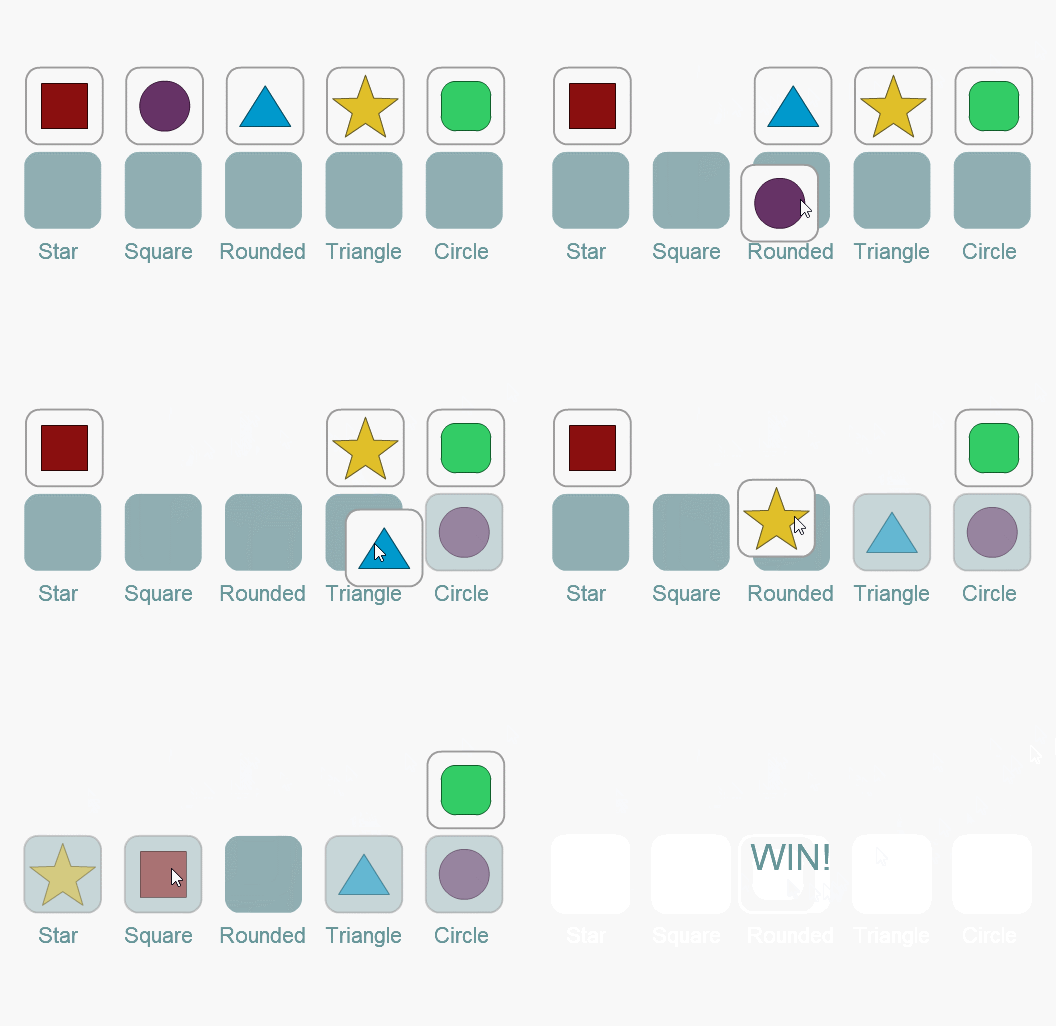
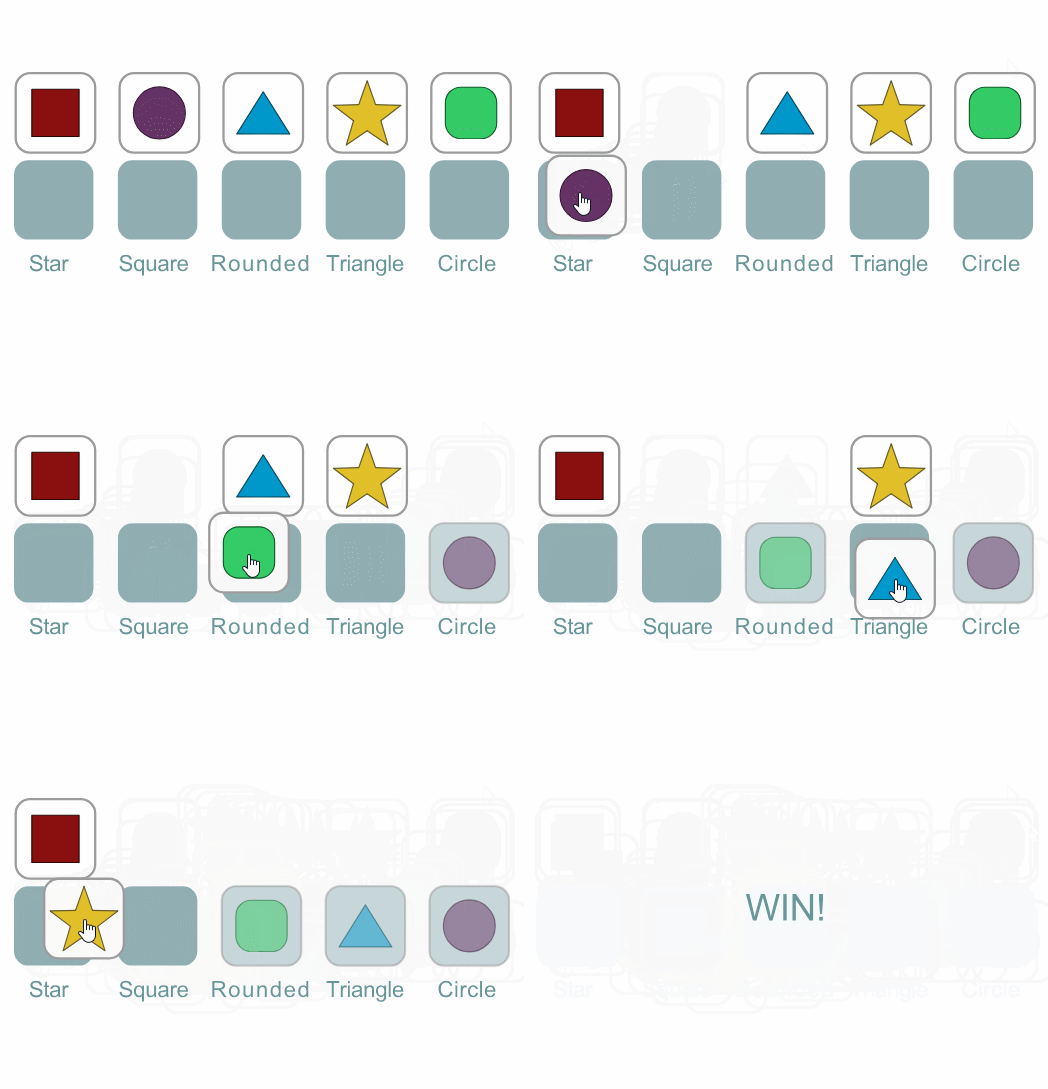
HTML5 preview:
AS3 code:

import flash.events.MouseEvent;

import flash.display.MovieClip;

import flash.display.DisplayObject;

var win:Boolean = false;

var resetPosition:Boolean = true;

var piecePrefix:String = "piece";

var slotPrefix:String = "slot";

function start():void

{

     for (var i:int = 0, total:int = pieces.numChildren; i < total; i++)

     {

          var piece = (pieces.getChildAt(i) as MovieClip);

          piece.originalX = piece.x;

          piece.originalY = piece.y;

     }

     pieces.addEventListener(MouseEvent.MOUSE_DOWN, onMouse);

     pieces.addEventListener(MouseEvent.MOUSE_UP, onMouse);

     slots.mouseChildren = false;

}

function onMouse(e:MouseEvent):void

{

     if (e.type == MouseEvent.MOUSE_DOWN)

     {

          if (e.currentTarget == pieces)

          {

               if (!e.target || e.target == pieces)

                    return;

               pieces.setChildIndex(e.target as MovieClip, pieces.numChildren - 1);

               e.target.startDrag();

          }

     }

     else if (e.type == MouseEvent.MOUSE_UP)

     {

          var slot:MovieClip;

          var target:MovieClip = e.target as MovieClip;

          if (!target || target == pieces)

               return;

          target.stopDrag();

          for (var i:int = 0, total:int = slots.numChildren; i < total; i++)

          {

               slot = slots.getChildAt(i) as MovieClip;

               if (target.hitTestObject(slot))

               {

                    if (target.name.replace(piecePrefix, "") == slot.name.replace(slotPrefix, ""))

                    {

                         target.x = slot.x;

                         target.y = slot.y;

                         target.alpha = 0.5;

                         target.mouseEnabled = false;

                         target.inPlace = true;

                         break;

                    }

                    else

                         returnToOrigin(target);

               }

          }

          if (!target.inPlace)

          returnToOrigin(target);

          for (i = 0, total = pieces.numChildren; i < total; i++)

               if (!(pieces.getChildAt(i) as MovieClip).inPlace)

                    return;

          onWin();

     }

}

function returnToOrigin(mc:MovieClip):void

{

     if (resetPosition)

     {

          mc.x = mc.originalX;

          mc.y = mc.originalY;

     }

}

function onWin()

{

     win = true;

     MovieClip(root).gotoAndStop(2);

}

start();

AS3 / FLA download:

animate_cc_as3_drag_and_drop_pieces.zip - Google Drive

HTML5: code:

this.win = false;

this.resetPosition = true;

this.piecePrefix = "piece";

this.slotPrefix = "slot";

this.start = function()

{

     for (var i = 0, total = this.pieces.children.length; i < total; i++)

     {

          var piece = this.pieces.children;

          piece.originalX = piece.x;

          piece.originalY = piece.y;

     }

     this.on("mousedown", this.mouseDownHandler.bind(this));

     this.on("pressmove", this.pressMoveHandler.bind(this));

     this.on("pressup", this.pressUpHandler.bind(this));

}.bind(this);

this.mouseDownHandler = function(e)

{

     if (e.target.parent == this.pieces)

          this.pieces.setChildIndex(e.target, this.pieces.children.length - 1);

};

this.pressMoveHandler = function(e)

{

     if (e.target.parent == this.pieces)

     {

          e.target.x = e.stageX / stage.scaleX;

          e.target.y = e.stageY / stage.scaleY;

     }

};

this.pressUpHandler = function(e)

{

     var target = e.target;

     var slot;

     var objects;

     if (!target || target.parent != this.pieces)

          return;

     objects = this.slots.getObjectsUnderPoint(target.x, target.y);

     if (objects.length == 0)

     {

          this.returnToOrigin(target);

          return;

     }

     slot = objects[0].parent;

     if (slot)

     {

          if (target.name.replace(this.piecePrefix, "") == slot.name.replace(this.slotPrefix, ""))

          {

               target.x = slot.x;

               target.y = slot.y;

               target.mouseEnabled = false;

               target.alpha = 0.5;

               target.inPlace = true;

          }

          else

               this.returnToOrigin(target);

     }

     for (i = 0, total = this.pieces.children.length; i < total; i++)

          if (!this.pieces.getChildAt(i).inPlace)

               return;

     this.onWin();

};

this.returnToOrigin = function(obj)

{

     if (this.resetPosition)

     {

          obj.x = obj.originalX;

          obj.y = obj.originalY;

     }

}.bind(this);

this.onWin = function()

{

     this.win = true;

     exportRoot.gotoAndStop(1);

}.bind(this);

stage.on("drawstart", this.start, this, true);

HTML5 download:

animate_cc_html5_drag_and_drop_pieces.zip - Google Drive

I hope this helps.

Regards,

JC

2 replies

JoãoCésar17023019
Community Expert
JoãoCésar17023019Community ExpertCorrect answer
Community Expert
July 2, 2018

Hi.

Here are my suggestions in both AS3 and HTML5.

AS3 preview:

HTML5 preview:

AS3 code:

import flash.events.MouseEvent;

import flash.display.MovieClip;

import flash.display.DisplayObject;

var win:Boolean = false;

var resetPosition:Boolean = true;

var piecePrefix:String = "piece";

var slotPrefix:String = "slot";

function start():void

{

     for (var i:int = 0, total:int = pieces.numChildren; i < total; i++)

     {

          var piece = (pieces.getChildAt(i) as MovieClip);

          piece.originalX = piece.x;

          piece.originalY = piece.y;

     }

     pieces.addEventListener(MouseEvent.MOUSE_DOWN, onMouse);

     pieces.addEventListener(MouseEvent.MOUSE_UP, onMouse);

     slots.mouseChildren = false;

}

function onMouse(e:MouseEvent):void

{

     if (e.type == MouseEvent.MOUSE_DOWN)

     {

          if (e.currentTarget == pieces)

          {

               if (!e.target || e.target == pieces)

                    return;

               pieces.setChildIndex(e.target as MovieClip, pieces.numChildren - 1);

               e.target.startDrag();

          }

     }

     else if (e.type == MouseEvent.MOUSE_UP)

     {

          var slot:MovieClip;

          var target:MovieClip = e.target as MovieClip;

          if (!target || target == pieces)

               return;

          target.stopDrag();

          for (var i:int = 0, total:int = slots.numChildren; i < total; i++)

          {

               slot = slots.getChildAt(i) as MovieClip;

               if (target.hitTestObject(slot))

               {

                    if (target.name.replace(piecePrefix, "") == slot.name.replace(slotPrefix, ""))

                    {

                         target.x = slot.x;

                         target.y = slot.y;

                         target.alpha = 0.5;

                         target.mouseEnabled = false;

                         target.inPlace = true;

                         break;

                    }

                    else

                         returnToOrigin(target);

               }

          }

          if (!target.inPlace)

          returnToOrigin(target);

          for (i = 0, total = pieces.numChildren; i < total; i++)

               if (!(pieces.getChildAt(i) as MovieClip).inPlace)

                    return;

          onWin();

     }

}

function returnToOrigin(mc:MovieClip):void

{

     if (resetPosition)

     {

          mc.x = mc.originalX;

          mc.y = mc.originalY;

     }

}

function onWin()

{

     win = true;

     MovieClip(root).gotoAndStop(2);

}

start();

AS3 / FLA download:

animate_cc_as3_drag_and_drop_pieces.zip - Google Drive

HTML5: code:

this.win = false;

this.resetPosition = true;

this.piecePrefix = "piece";

this.slotPrefix = "slot";

this.start = function()

{

     for (var i = 0, total = this.pieces.children.length; i < total; i++)

     {

          var piece = this.pieces.children;

          piece.originalX = piece.x;

          piece.originalY = piece.y;

     }

     this.on("mousedown", this.mouseDownHandler.bind(this));

     this.on("pressmove", this.pressMoveHandler.bind(this));

     this.on("pressup", this.pressUpHandler.bind(this));

}.bind(this);

this.mouseDownHandler = function(e)

{

     if (e.target.parent == this.pieces)

          this.pieces.setChildIndex(e.target, this.pieces.children.length - 1);

};

this.pressMoveHandler = function(e)

{

     if (e.target.parent == this.pieces)

     {

          e.target.x = e.stageX / stage.scaleX;

          e.target.y = e.stageY / stage.scaleY;

     }

};

this.pressUpHandler = function(e)

{

     var target = e.target;

     var slot;

     var objects;

     if (!target || target.parent != this.pieces)

          return;

     objects = this.slots.getObjectsUnderPoint(target.x, target.y);

     if (objects.length == 0)

     {

          this.returnToOrigin(target);

          return;

     }

     slot = objects[0].parent;

     if (slot)

     {

          if (target.name.replace(this.piecePrefix, "") == slot.name.replace(this.slotPrefix, ""))

          {

               target.x = slot.x;

               target.y = slot.y;

               target.mouseEnabled = false;

               target.alpha = 0.5;

               target.inPlace = true;

          }

          else

               this.returnToOrigin(target);

     }

     for (i = 0, total = this.pieces.children.length; i < total; i++)

          if (!this.pieces.getChildAt(i).inPlace)

               return;

     this.onWin();

};

this.returnToOrigin = function(obj)

{

     if (this.resetPosition)

     {

          obj.x = obj.originalX;

          obj.y = obj.originalY;

     }

}.bind(this);

this.onWin = function()

{

     this.win = true;

     exportRoot.gotoAndStop(1);

}.bind(this);

stage.on("drawstart", this.start, this, true);

HTML5 download:

animate_cc_html5_drag_and_drop_pieces.zip - Google Drive

I hope this helps.

Regards,

JC

Participant
April 27, 2020

If you don't mind I  have a few questions about your HTML 5 code. 


1. What if the dragable items are .png files and the target is another .png file?

2. How would you add the listener to the mouse event for the images (png files)?

JoãoCésar17023019
Community Expert
Community Expert
April 28, 2020

Hi.


You can nest your PNG/bitmap inside of Button or Movie Clip instances. If you use Movie Clips don't forget to set the mouseChildren property to false so the target property will be the Movie Clip instance itself and not the bitmap inside of it.


Please let me know if this is the answer you're looking for.


Regards,

JC 

macpawel
Participating Frequently
July 2, 2018

It's no as easy as you think.

If you want to check right position - you can use hitTest command - try to find some help

Maybe this: Usar HitTest (Adobe Animate HTML5) - YouTube
