


New Participant
July 27, 2021
Question

ANIMATE/MEDIA ENCODER NOT EXPORTING MP4. NOT EVEN QUEUED!

  • July 27, 2021
  • 2 replies
  • 1048 views


This issue still effected me when completely up to date. I've down versioned to work around, incase it was an update bug.
Currently running Versions: AME - 14.9   AANIMATE - 21.0.6

The main issue comes from trying to export a scene from animate (B/W line animation):
FILE>EXPORT>EXPORT VIDEO/MEDIA function.
It simply doesn't "DO IT"
Now, what I have tried is duplicating the same layers in a new scene, and this worked ONCE, and never again.
I've also uninstalled various times, both programs.
I've also cleared all caches, and BG data.
The "solution" of doing this via Premier/AE is TIME CONSUMING for a simple export.
I've check the queue logs, and it looks like this:
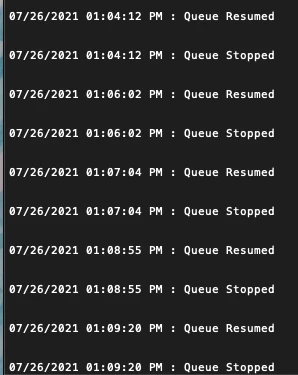
Not sure what's the problem, was hoping someone here could shed some light, maybe it's a simple unchecked box, or some obscure setting.
It's been really cutting into my work time, and I'm severly annoyed with AME.
Is this an animate issue or AME?

This topic has been closed for replies.

2 replies

Community Expert
July 30, 2021

export as a quicktime file, then you can take it into media encoder.  

New Participant
July 30, 2021

Been finding that duplicating my layers into a new untitled scene, and exporting without saving has been a work around.
Still not sure why animate isn't exporting "named and saved" files. it's all local.

New Participant
July 27, 2021

UPDATE:

AME will queue an UNSAVED, unnamed NEW scene from animate, but will not queue/export a SAVED, NAMED scene.

For instance, I merely copied the layers of my working scene into a NEW scene with the same settings.
I exported the file, and AME took it. 

HOWEVER, it STILL refused to export on my second test where I SAVED and NAMED the scene BEFORE exporting.

Not sure if this helps, but it's annoying.

Mohanaraj
Adobe Employee
Adobe Employee
July 27, 2021

Hi, are you saving the file locally or in a network/shared location? Can you please share the path here to see if anything in the path leading to this?


Thanks!

Mohan

New Participant
July 27, 2021

Saving locally on my desktop.
I was exporting to a local folder in my computer, lazily still in my downloads.
Downloads>folder