



Jeffery.Wright
Inspiring
May 29, 2025
Answered

Animate v2301 HTML5 Canvas placing variables in wrong dynamic text locations

  • May 29, 2025
  • 2 replies
  • 1615 views

On a frame I have 5 Dynamic Text objects:
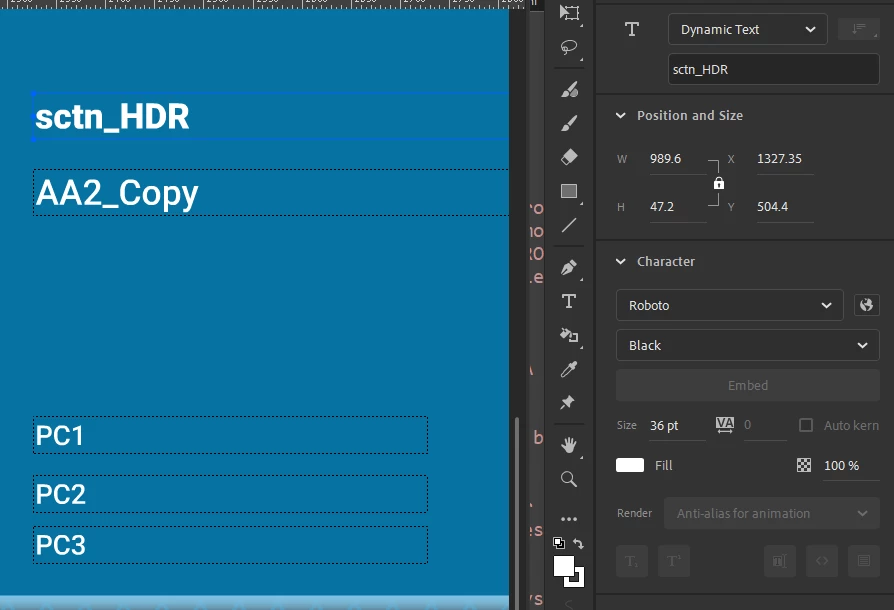
On that frame I am directing variables to populate these objects:

this.sctn_HDR.text = sctn_AA2A;
this.AA2_Copy.text = AA2_copy;

this.PC1.text = AA2_PC1;
this.PC2.text = AA2_PC2;
this.PC3.text = AA2_PC3;

These are the varible strings:

sctn_AA2A = "SciLog Cryobag Filler System";
AA2_copy = "The SciLog Cryobag Filler...";

AA2_PC1 = "Single Use Sensors & Monitors";
AA2_PC2 = "Single Use Assemblies";
AA2_PC3 = "Bioprocess Containers";


So, what's the deal with this misplacement of the variables I assigned? 



Why is Animate making my variables appear where I did not indicate? 


Why, for example, is PC3 not displaying the string I assigned to it? 


Advanced layers on or off makes no difference. 


Anyone else running into this issue? 


Thanks.


Correct answer kglad

How did you do it? What did I miss? Yoou're a miracle worker!


all those dynamic textfields were in a problematic layer.  why it is problematic, i don't know.  it may have been a guide layer previously or a camera layer or hidden or something else.  or maybe that keyframe was the problem.  it could have been part of a tween or something else.


i didn't search the fla history trying to figuire it out.


anyway, i moved those 5 or so textfields to the layer above.  i changed nothing else.  i group selected them, cut and pasted in place after creating a blank keyframe in the above layer.

2 replies

JoãoCésar17023019
Inspiring
May 29, 2025

Hi.


Have you double-checked in the Properties panel if the instances names are assigned as you expected? Or maybe if you have other hidden/forgotten instances with the same name?

Please let us know.


Regards,

JC

Jeffery.Wright
Inspiring
May 29, 2025

The objects AA2_Copy, PC1, 2 and 3 are unique to this frame. 


sctn_HDR appears on other frames and is populated correctly.


Why would adding new DynText objects to a frame cause variables to be assigned where they don't belong? 


Thanks. 


kglad
kgladCorrect answer
Braniac
May 29, 2025

How did you do it? What did I miss? Yoou're a miracle worker!


all those dynamic textfields were in a problematic layer.  why it is problematic, i don't know.  it may have been a guide layer previously or a camera layer or hidden or something else.  or maybe that keyframe was the problem.  it could have been part of a tween or something else.


i didn't search the fla history trying to figuire it out.


anyway, i moved those 5 or so textfields to the layer above.  i changed nothing else.  i group selected them, cut and pasted in place after creating a blank keyframe in the above layer.

kglad
Braniac
May 29, 2025

use console.log to debug 

Jeffery.Wright
Inspiring
May 29, 2025

Thanks, I have and it makes no sense. 


Uncaught TypeError: Cannot set properties of undefined (setting 'text')


this.PC2.text = AA2_PC2;


PC2 does exist and so does the variable. Nothing about the console log is helpful. 

I tested this in Animate 2205 with the same results. 


What on Earth could be the issue? 


Thanks again.