


Participating Frequently
October 29, 2022
Answered

Animate Video/Media Export only black screen

  • October 29, 2022
  • 3 replies
  • 2643 views

Hello

When trying to export an Animate File (ActionScript 3 configuration) as a video (=>export =>video), the result is always a video with a black screen.

I tried several video formats like:

- H.264/Default (AME)

- H.264/YouTube 480p SD

I also tried a complex project files vs a very simple project.

I deinstalled and reinstalled Animate (23.0) and Media Encoder (23.0).  I'm working on macOS Big Sur 11.6.8.

Always the same frustrating result: a video with a black screen.

The only thing I can export, is a SWF (=>export =>movie).

Unfortunately, these two old threads don't help:

https://community.adobe.com/t5/animate-discussions/adobe-animate-exporting-video-as-black-screen-with-no-audio/m-p/9982356#M183435

https://community.adobe.com/t5/animate-discussions/animate-export-video-issues/m-p/11243127#M205522

Thanks a lot for every help!
    This topic has been closed for replies.
    Correct answer Mario_CR

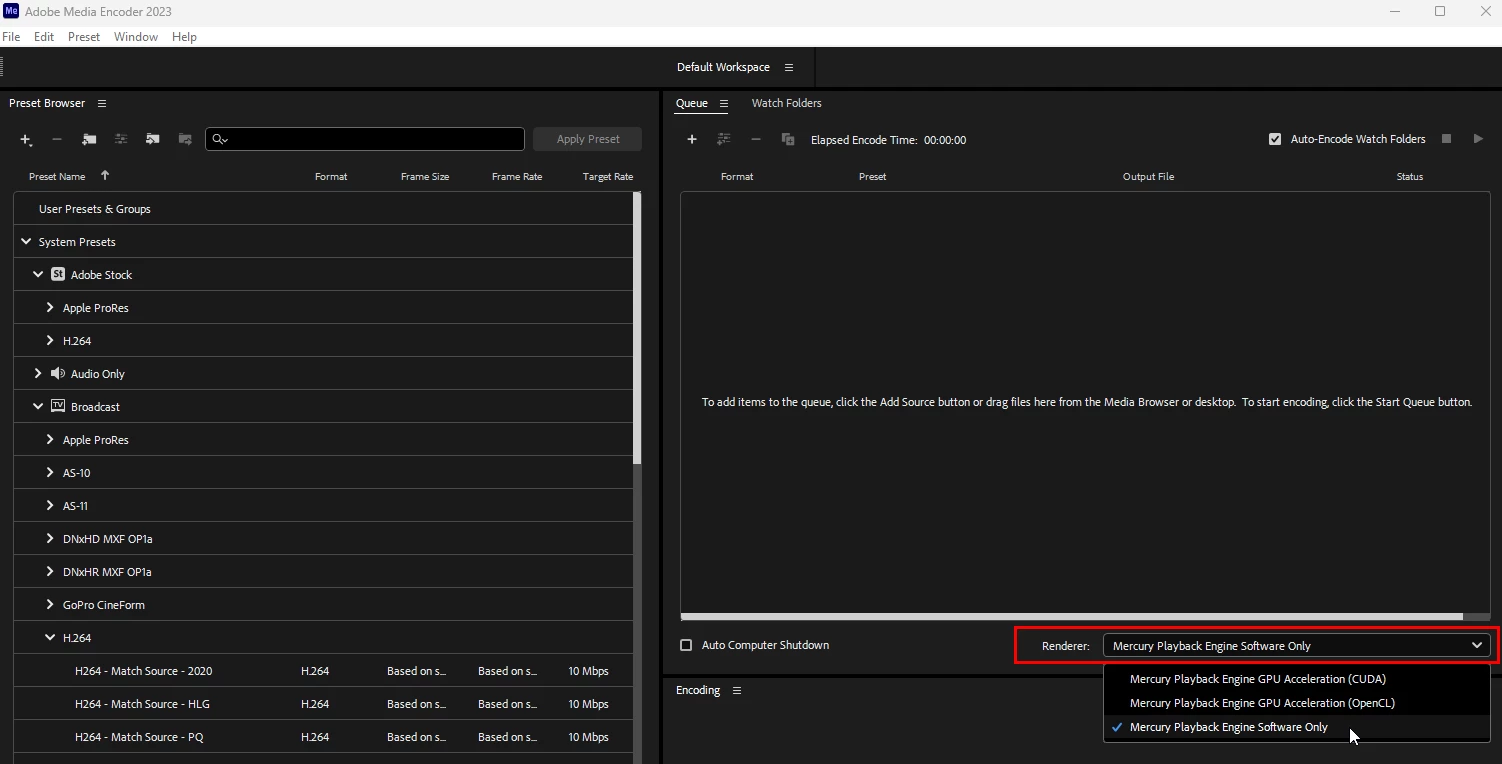
    Open Media Encoder and change the renderer to software encoding:


    3 replies

    Mario_CR
    Mario_CRCorrect answer
    Inspiring
    October 29, 2022

    Open Media Encoder and change the renderer to software encoding:


    Participating Frequently
    October 30, 2022

    Thanks a lot, Mario_CR! That did solve the problem.

    I'm not sure if that means that my hardware is too old or if there is a software problem?

    I'm working on a quite old MacBook Pro (Retina, 15', 2014), 2.5 GHz Quad-Core Intel Core i7, 16 GB 1600 MHz DDR3, NVIDIA GeForce GT 750M 2 GB
    Intel Iris Pro 1536 MB.

    Mario_CR
    Inspiring
    October 30, 2022

    Could be, gpu acceleration is hardware based, many of these older cards are no longer supported by Nvidia. It's worth a shot to look for driver updates for the GT750M just to make sure you have the latest version installed. If not, software rendering should be enough to get you by.

    Participating Frequently
    October 29, 2022

    The converion tool used is: convertio.co

    kglad
    Adobe Expert
    October 29, 2022

    open the as3 fla in animate and then export your video.

    Participating Frequently
    October 29, 2022

    That is what I described in my initial post. When I open the fla in Animate and export (=>export =>video) a .mov file is sent to Media Encoder. After Media Encoder converted the .mov from Animate, the result is a .mp4 with only a black screen.

    Participating Frequently
    October 29, 2022

    And when I try to convert the SWF to a MP4 it doesn't work: "Invalid data found when processing input. The input file may be corrupted."