


Participating Frequently
October 29, 2022
Answered

Animate Video/Media Export only black screen

  • October 29, 2022
  • 3 replies
  • 2643 views

Hello

When trying to export an Animate File (ActionScript 3 configuration) as a video (=>export =>video), the result is always a video with a black screen.

I tried several video formats like:

- H.264/Default (AME)

- H.264/YouTube 480p SD

I also tried a complex project files vs a very simple project.

I deinstalled and reinstalled Animate (23.0) and Media Encoder (23.0).  I'm working on macOS Big Sur 11.6.8.

Always the same frustrating result: a video with a black screen.

The only thing I can export, is a SWF (=>export =>movie).

Unfortunately, these two old threads don't help:

https://community.adobe.com/t5/animate-discussions/adobe-animate-exporting-video-as-black-screen-with-no-audio/m-p/9982356#M183435

https://community.adobe.com/t5/animate-discussions/animate-export-video-issues/m-p/11243127#M205522

Thanks a lot for every help!
    This topic has been closed for replies.
    Correct answer Mario_CR

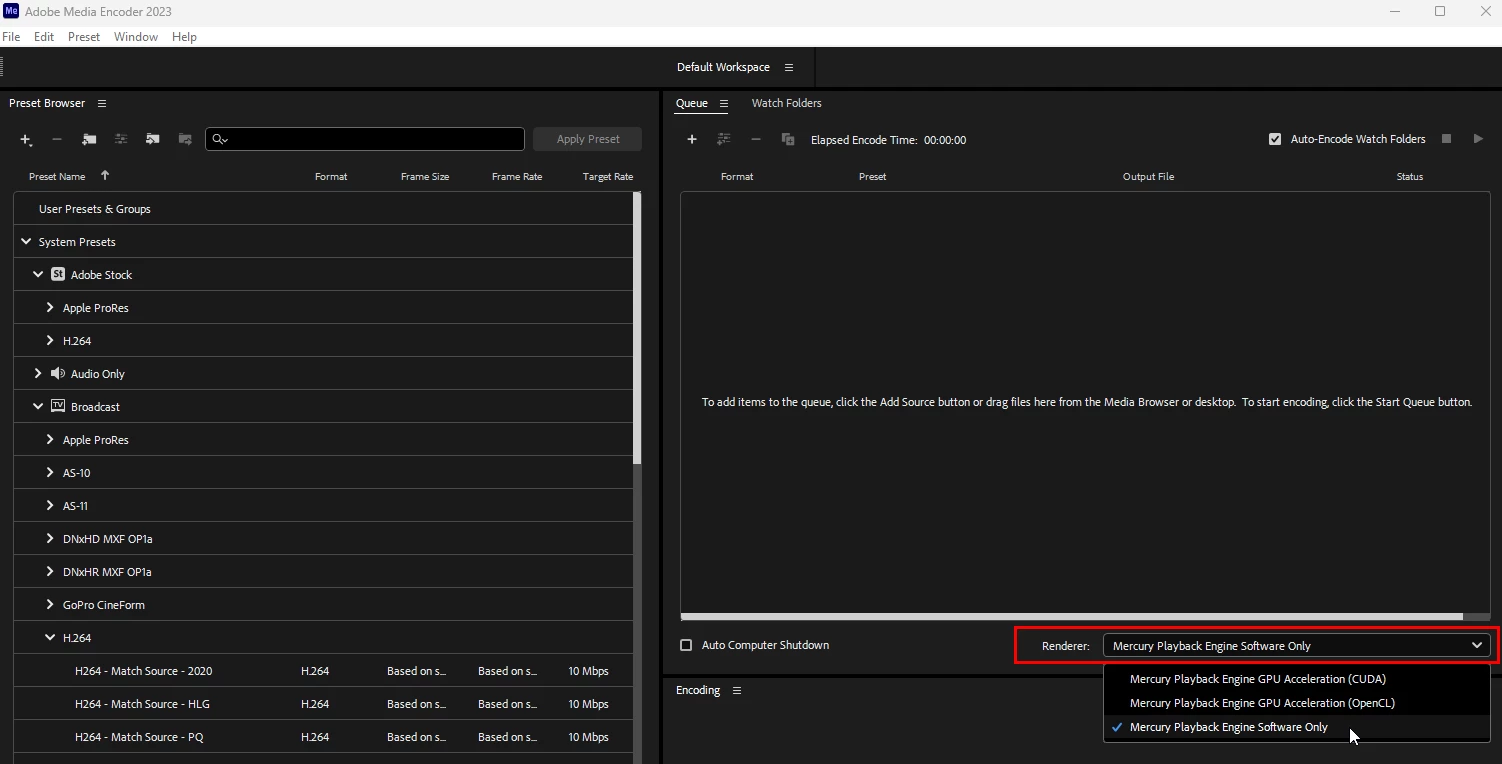
    Open Media Encoder and change the renderer to software encoding:


    3 replies

    Mario_CR
    Mario_CRCorrect answer
    Community Expert
    October 29, 2022

    Open Media Encoder and change the renderer to software encoding:


    Participating Frequently
    October 30, 2022

    Thanks a lot, Mario_CR! That did solve the problem.

    I'm not sure if that means that my hardware is too old or if there is a software problem?

    I'm working on a quite old MacBook Pro (Retina, 15', 2014), 2.5 GHz Quad-Core Intel Core i7, 16 GB 1600 MHz DDR3, NVIDIA GeForce GT 750M 2 GB
    Intel Iris Pro 1536 MB.

    New Participant
    March 28, 2023

    Thank you a lot! I'll check for an update. All the best!


    it doesn't work for me 😞


    Participating Frequently
    October 29, 2022

    The converion tool used is: convertio.co

    kglad
    Community Expert
    October 29, 2022

    open the as3 fla in animate and then export your video.

    Participating Frequently
    October 29, 2022

    That is what I described in my initial post. When I open the fla in Animate and export (=>export =>video) a .mov file is sent to Media Encoder. After Media Encoder converted the .mov from Animate, the result is a .mp4 with only a black screen.

    Participating Frequently
    October 29, 2022

    And when I try to convert the SWF to a MP4 it doesn't work: "Invalid data found when processing input. The input file may be corrupted."