


New Participant
October 19, 2017
Answered

Attach to camera in Animate 2018 is reversed!

  • October 19, 2017
  • 1 reply
  • 799 views

Hi Adobe,

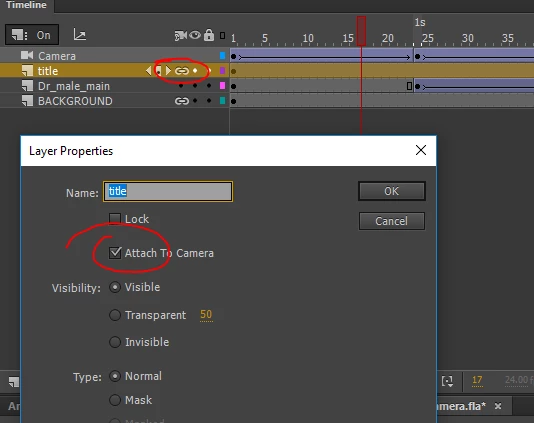
Just want to let you know that attach layer to camera feature in new Adobe Animate released on October 18, 2017 (version 18.0) has a bug - when an attach camera is selected and icon (like a chain link) is displayed in a layer, and the layer's property dialog box has a check mark on "Attach To Camera" - the layer is actually NOT attached to the camera and vise versa. The result is completely reversed from what it is supposed to be!

In my screenshot below  the layer named "title" is actually NOT attached to camera, and the layer "Dr_male_main" is Attached!

Please fix it!

Thank you!
    This topic has been closed for replies.
    Correct answer Colin Holgate

    For me, if the lock is on and I change the camera, the layer remains in a fixed position on the stage. If it's not on it zooms and pans because of the camera movement,

    If you have an FLA that doesn't work like that, can you post it somewhere?

    1 reply

    Colin Holgate
    Inspiring
    October 19, 2017

    Your screenshot, and what I see, both show it working correctly. The only oddity is that the chain link doesn't update until you close the dialog box.

    New Participant
    October 19, 2017

    Thank you for reply, however that's not the case. Let me explain again. The active Chain link icon and "Attach To camera" checked box in the layer's properties dialog indicate that the layer IS attached to camera. But in reality it is NOT. Referring to my screenshot the layers 'title' and 'BACKGROUND' are NOT affected by the camera animation despite all visual indicators, it is absolutely opposite - they behave like they are locked and not to be affected by the camera! That's what is odd. And  contrary, the layer "Dr_male_main", which doesn't have a Chain link icon and has only a black dot instead beside its name in timeline IS affected by any camera animations, so it behaves like it is attached to camera. I hope it is clear.

    Colin Holgate
    Colin HolgateCorrect answer
    Inspiring
    October 19, 2017

    For me, if the lock is on and I change the camera, the layer remains in a fixed position on the stage. If it's not on it zooms and pans because of the camera movement,

    If you have an FLA that doesn't work like that, can you post it somewhere?