Thx for replying. Like you showed me, I tried with Shape as mask object indtead of bitmap. But it did not work either :S
Here is my code:
//create bitmap
var bitmap:Bitmap = new Bitmap(new BitmapData(400,400));
//create blur filter
var blur:BlurFilter = new BlurFilter(10, 10);
//create shape
var shape:Shape = new Shape();
shape.graphics.beginFill(0xff0000, 0.8);
shape.graphics.drawCircle(200,200,100);
shape.graphics.endFill();
shape.filters = [blur];
//create mask
var block:Shape = new Shape();
block.graphics.beginFill(0);
block.graphics.drawCircle(250,200,100);
block.graphics.endFill();
shape.cacheAsBitmap = true;
block.cacheAsBitmap = true;
shape.mask = block;
bitmap.bitmapData.draw(shape);
and this is the result:
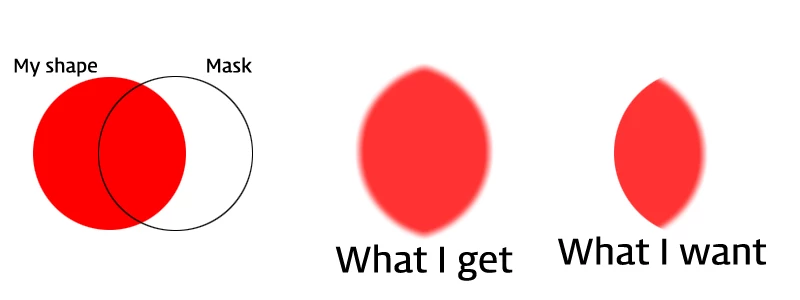
any idea?
The difference between the code I posted and what you have there is that you are applying the mask and the blur to the shape, whereas I applied the blur to the shape and the mask to a container the shape is inside. This is because for a given object the filters apply AFTER any masking, but you want the reverse. The only way to control the order that I know if is to create more layers.
In other words, change the last code you posted like this:
1. Create a container for the shape:
var container:Sprite = new Sprite();
2. Add the shape to the container:
container.addChild(shape);
3. Apply the blur to the shape, and the mask to the container:
shape.filters = [blur];
container.mask = block;
3. Draw the container to the bitmap:
bitmap.bitmapData.draw(container);
That should produce the image you want.
-Aaron




 AdChoices