Inspiring
September 11, 2013
Answered

Blur filter + mask

  • September 11, 2013
  • 2 replies
  • 4302 views

I think a couple people asked about this problem but none of them seemed to get an answer so I am re-posting.

This is how blur filter and mask work in code

var blur:BlurFilter = new BlurFilter();

blur.blurX = 10;

blur.blurY = 10;

var mask:Bitmap = new Bitmap(...)

var shape:Shape = new Shape();

shape.graphics.beginFill(color, alpha);

shape.graphics.moveTo(100, 100);

shape.graphics.lineTo(...);

shape.graphics.endFill();

shape.filters = [blur]

shape.mask = mask;

bitmap.bitmapData.draw(shape);

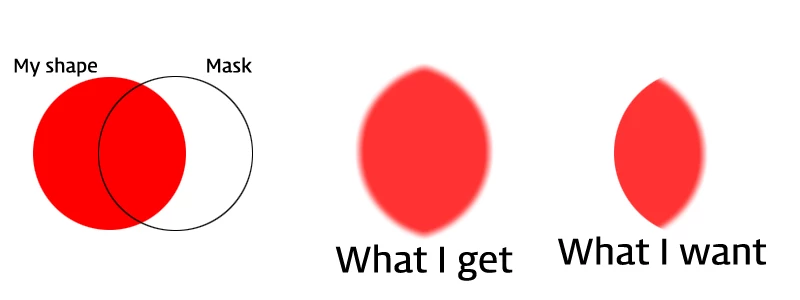
But result is not what I want. Please see the below image:

Making another bitmap and copy pixels using the mask works but it makes whole applcation very slow.

How can I mask blur filter using a single draw?

This topic has been closed for replies.
Correct answer Aaron Beall

Thx for replying. Like you showed me, I tried with Shape as mask object indtead of bitmap. But it did not work either :S

Here is my code:

//create bitmap

var bitmap:Bitmap = new Bitmap(new BitmapData(400,400));

//create blur filter

var blur:BlurFilter = new BlurFilter(10, 10);

//create shape

var shape:Shape = new Shape();

shape.graphics.beginFill(0xff0000, 0.8);

shape.graphics.drawCircle(200,200,100);

shape.graphics.endFill();

shape.filters = [blur];

//create mask

var block:Shape = new Shape();

block.graphics.beginFill(0);

block.graphics.drawCircle(250,200,100);

block.graphics.endFill();

shape.cacheAsBitmap = true;

block.cacheAsBitmap = true;

shape.mask = block;

bitmap.bitmapData.draw(shape);

and this is the result:
any idea?


The difference between the code I posted and what you have there is that you are applying the mask and the blur to the shape, whereas I applied the blur to the shape and the mask to a container the shape is inside. This is because for a given object the filters apply AFTER any masking, but you want the reverse. The only way to control the order that I know if is to create more layers.

In other words, change the last code you posted like this:

1. Create a container for the shape:

var container:Sprite = new Sprite();

2. Add the shape to the container:

container.addChild(shape);

3. Apply the blur to the shape, and the mask to the container:

shape.filters = [blur];

container.mask = block;

3. Draw the container to the bitmap:

bitmap.bitmapData.draw(container);

That should produce the image you want.

-Aaron

2 replies

Inspiring
September 12, 2013

It`s not advisable to name your instances with reserved keywords, properties etc.

try

_shape.filters = [blur];

_shape.cacheAsBitmap = true;

_mask.cacheAsBitmap = true;

shape.mask = _mask;


9tontruckAuthor
Inspiring
September 12, 2013

Thanks for replying. but that does not work in my side unfortunately. Please take a look at my code

9tontruckAuthor
Inspiring
September 13, 2013

The difference between the code I posted and what you have there is that you are applying the mask and the blur to the shape, whereas I applied the blur to the shape and the mask to a container the shape is inside. This is because for a given object the filters apply AFTER any masking, but you want the reverse. The only way to control the order that I know if is to create more layers.

In other words, change the last code you posted like this:

1. Create a container for the shape:

var container:Sprite = new Sprite();

2. Add the shape to the container:

container.addChild(shape);

3. Apply the blur to the shape, and the mask to the container:

shape.filters = [blur];

container.mask = block;

3. Draw the container to the bitmap:

bitmap.bitmapData.draw(container);

That should produce the image you want.

-Aaron


It works! Thanks Aaron!!

Ned Murphy
Braniac
September 11, 2013

Have you tried putting the shape inside a movieclip and apply the mask to the movieclip instead of the shape?

9tontruckAuthor
Inspiring
September 11, 2013

Thanks for asking. As far as I know, the "graphic" in shape behaviours exactly same with one in sprite or movieclip

Ned Murphy
Braniac
September 12, 2013

Can you post the complete code with the mask and shape defined?
