


New Participant
June 2, 2020
Answered

Brush Tool is not working properly

  • June 2, 2020
  • 1 reply
  • 6203 views

Hi everyone! So I've used Animate for a while and this is the first time I have ever seen this issue.


I just got a new computer (an Acer Aspire TC-885-UA91, to be specific), hooked up my Gaomon display tablet to it, and booted up a project only to touch the screen and see the picture attached. Basically, wherever I touch with the pen, it creates a line straight down.


I thought that maybe this was a problem between the Gaomon and the computer, so I tested this on Illustrator, but the brush tool worked fine. Maybe it's RAM, so I replaced that 16 GB, but nope, still going straight down. I once got it to draw correctly, pressure and everything, but I have no idea what I did differently that time. Couldn't recreate the magic.


Let me know if someone knows what's up! I'm sure I'm not doing something right. Thanks!
This topic has been closed for replies.
Correct answer n. tilcheff

Hi mate,


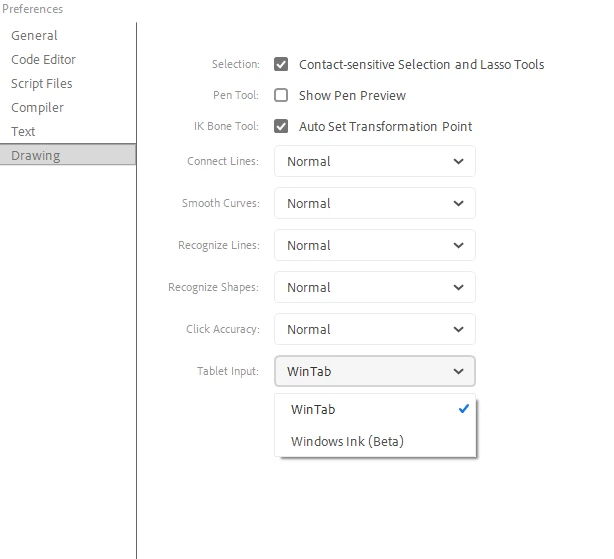
Go to Edit > Preferences > Edit Preferences... > Drawing and see if switching to Windows Ink (Beta) helps.

Don't forget to restart Animate.

1 reply

n. tilcheff
n. tilcheffCorrect answer
Brainiac
June 2, 2020

Hi mate,


Go to Edit > Preferences > Edit Preferences... > Drawing and see if switching to Windows Ink (Beta) helps.

Don't forget to restart Animate.

Nick - Character Designer and Animator, Flash user since 1998 | Member of the Flanimate Power Tools team - extensions for character animation
New Participant
June 2, 2020

You are an absolute genius. Thank you so much!

n. tilcheff
Brainiac
June 2, 2020

Great to hear you got it to behave, mate 🙂


Nick - Character Designer and Animator, Flash user since 1998 | Member of the Flanimate Power Tools team - extensions for character animation