



BUG? with statusbar when showing PDFs in Adobe Air (& Animate CC) AS3
Anyone else having this specific issue?
Regardless of settings in Adobe Reader AND adding #scrollbar=0&toolbar=0&statusbar=0&messages=0&navpanes=0 to the PDF this little widget shows up on my application.... I'd be fine with it if it didn't allow the user to print or go to the internet (by blicking the acrobat logo then the "?") but I use Adobe Animate to create locked down touch screen kiosks and allowing the user to browse the net is not acceptable.
I've tried:
Various settings in acrobat reader... various PDF files.... various computers (all running Win10) htmlLoader (my preference) and this... stagewebview.
Issue: seemingly randomly upon opening the stagewebview (statusbar? see below photo) become visible even though its been dissabled. In my original full project it manifests when i leave the page and come back.... sometimes.... rarely... but when it does... its back for good until i restart the application)
Can be recreated by:
Running the open and close functions over and over again with various different timings between them (perhaps i'm stepping on them loading?)
I had try/catch's in there before I just removed to keep the code short.
Help! I have a multiple kiosks that have this issue. I'm hoping somebody else on here (or Adobe) has come upon this issue and created a workaround to show PDFs without giving the user access to the printer and internet.
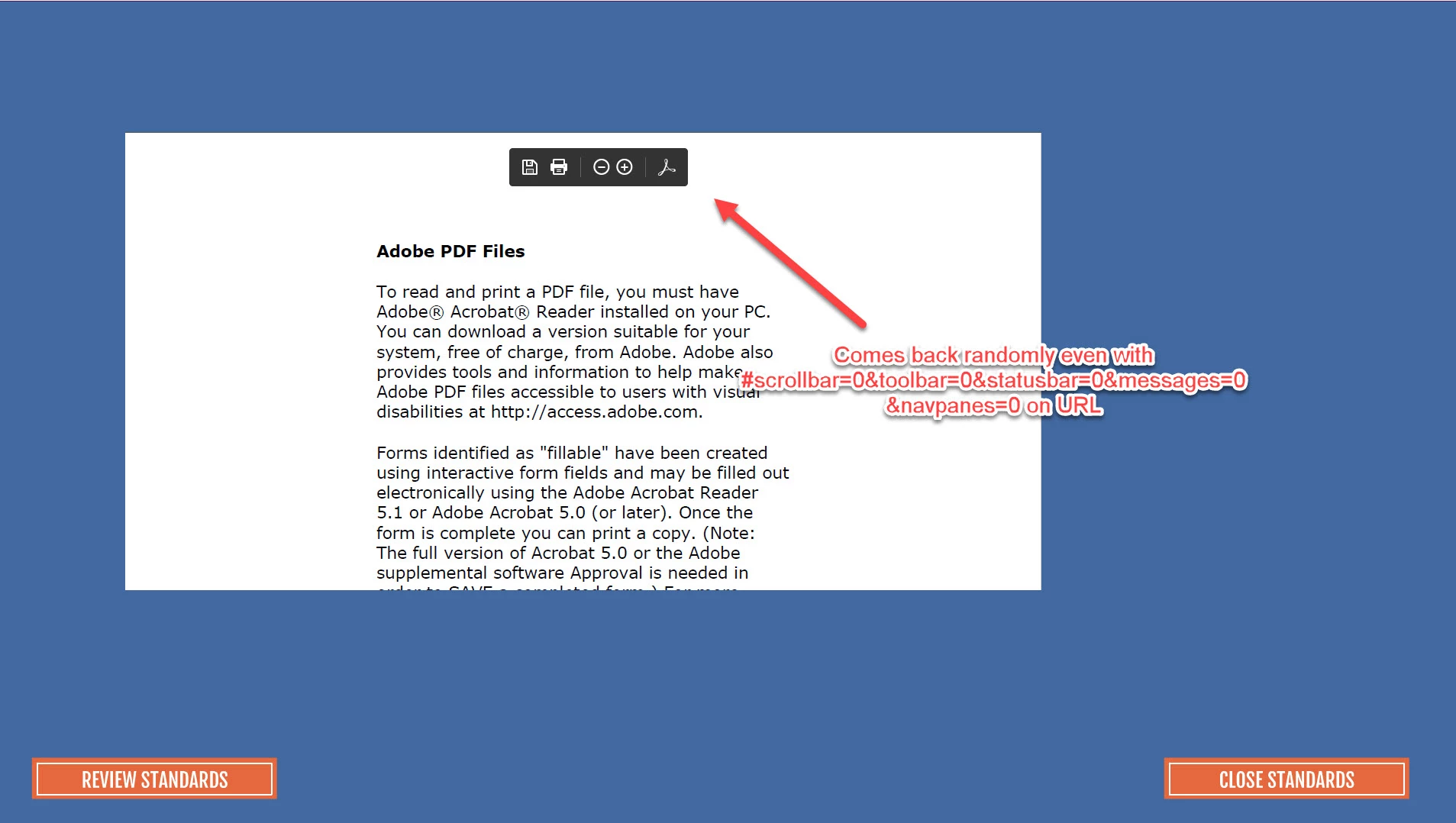
Here is an example of what happens.... admittedly it did it quickly in this recording... i've had it take 5 minutes before
BELOW IS THE CODE:
import flash.display.MovieClip;
import flash.media.StageWebView;
import flash.geom.Rectangle;
import flash.desktop.NativeApplication;
import flash.events.MouseEvent;
import flash.filesystem.File;
stop();
var myStageWebView: StageWebView;
reviewButton_mc.addEventListener(MouseEvent.CLICK, step1ButtonOnClick);
closeButton_mc.addEventListener(MouseEvent.CLICK, qualificationCloseButtonOnClick);
function step1ButtonOnClick(event: MouseEvent): void {
myStageWebView = new StageWebView(true);
myStageWebView.viewPort = new Rectangle(172, 172, 1200, 600);
myStageWebView.loadURL("https://www.fsa.usda.gov/Internet/FSA_File/tech_assist.pdf#scrollbar=0&toolbar=0&statusbar=0&messages=0&navpanes=0");
myStageWebView.stage = this.stage;
}
function qualificationCloseButtonOnClick(event: MouseEvent): void {
myStageWebView.stage = null;
myStageWebView.viewPort = null;
myStageWebView.dispose();
myStageWebView = null;
}
 AdChoices