George Bernard
Inspiring
May 20, 2021
Answered

Can I make Canvas HTML5 Animation of transform Shape into Cube?

  • May 20, 2021
  • 1 reply
  • 1090 views

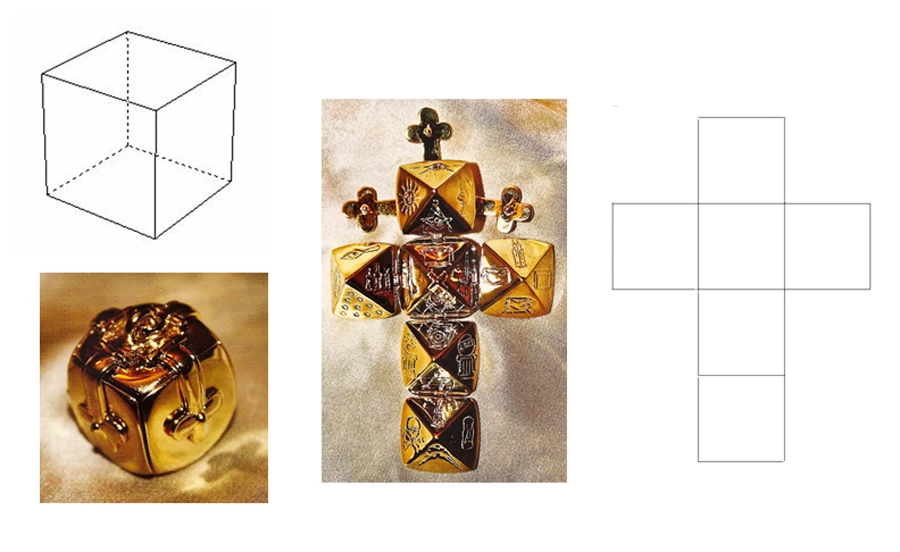
Hi everyone, I want to make Animation of open/ close a box, transform a shape into a cube. Can I do it using HTML5 Canvas in Animate? Below is image sample on internet, I want to transform the shape of right image, into a cube/ shape on top-left. It's may look like 3D but this is entirely 2D transform so I think Animate can do it, just don't know how.

    This topic has been closed for replies.
    Correct answer George Bernard

    Shape hints not working in my case, when I use shape tweens to transform square into rhombi, I add hints to all 4 vertexes but it's still rotate (hint b and d). And without hint, shape tween make it so random. I don't think we should use shape tweens for this type of animation.


    This work best for me (though there are still many room to upgrade):

    1. Create 6 squares and choose 1 square to be "origin". Origin square should connect to most of other squares. This origin square will have transformation point in exactly center.

    2. With each "children" square, set their transformation point to center of their "origin" line.

    3. Using Classic tween or Motion tween to transform "origin square" first.

    4. Then move children squares so they match with their "origin" line before transform it.

    5. Repeat the step till the cube done.

    6. After the cube done, we go to the hardest part of adding dot line. We check frame by frame to find out when to add dot line over straight line. Easier said than done but we can do it.

    Because free transform tool not allow us to free transform vortexes to make the exact rhombi we want. Setting transformation point make it less hard than do it "free". It's also avoid shape "free" rotate (lol)


    1 reply

    kglad
    Community Expert
    Community Expert
    May 20, 2021

    i would use 6 squares on six layers and use six tweens.  


    to get 3 lines to tween from solid to dotted i would again use 3 solid lines on 3 additional layers and alpha tween each to a dotted line.

    George Bernard
    Inspiring
    May 21, 2021

    Thank you, I got the idea. However, I currently got trouble when using transform tool to re-shape these squares, hard to transform it to my desired shape. "Free transform" is not realy "free", isn't it? Do you recommend anything I can do to make it easier?

    George Bernard
    Inspiring
    May 21, 2021

    I upload my file here, could anyone help me about this?

    https://www.dropbox.com/s/pupm7i6kg8tse9v/box.fla?dl=0