


Participant
June 8, 2018
Answered

Can't import videos to animate

  • June 8, 2018
  • 4 replies
  • 11977 views

I just downloaded the trial version of Adobe Animate as i want to learn how to create html5-banners. i have a short video clip I'm planning to use in the banner but i'm having problem importing it. The "Import video" is not "clickable" under files/import and when i click on "import to library", I just get a error message saying the file (FLV) saying it isn't able to be imported. I'm using a mac. 
This topic has been closed for replies.
Correct answer chenjil43641795

4 replies

Participant
February 24, 2021

I have a similar problem, I imported my video correctly but I can't see it when I test my animation on my browser. 

Do anyone have an idea? 


kglad
Community Expert
Community Expert
February 24, 2021

are you creating an html5 project?  if so, click control > test > test in browser 

Participant
January 21, 2021

I wish the video were in english

kglad
Community Expert
Community Expert
January 22, 2021

the solution is the same as my original post, import an mp4.


if you have a video (eg, flv) that you need to convert, use adobe media encoder.

Participant
February 10, 2022

there's a bug in an 2022.  use a previous version to import h.264 video.


Thanks kglad, that solved the problem!


chenjil43641795
Legend
June 9, 2018

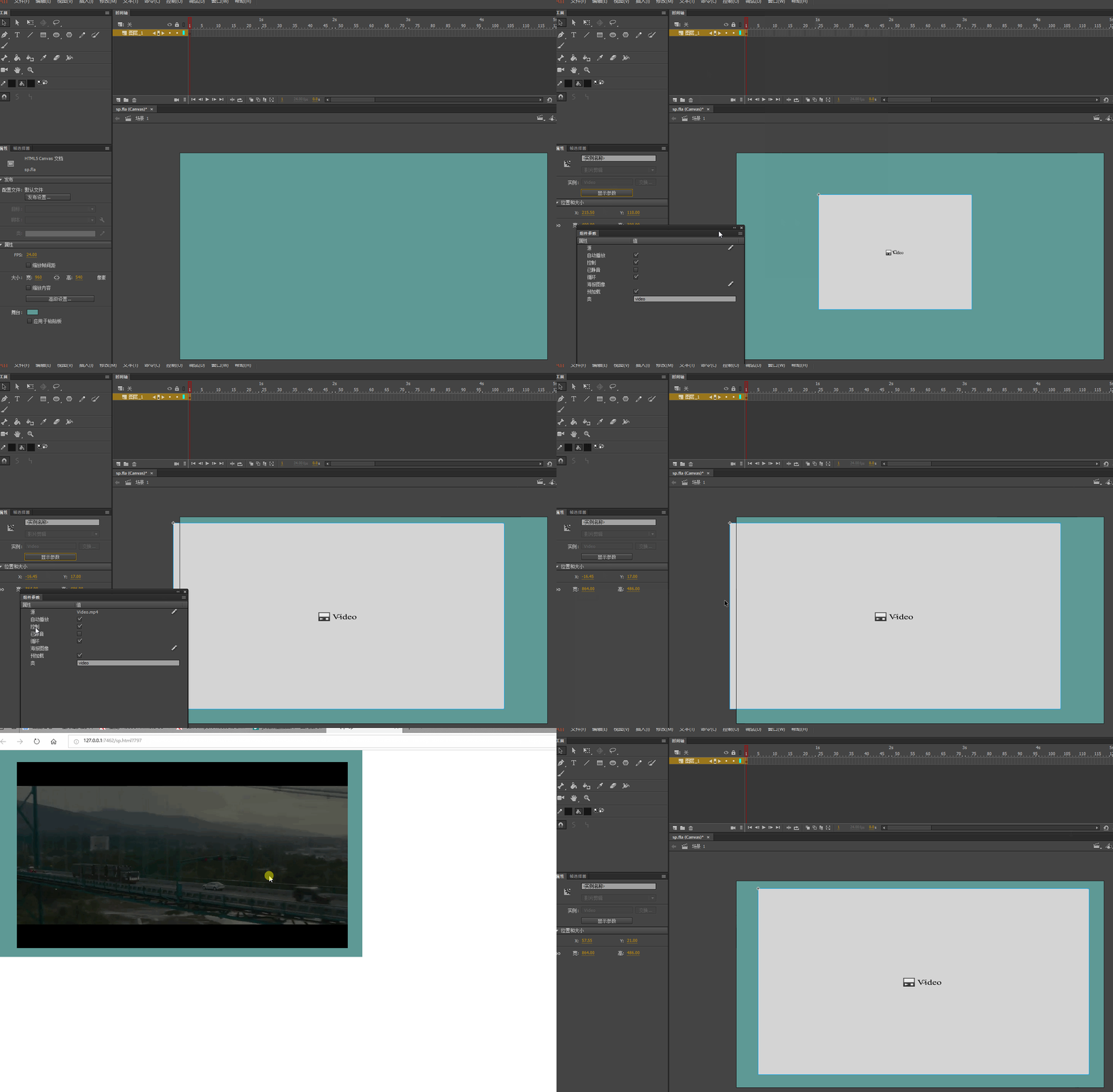
If you only need to play the video

H5 does not support direct import.

Please open the window---component

Video---Video,Double click

Window--Component parameters

Set source.

You can copy the video to a file folder.

Path Write file name only.

If you use video as a material

ANCC now not only can't import video,

And you're going to have problems importing a lot of bitmaps.

I suggest you if the video is not very big.

You can use other software to output a JPG sequence, and then import

Participant
June 9, 2018

I want to do something like this; Banner.gif​. In that gif I just imported the video in Photoshop and created a gif but it's obvs. to big/heavy to use for the platform. What kind of solution what you suggest, I'm still a newbie for stuff like this so any tips would be great!

Thanks for the help!

chenjil43641795
Legend
June 9, 2018

See demo.

By the first method, you can.

Video Too Big

You can use the Adobe Media encoder CC 2018 Conversion.

The size is set smaller.

The quality is not too high.

Format MP4

kglad
Community Expert
Community Expert
June 8, 2018

try an mp4.