


luka_vihar@yahoo.com
New Participant
March 11, 2019
Answered

Clicking on a button opens multiple new tabs instead of only one

  • March 11, 2019
  • 2 replies
  • 13731 views

I have this strange problem that started to happen recently, and have no idea how to fix it.

In Adobe Animate I created an animated HTML5 banner in HTML5 canvas, with button in it that leads me to an URL when I click that button.

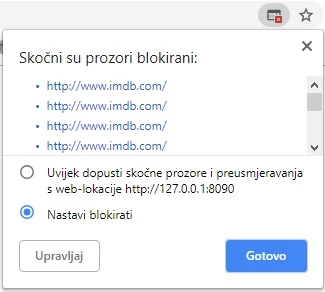
But the problem is when I click that button it opens multiple new tabs instead only one. (Like this in the picture)
The way I created a button is on a new layer i created new rectangle with dimensions of whole canvas,

converted it to a new symbol (button), double click it to enter that symbol, and created a keyframe only on HIT state.

Then returned to "Scene 1", clicked on a button, put an instance name on that button and in code snippet wrote this code:

this.btn_name.addEventListener("click", fl_ClickToGoToWebPage);

function fl_ClickToGoToWebPage() {

window.open("http://www.adobe.com", "_blank");}

(ofc instead of adobe.com I put my own URL)

This method worked for me until now. But all of a sudden this problem started to appear.

I tried in 2 different versions of Adobe Animate (2018 & 2019) but the issue is still here.

And the interesting thing is that problem occurs only when I select "Loop timeline" in "Publish Settings..."

Without "Loop timeline" checked it works just fine.

I'm really stuck in limbo with this

This topic has been closed for replies.
Correct answer JoãoCésar17023019

To make sure, try writing your code in one of the following ways:

function fl_ClickToGoToWebPage()

{

    window.open("http://www.adobe.com", "_blank");

}

if (!this.started)

{

    this.btn_name.addEventListener("click", fl_ClickToGoToWebPage);

    this.started = true;

}

OR

function fl_ClickToGoToWebPage()

{

    window.open("http://www.adobe.com", "_blank");

}

if (!this.btn_name.hasEventListener("click"))

    this.btn_name.addEventListener("click", fl_ClickToGoToWebPage);

Please let us know if the issue goes away.

Regards,

JC

2 replies

JoãoCésar17023019
Community Expert
March 12, 2019

Hi.

Do you have more than one frame in your main timeline?

Because if so, it's possible that the frame your code lives in is being visited over and over again which causes your button to receive multiple listeners.

Please let us know.

Regards,

JC

New Participant
September 27, 2020

Hey all,

Im having the same issue. I see Master Joao managed to fix this but I dont get the idea how.

In my case everything is fine on the first run of the animation, but after is repeated every click opens the warning and goes to the link successfuly.


Here is my code:

this.button_link.addEventListener("click", fl_ClickToGoToWebPage);

function fl_ClickToGoToWebPage() {
    window.open("https://www.regionalensaemzavrabotuvanje.com", "_blank");
}

if (!this.started) {
    this.button_link.addEventListener("click", fl_ClickToGoToWebPage);
    this.started = true;
}


and here is how it looks. The script is at the start of the loop.


Thans,


New Participant
September 27, 2020

I didnt noticed benm50558687 last comment 🙂


Problem solved.

Just had to make sure i removed the line 'this.button_1.addEventListener......'


kdmemory
Inspiring
March 11, 2019

Hi Vihar

Your button and code seems alright to me

this.btn_name.addEventListener("click", fl_ClickToGoToWebPage);

function fl_ClickToGoToWebPage() {

    window.open("http://www.adobe.com", "_blank");

}

I would only use the secure https protocol like: window.open{"https://www.imdb.com", "_blank"};

I am not sure why it is opening multiple tabs. But the screen shot you supplied talks about "blocking these windows". "nastavi blokirati" means according to Google translate "continue blocking". Thus it's maybe not opening multiple tabs, it's asking you if you want to block them from opening. (It's slovenian, right?).

Just try it with https://

Klaus

luka_vihar@yahoo.com
New Participant
March 12, 2019

kdmemory:

I tried with https:// also but still the same issue

Yes it says continue blocking pop up windows (it's Croatian ), but that shouldn't be happening.

It should open only one new tab, because if I allow Chrome, or Mozzila to open those pop up windows it will open multiple tabs.

But like I said it's very strange because I used to create animated HTML5 banners before with looping timeline and never experienced this issue. It started out from nothing.

Joao Cesar:

Yes it has more than one frame. This is screenshot from my layers:

But I really think that everything if ok with this setup, because before I was creating animations of 40+ sec and multiple layers and frames with looping timeline and everything was fine

JoãoCésar17023019
Community Expert
April 22, 2020

Hi 

Just starting out learning Animate during lockdown!


Having the same issue with multiple tabs opening. I've got a banner ad on loop and I've tried your code but it doesn't seem to work.


Attached a screen shot of my timeline.


Hi.


Really good to know that you're taking your time to learn Adobe Animate!


About your issue, can you show me the code you're using?


Regards,

JC