


New Participant
January 26, 2015
Answered

CS5 - QuickTime version 7.1 or later required?

  • January 26, 2015
  • 2 replies
  • 27060 views

I'm trying to open an .mp4 file (File>Import>Video Frames to Layers) but every time I try it comes up with a message saying 'Could not complete the Video Frames to Layers command because QuickTime version 7.1 or later is required.' The thing is, I just updated my QuickTime to version 7.7.6? Is there any way I can fix this? Or any loophole I can use to continue making gifs without QuickTime?

P.S Both Photoshop and QuickTime have only been installed recently, could this be contributing to the problems I'm having?
This topic has been closed for replies.
Correct answer jarisunnari

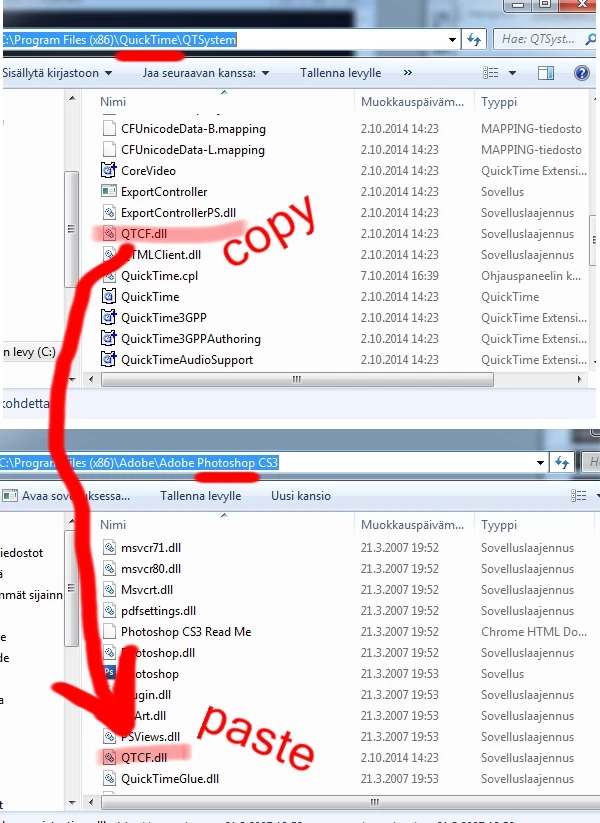
PhotoShop can't fint the QTCF.dll. Fix is easy:

go to QTSystem-folder -> "C:\Program Files (x86)\QuickTime\QTSystem"

there you will find a "QTCF.dll"

just copy (ctrl+c) the dll-thingy and paste it (ctrl+v) in the Photoshop folder "C:\Program Files (x86)\Adobe\Adobe Photoshop CS3"

Then it'll work fine.

2 replies

nandhak14579865
New Participant
August 8, 2017

thanks man it really worked...

jarisunnariCorrect answer
New Participant
July 7, 2015

PhotoShop can't fint the QTCF.dll. Fix is easy:

go to QTSystem-folder -> "C:\Program Files (x86)\QuickTime\QTSystem"

there you will find a "QTCF.dll"

just copy (ctrl+c) the dll-thingy and paste it (ctrl+v) in the Photoshop folder "C:\Program Files (x86)\Adobe\Adobe Photoshop CS3"

Then it'll work fine.

Alfred PS
Known Participant
October 15, 2016

you right!! thanks