

Inspiring
March 31, 2017
Answered

Getting "unable to load a certificate in this file" when trying to publish APK

  • March 31, 2017
  • 24 replies
  • 18813 views

I wanted to update one of my apps, but when I try to publish it, I receive the following message:
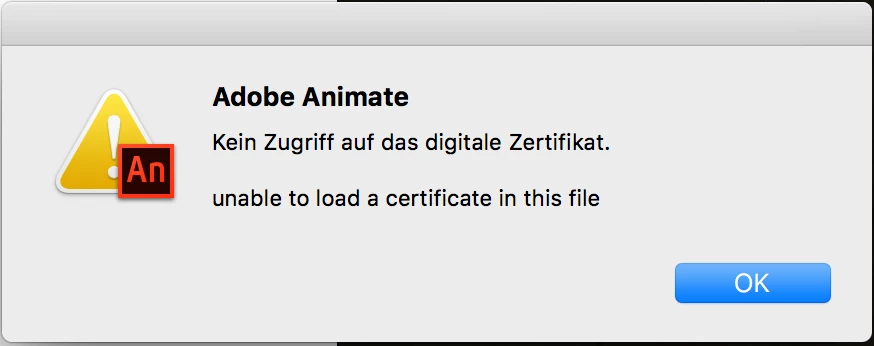
What is wrong with my certificate?

This topic has been closed for replies.
Correct answer aliciab72459363

Pretty sure CS5 couldn't do Android publishing, but I may be wrong. Could it have been CS5.5? If you used features that no longer exist (TLF textfields for example), you wouldn't be able to do an update using any version of Animate.

As for getting older versions, if you're subscribed to Creative Cloud you have a CC menu where you go to get app updates, or to download apps you don't have. In that menu there is a Find Additional Apps section. Set its drop down menu to View Previous Versions, then under Flash Pro you can download any of the last ten updates, back as far as CS6.


Yeah, it works!

Just installed "Adobe Animate 2015.2" and was able to publish my app using AIR 25.

Temporary fix: Don't use the latest version of Animate CC 2017.

24 replies

Mohanaraj
Adobe Employee
Adobe Employee
April 4, 2017

Hi All,

This seems to be an issue with ADT and Latest Java(8.0_121) discussed at https://forums.adobe.com/thread/2267056 . I'm checking with AIR team on this and will update this thread when I have more information.

Thanks!

Mohan

Inspiring
April 4, 2017

Thanks Mohanaraj. Are you also able to check the below AIR issue that doesn't work with Animate? I posted the android logs. AIR 25 fixed the AIR side but in Animate, it doesn't work (confirmed by Distriqt as well). Is this fixed in the new Animate assuming we get past this cert issue?

Tracker

Colin Holgate
Inspiring
April 4, 2017

You could check the other topic and make the change to point ADT at the old Java. Then you could test Animate CC 2017.2 with the 1024 bit certificate and the Distriqt dialog.

Participant
April 1, 2017

I think it is not air bug because I published another app with same old certificate on flash builder v4.7 with Air v25

Inspiring
April 1, 2017

I know it is not but there is no Animate CC in the drop down, so no clue where to report!

Inspiring
April 3, 2017

It can be a black hole. But see if you have any entries here:

Tracker


I received a response from Adobe. It does not seem they understand how publishing to Google Play works as it is my understanding, you need to use the SAME certificate for an app update or it will fail. I already replied as such but I encourage everyone to hit Colin's link and send in bug request, more people the better.

"Thanks for reaching out to us. We have internally tracked this issue. For the time being you can create new certificate in Animate CC 2016.2.0.24 version and try using the same certificate while publishing. This new certificate will work."

Participant
April 1, 2017

Now I upgraded my animate CC 2017.2 and also I have same problem. New version does not give same error with new certificate but I need my old certificate to update my app on android store!!!!!

Inspiring
April 1, 2017

Glad I am not alone here. Anybody know where to report this? If I go into the tracker.adobe.com, I do not see Animate as a product to choose. Will submit this as an AIR bug I guess?

Inspiring
April 1, 2017

I created one here so go vote!

Tracker

Inspiring
April 1, 2017

Ok, maybe I should add some additional info.

The german line in the screenshot above means "No access to digital certificate".

I created this certificate on my old iMac with Flash Professional CS6, about 2 years ago.

When I wanted to update my app about a half year ago, I noticed that I need a new AIR SDK which seemed to be incompatible with Flash CS6.

So I installed the test version of Animate CC 2016 on my new iMac and everything worked like expected.

Now, when I really needed to publish an update, I decided to subscribe to CC and now get this annoying error.

When I use a new certificate, I can compile an APK. But I need to use this certificate to upload my update to Google Play.

I also noticed that I cannot open this certificate in my Mac OS keychain:

Basically translates to "An Error occurred. An object could not be imported. Cannot request the content of this object."

On my old iMac (still El Capitan) I actually can import this certificate.

I also tried to import it and export it again but this also didn't work on my new setup.

Colin Holgate
Inspiring
April 1, 2017

What would be the reason to install an Android certificate in your keychain?

If you are updating an app that is in Google Play you're going to have some difficulty, in that you have to publish again with the same certificate you used when you submitted the app.

If need be you could use CS6. The Help menu has a Manage Adobe SDKs option, and you can add AIR 25 in there, and hopefully CS6 will manage to use the old certificate.

Inspiring
April 1, 2017

The reason I tried to install the certificate in my Mac OS keychain was to test if it is a system wide issue or if it only occurs when compiling the APK. My old iMac manages to install it without problems, while my new one tells me basically the same thing as Adobe Animate:

s.aydiner​, mola2alex

I'm quite "happy" that I'm not the only one with this issue...