



gooneybird
Inspiring
June 5, 2018
Answered

Google Fonts not loading in the 'Add Web Fonts' UI in Animate CC

  • June 5, 2018
  • 8 replies
  • 4299 views

Here's the issue. I'm hoping someone else has experienced this and knows how to fix it:

  • I'm using the latest version of Animate on Windows 10
  • I create an HTML Canvas document with a dynamic text field.
  • I click the globe icon next to the Font Family name to Add Web Fonts and select Google Fonts
  • The interface opens, but, depending on the sort type that I choose, either a small subset of the fonts are listed or none at all.

When I choose Sort by Alphabet, for instance, only the fonts starting with the letter 'A' all the way to 'Bevan' are listed. No more:
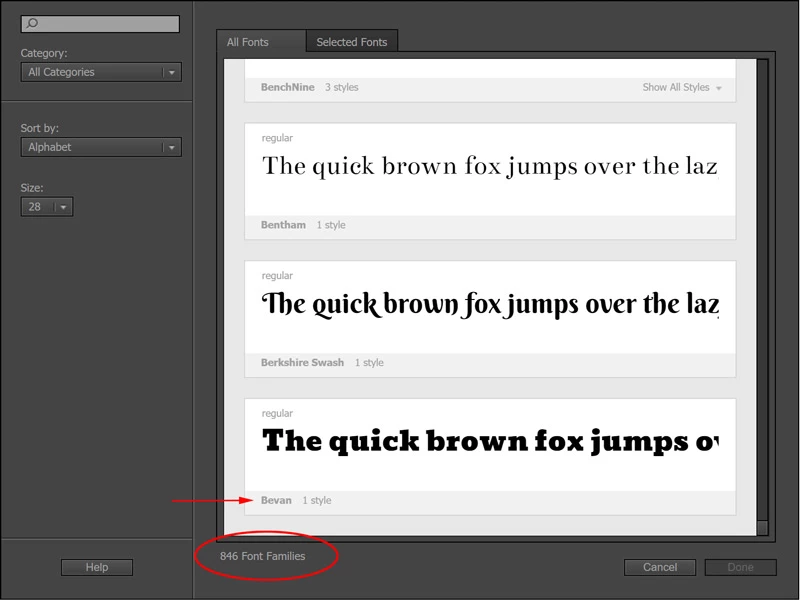
Other sort types result in 0 fonts displayed. Sometimes I'll see a few fonts displayed, but usually only around 20 or so.

I've had a live support session that resulted in no solution. I noticed they cleared some files (the 'gfonts' folder under the AppData folder).  There's a cache folder there that lists 236 fonts (more than what is displayed in the interface, but still way less than the full Google Fonts list). If I delete the whole gfonts folder and restart Animate, it reappears with the same number of fonts (and same behavior) each time.

It's driving me nuts. Any suggestions would be appreciated.

This topic has been closed for replies.
Correct answer gooneybird

I spoke with tech support and they were able to replicate the issue. So it's a known bug now, at least.Gory Greg

8 replies

Participant
May 26, 2021

This issue is still present in Animate 2021 - 3 years on from whe the issue was raised.

Any update on this?


Adobe Employee
June 9, 2021

@Tom Hartney The Google fonts dialog of Animate has infinite scrolling - the content gets loaded continuously only as you scroll down the dialog. I was able to scroll down till 'R' after sorting by "Alphabet" - so it looks fine at my end.


This load time depends on the internet speed of your setup as well. Also, make sure you are on the latest version of Animate - 21.0.7.

Let me know if you are still facing the issue.


Thanks, Sukhesh.

Participating Frequently
May 6, 2022

Still google web fonts not showing on publish.

Adobe fonts do.

Please fix this.

Ron

Participant
January 28, 2019

Libre Franklin is not showing up in the google fonts pls help. I have tried everything from signing out of creative cloud to reinstalling versions nothing seems to work.

gooneybird
Inspiring
December 11, 2018

Good news, everyone...this issue has been fixed! I got an email today saying the December update (19.1.0.349) addresses the font problem.  I just tried it out and it looks like ALL of the Google fonts loaded. Note: It takes a while to load them all the first time.

ericr40342292Gory Greg

JoãoCésar17023019
Community Expert
Community Expert
December 11, 2018

These are excellent news!

Participant
October 17, 2018

Also an issue with Typekit. Only a few "A" fonts load in the UI. Have been waiting for 20 minutes for more to load but no deal.

gooneybird
Inspiring
October 17, 2018

Yep. Same thing for me.

I was really hoping this was going to be a quick fix.

Participant
October 17, 2018

I just reverted back to last version. works way better.

gooneybird
gooneybirdAuthorCorrect answer
Inspiring
June 8, 2018

I spoke with tech support and they were able to replicate the issue. So it's a known bug now, at least.Gory Greg

Inspiring
June 11, 2018

gooneybird​ Thanks for getting back and letting me know!

gooneybird
Inspiring
October 17, 2018

Has this ever been resolved or still being looked at? I still only get to 'Bitter' in the Google Fonts list when I have 'Alphabet' selected in Sort by: . When I search for a font like Hind, which is in Google Fonts, it brings up nothing.


Just updated Animate today, and the Google Font issue remains. *sigh*

Inspiring
June 6, 2018

And please dont forget to come back and give the solution if you get this resolved. Cheers.

gooneybird
Inspiring
June 6, 2018

I definitely will. Thanks for posting, btw. It helps to see that the issue is identical for you.

Preran
Community Manager
Community Manager
June 6, 2018

Can you share your case number with me? To share your number, click my picture and use the Message button. I will see what I can do.

Inspiring
June 6, 2018

I have the same problem, though my Google Fonts has always been a bit flakey (sometimes never showing any fonts) even after resetting preferences. I thought it was a setting.