


Known Participant
December 25, 2017
Question

Grid not setting up properly for bejeweled style game

  • December 25, 2017
  • 2 replies
  • 1330 views

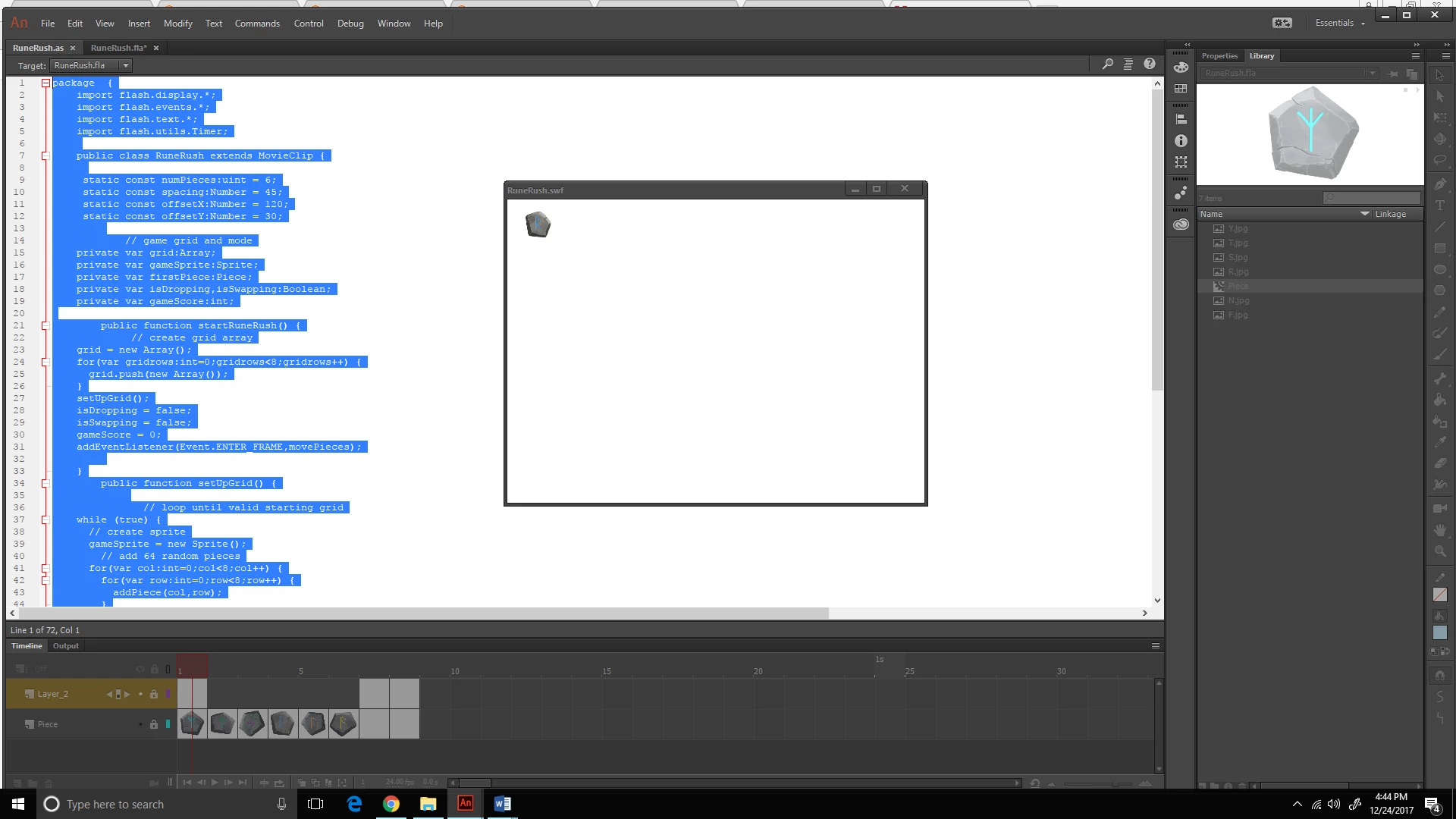
I am working on setting up a grid for a bejeweled type of game. I set everything up so that the grid will take one of the six pieces in my movie clip and set it up on a 8 by 8 grid, but it appears to only play that clip  and not function how I want it. Any help is appreciated.

package  {

import flash.display.*;

    import flash.events.*;

    import flash.text.*;

    import flash.utils.Timer;

public class RuneRush extends MovieClip {


static const numPieces:uint = 6;

     static const spacing:Number = 45;

     static const offsetX:Number = 120;

     static const offsetY:Number = 30;

    // game grid and mode

    private var grid:Array;

    private var gameSprite:Sprite;

    private var firstPiece:Piece;

    private var isDropping,isSwapping:Boolean;

    private var gameScore:int;

public function startRuneRush() {

// create grid array

    grid = new Array();

    for(var gridrows:int=0;gridrows<8;gridrows++) {

      grid.push(new Array());

    }

    setUpGrid();

    isDropping = false;

    isSwapping = false;

    gameScore = 0;

    addEventListener(Event.ENTER_FRAME,movePieces);

}

public function setUpGrid() {

   // loop until valid starting grid

    while (true) {

      // create sprite

      gameSprite = new Sprite();

        // add 64 random pieces

      for(var col:int=0;col<8;col++) {

        for(var row:int=0;row<8;row++) {

          addPiece(col,row);

}

}

  // try again if matches are present

    if (lookForMatches().length != 0) continue;

    // try again if no possible moves

    if (lookForPossibles() == false) continue;

    // no matches, but possibles exist: good board found

    break;

  }

  // add sprite

  addChild(gameSprite);

}

// create a random piece, add to sprite and grid

public function addPiece(col,row:int):Piece {

    var newPiece:Piece = new Piece();

    newPiece.x = col*spacing+offsetX;

    newPiece.y = row*spacing+offsetY;

newPiece.column = col;

    newPiece.row = row;

    newPiece.type = Math.ceil(Math.random()*7);

    newPiece.gotoAndStop(newPiece.type);

newPiece.select.visible = false;

    gameSprite.addChild(newPiece);

    grid[col][row] = newPiece;

    newPiece.addEventListener(MouseEvent.CLICK,clickPiece);

    return newPiece;

  }

}
This topic has been closed for replies.

2 replies

kglad
Community Expert
December 25, 2017

do you have a display object with class named Piece?

Known Participant
December 27, 2017

I have a movie clip named Piece with 6 separate pieces within it.

kglad
Community Expert
December 28, 2017

again, you need a movieclip with CLASS name Piece.  you do not have that.

ie, right click your library movieclip piece>click properties>tick export for actionscript>assign linkage/class Piece;  case-counts.

JoãoCésar17023019
Community Expert
December 25, 2017

I tried to run your code like this:

package

{

    import flash.display.*;

    import flash.events.*;

    import flash.text.*;

    import flash.utils.Timer;

    public class RuneRush extends MovieClip

    {

        static const numPieces: uint = 6;

        static const spacing: Number = 45;

        static const offsetX: Number = 120;

        static const offsetY: Number = 30;

        private var grid: Array;

        private var gameSprite: Sprite;

        private var firstPiece: Piece;

        private var isDropping, isSwapping: Boolean;

        private var gameScore: int;


        public function RuneRush()

        {

            startRuneRush();

        }

        public function startRuneRush()

        {

            grid = new Array();

            for (var gridrows: int = 0; gridrows < 8; gridrows++)

            {

                grid.push(new Array());

            }

            setUpGrid();

            isDropping = false;

            isSwapping = false;

            gameScore = 0;

            //addEventListener(Event.ENTER_FRAME, movePieces);

        }

        public function setUpGrid()

        {

            while (true)

            {

                gameSprite = new Sprite();

                for (var col: int = 0; col < 8; col++)

                {

                    for (var row: int = 0; row < 8; row++)

                    {

                        addPiece(col, row);

                    }

                }

                /*if (lookForMatches().length != 0)

                    continue;

                if (lookForPossibles() == false)

                    continue;*/

                break;

            }

            addChild(gameSprite);

        }

        public function addPiece(col, row: int): Piece

        {

            var newPiece: Piece = new Piece();

            newPiece.x = col * spacing + offsetX;

            newPiece.y = row * spacing + offsetY;

            newPiece.column = col;

            newPiece.row = row;

            newPiece.type = Math.ceil(Math.random() * 7);

            newPiece.gotoAndStop(newPiece.type);

            //newPiece.select.visible = false;

            gameSprite.addChild(newPiece);

            grid[col][row] = newPiece;

            //newPiece.addEventListener(MouseEvent.CLICK, clickPiece);

            trace(newPiece.x, newPiece.y, newPiece.column, newPiece.row, newPiece.type, grid[col][row]);

            return newPiece;

        }

    }

}

And the grid was setup properly.

What exactly are you not being able to do?

Regards,

JC

Known Participant
December 27, 2017

The pieces are supposed to be randomly generated on the grid  in a 8 by 8 pattern but it only is displaying the one piece. The Piece is a movie clip with 6 different looking pieces, and the grid is supposes to pull from the movie clip and display them in a random 8 by 8 order.

Known Participant
January 11, 2018

Have you sent to joao.cesar@minifliper.com?

You can upload your content to Google Drive or Dropbox and share the link here as well.


Okay I emailed them to your email, let me know if you get them.