

Answered
How can I save a flash or swf file to flv file?
I've created a flash banner and I need to send it by email as a flv file. Does any one knows how to convert from swf or fla files to flv?
Thanks

I've created a flash banner and I need to send it by email as a flv file. Does any one knows how to convert from swf or fla files to flv?
Thanks
Only accept FLVs at 40 KB? Yikes... Well, I'll say this, I never work on ads or banners, etc., so I don't have to deal with such stringent file size parameters. But, when it comes to video, you only have one option to reduce the file size: Compress compress compress.
You have to choose a very low bit rate (aka data rate) for your FLV video file when you compress the MOV file. And, likely, it's going to make it look pretty crumby... You're going to have to set your data rate down tot he absolute lowest setting.
Data rate is measure in kbps (kilobits per second), such as 700 kbps (a current, typical data rate for video that is suitable for broadband Internet speeds).
As an aside, I find it pretty odd that they require a video file, versus a simple, small Flash SWF animation (that's more to do with my banner ad / bandwidth limits un-awareness than anythings, though). It makes your job a little harder and adds seemingly unnecessary steps... They really require that ALL banner animations be video, and not Flash SWF animations? Be sure you know 100% what their specs are, AND also ask to see other banner ad examples so you can see proof that other animations have been given tot hem with the same spec. I just can't belive that a video file is going to be < 40KB...
Get more familiar with using the Adobe Media Encoder. If you're not that confortable using it, just search online for tutorials about it, which will be easy to find.
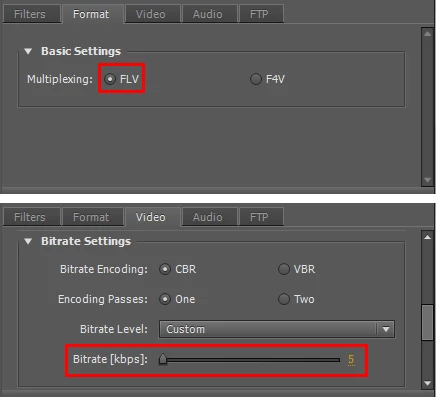
See the attached image. I did a 60 frame (30 fps, total runtime of 2 seconds only) SWF animation of a box animated from the upper-left to the lower right, stage size of 300x200 (per your spec). Simple, basic, nothing crazy. From Flash, I exported the MOV file, and brought this into Adobe Media Encoder CS5. Setting the format of the new video to FLV, and setting the data rate to 5 (crazy low setting). The file size came down to ~ 110 KB.
Good luck!
Already have an account? Login
Enter your E-mail address. We'll send you an e-mail with instructions to reset your password.
 AdChoices