


fredmiles
Participant
November 20, 2018
Answered

How do I access the Blending Mode pop up menu in Animate?

  • November 20, 2018
  • 1 reply
  • 369 views

I've imported an FLV movie from AE of falling snow into an Animate AS3 project. I then imported it to the stage OK. However, I need to blend it, and although the tutorial says that selecting the instance on the stage should produce a blend mode pop up menu in the property inspector, I'm not seeing one. Am I missing something? Thanks.
This topic has been closed for replies.
Correct answer ClayUUID

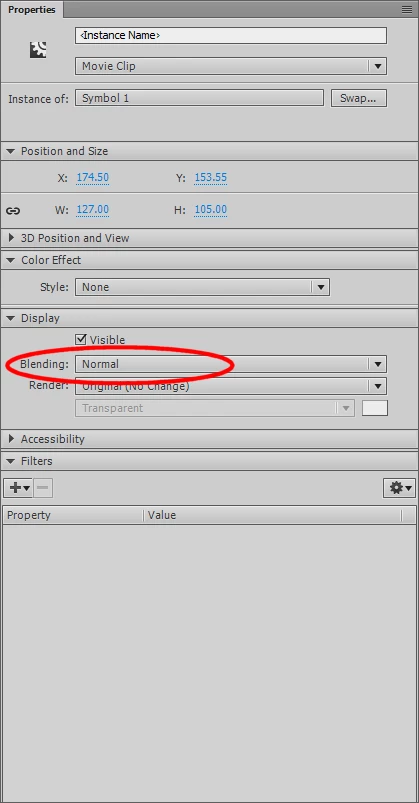
Blending options are not in a pop up menu. Blending options for the currently selected symbol are in the Display section of the Properties panel.

1 reply

ClayUUIDCorrect answer
Legend
November 20, 2018

Blending options are not in a pop up menu. Blending options for the currently selected symbol are in the Display section of the Properties panel.

fredmiles
fredmilesAuthor
Participant
November 21, 2018

Thank you! I didn't realize that the embedded video needed to be converted to a movie clip, and that will bring up the "Display" menu. It is curious that when I add the movie clip of the snow overlay to the stage, I can control the blending, but it won't play when I test the movie in a browser unless I also add the embedded video to the scene, outside of the stage. Any thoughts are appreciated. Thanks.